YouTube Summarizer to Slides: Turn Videos into Presentations
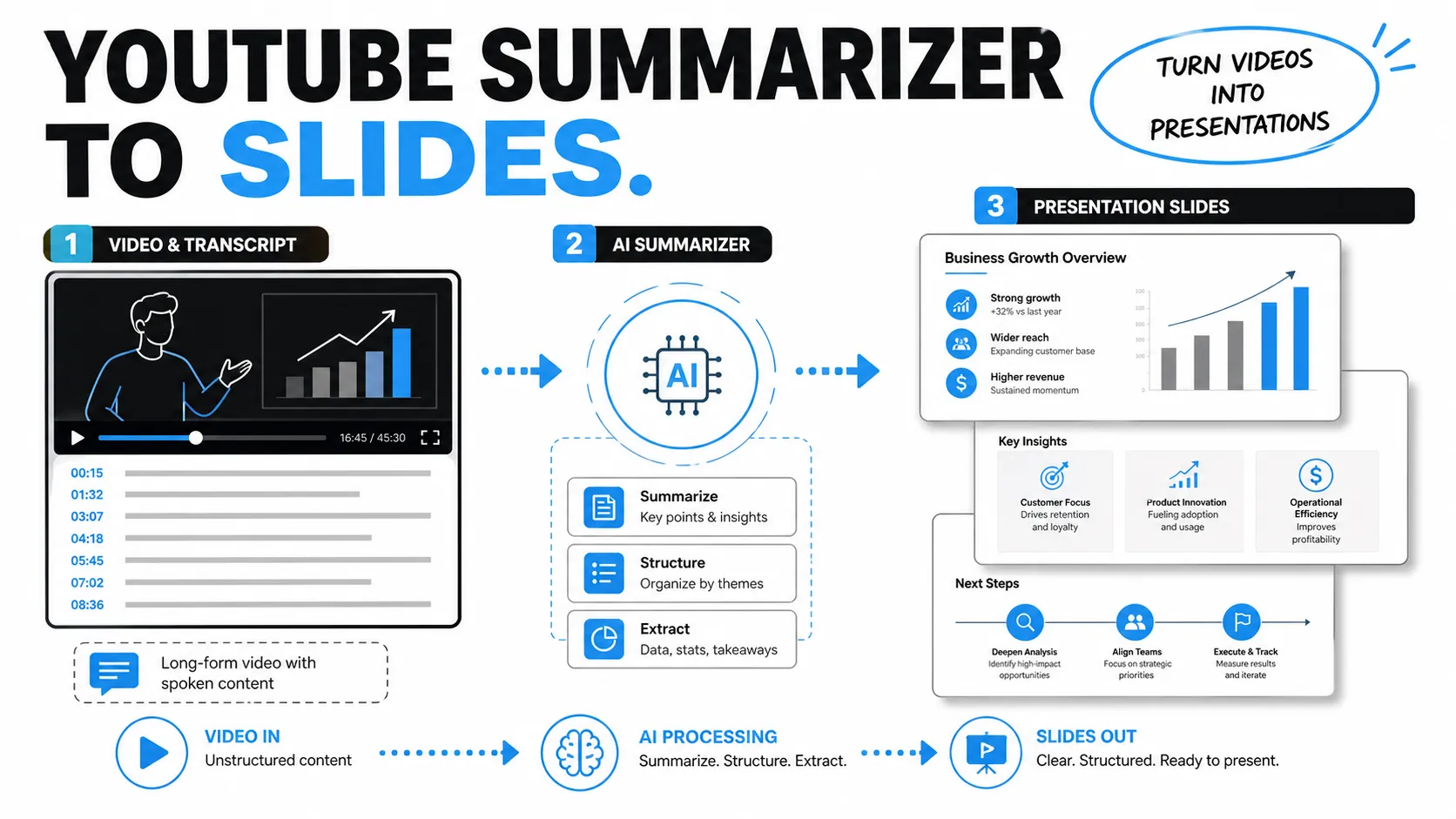
A YouTube video can contain an entire lecture, webinar, interview, product demo, keynote, or market commentary in one place. The problem is that a useful presentation is not just a shorter version of that video. A deck needs a clear message, a logical flow, and slides that help an audience understand what matters.
That is why the best YouTube summarizer workflow does not stop at extracting a transcript or producing a paragraph summary. To turn video to slides, you need to move from raw spoken content to structured ideas, then from structured ideas to presentation logic. The goal is not to copy the video. The goal is to create a deck that communicates the right takeaways for the right audience.
Why Turning YouTube Videos into Slides Is Harder Than Summarizing Them
Videos are designed to be watched in sequence. Speakers repeat points, add context, respond to questions, tell side stories, and explain ideas gradually. Presentations work differently. A slide deck must compress information into a hierarchy: headline, supporting point, evidence, implication, and next step.
That difference creates the main challenge. A basic AI summary may tell you what the video covered, but it may not tell you how to present it. For example, a one-hour webinar might include product context, customer pain points, technical details, examples, objections, and closing remarks. A business presentation may only need the three strategic insights and one recommended action.
When you convert YouTube to PPT, the task is editorial as much as technical. You are deciding what the audience should remember, what they can ignore, and how each slide should move the argument forward.
What a YouTube Summarizer Can and Cannot Do
A YouTube summarizer is useful because it helps reduce the time required to understand long video content. It can identify major topics, extract key points, and sometimes organize ideas by timestamp. For research, training, sales enablement, and executive preparation, this is a strong first step.
However, summarization has natural limits. A summarizer can usually help with:
- Extracting or processing the transcript
- Identifying repeated themes and key statements
- Producing short summaries or chapter-level notes
- Highlighting timestamps, quotes, and examples
- Creating a first-pass list of takeaways
What it usually cannot do by itself is create a polished business presentation. It may not know your audience, your business objective, your brand standard, or the level of detail your meeting requires. It may also miss nuance, exaggerate importance, or flatten a speaker’s argument into generic bullet points.
In other words, summarization gives you content. Presentation work gives that content shape.
A Practical AI Workflow for Video to Slides
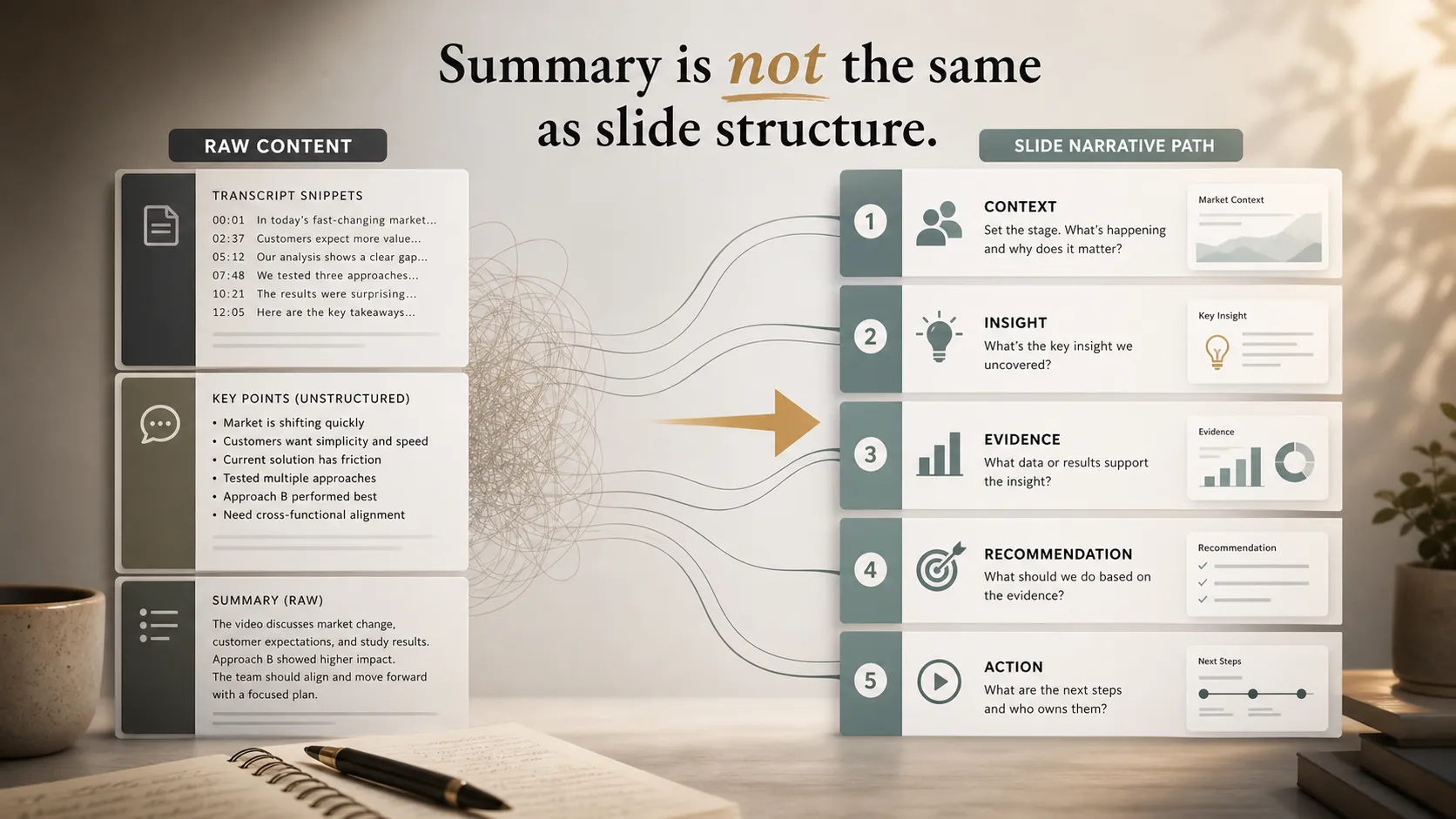
A strong AI presentation workflow starts with capture and ends with a reviewed, audience-ready deck. First, extract or obtain the transcript. If the transcript is generated automatically, scan it for obvious errors, especially names, numbers, product terms, and technical phrases.
Next, create a structured summary. Ask the AI to separate the video into themes rather than only paragraphs. For example, a product demo might be organized into customer problem, product capability, proof points, implementation process, and buyer objections. A market commentary video might be grouped by trends, risks, data points, implications, and strategic recommendations.
Then define the audience. A training deck for new employees needs a different structure from an executive briefing. A sales deck based on a demo video should emphasize business value and buyer outcomes, not every feature shown on screen. A research presentation should preserve evidence and assumptions more carefully than a motivational keynote summary.
After that, develop an outline. This is where the summary becomes a deck narrative. Decide the beginning, middle, and end: what problem the deck opens with, what evidence it uses, and what conclusion or action it leads toward. Once the outline is clear, map each section to slides. Each slide should have one main idea, not a transcript fragment.
Finally, review the deck manually. Check facts, remove repetition, simplify overloaded slides, and confirm that the message still reflects the original video accurately.
From Summary to Slide Structure: What to Keep, Cut, and Reframe
The biggest mistake in video-to-slides work is treating every interesting point as slide-worthy. Videos often include useful but nonessential material. A good deck is selective.
Keep the thesis of the video: the central argument or lesson. Keep supporting points that help prove that thesis. Keep strong examples, specific data, and useful frameworks. Keep implications that matter to the target audience.
Cut repetition, filler, long introductions, casual side comments, and examples that do not support the deck’s purpose. Also cut details that only make sense in the video format, such as “as you can see on the screen” or extended walkthrough narration.
Reframe spoken ideas into slide language. A speaker may say, “One of the things we kept seeing across customers was that onboarding became the bottleneck.” A slide headline could become: “Onboarding Is the Bottleneck Preventing Faster Adoption.” This is more direct, more executive-friendly, and easier to build a slide around.
The best slide structure does not merely summarize what was said. It translates the video’s meaning into a visual argument.
Where Pi Fits in the YouTube to PPT Workflow
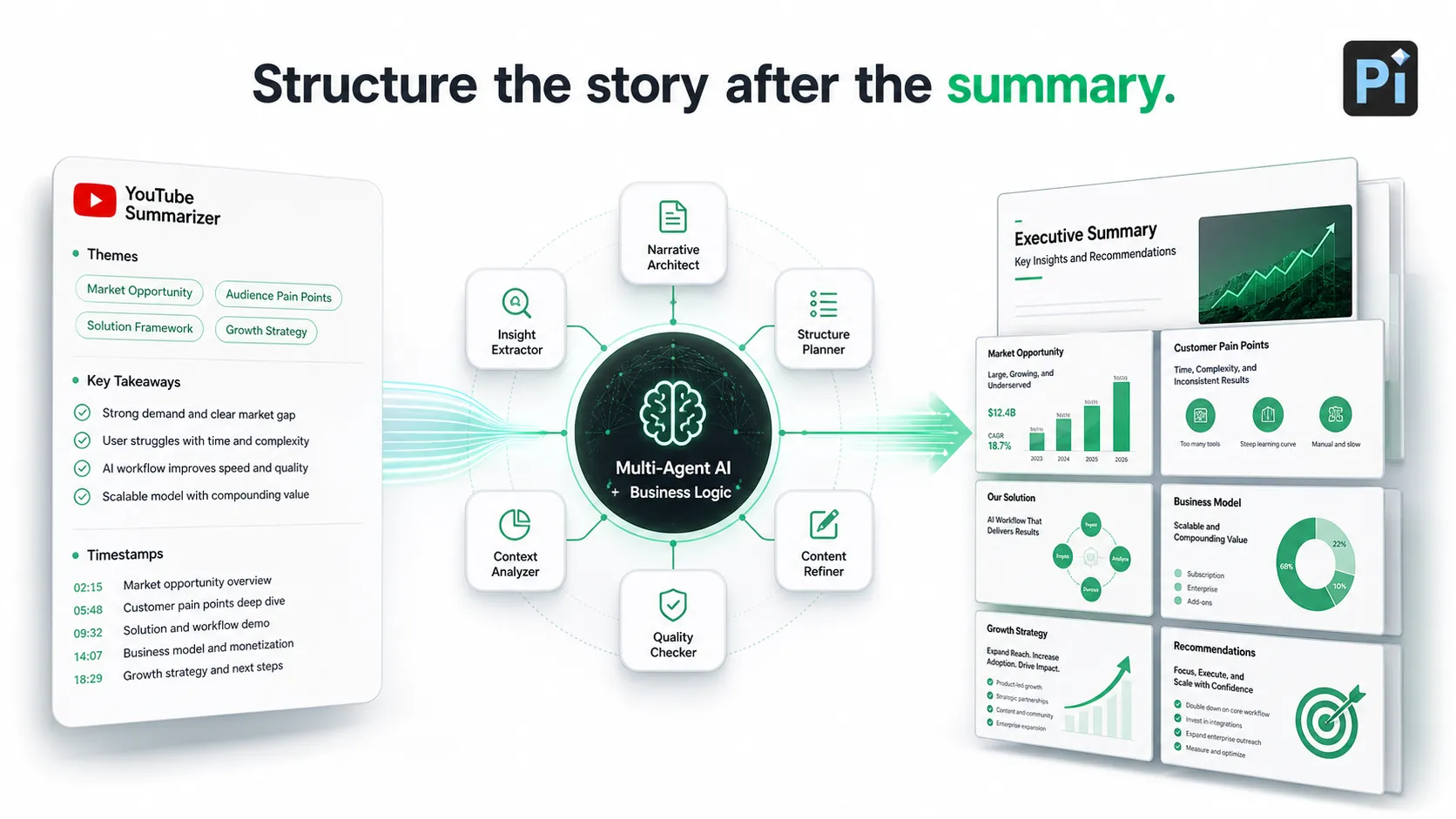
Pi, short for Presentation Intelligence, fits after the summarization stage. It is not positioned as a YouTube downloader or transcript tool. Instead, Pi helps transform summarized inputs into a professional presentation with stronger business logic, clearer structure, and premium visual quality.
1. Business Logic Comes Before Slide Styling
Once you have the video summary, Pi helps shape the material into a business-ready narrative. That matters because professional decks need more than topic coverage. They need a clear sequence: context, problem, insight, evidence, recommendation, and action.
For a pitch deck, this might mean reframing a founder interview into market problem, product insight, traction, and investor story. For an executive presentation, it might mean turning a webinar into a concise decision briefing.
2. Multi-Agent AI Helps Refine the Narrative
Pi’s Multi-Agent AI approach is useful when the source material contains many ideas. Instead of simply placing summary text onto slides, Pi helps evaluate how the content should be organized, what belongs on each slide, and how the deck should read as a complete argument.
This is especially valuable for consulting summaries, sales decks, market research decks, and training materials where clarity and logic matter as much as speed.
3. Professional Aesthetics Make the Deck Meeting-Ready
A video summary can become a rough outline quickly, but high-stakes presentations require visual discipline. Pi helps move the deck toward business-grade aesthetics: stronger hierarchy, cleaner layouts, more polished slide composition, and a presentation style suitable for professional settings.
The result is not just “AI-generated slides.” It is a more complete workflow from summarized video content to a structured, presentation-ready asset.
Example Workflows for Different Video Types
A webinar can become an executive briefing by extracting the main argument, identifying strategic implications, and reducing the content to decision-ready slides. Instead of copying every section, the deck should focus on what leaders need to know and what they should do next.
A tutorial can become a training deck by converting steps into modules, adding learning objectives, and simplifying instructions into slide-by-slide guidance. The goal is not to preserve the full narration, but to make the process teachable.
A product demo can become a sales deck by reframing features into buyer problems, value propositions, proof points, and implementation confidence. A strong deck explains why the product matters, not only how it works.
An interview can become an insight summary by grouping comments into themes, identifying memorable quotes, and translating expert opinions into key takeaways. A market commentary video can become a research presentation by separating evidence, assumptions, risks, and recommendations.
Comparison Table: Summary Output vs Presentation Output
| Requirement | Raw Summary Output | Presentation Output |
| Core purpose | Compress the video | Persuade or inform an audience |
| Structure | Topic-based notes | Narrative slide flow |
| Detail level | Broad coverage | Selective emphasis |
| Language | Transcript-like summary | Clear slide headlines |
| Evidence | Mentioned points | Chosen proof and examples |
| Design need | Minimal | Professional visual hierarchy |
| Final use | Personal understanding | Meeting-ready communication |
Best Practices Before You Present AI-Summarized Video Content
Before presenting content derived from a YouTube video, verify the source carefully. AI summaries can miss context, misread emphasis, or introduce small inaccuracies. Always check important claims, statistics, names, and quotes against the original video or other trusted materials.
Be mindful of copyright and usage rights. Summarizing a video for internal understanding is different from reusing someone else’s content in a public, commercial, or client-facing deck. When in doubt, attribute appropriately, avoid copying expressive material, and use the source as research rather than as content to duplicate.
Preserve context. A quote or claim may sound stronger when removed from the speaker’s full explanation. If the deck is for business use, make sure the takeaway is fair, accurate, and not misleading.
Finally, simplify the slides. A presentation should not feel like a transcript broken into pages. Use concise headlines, limited supporting text, and visuals that clarify the idea. The audience should understand the point quickly, then listen to the speaker for detail.
The Better Workflow: Summarize First, Structure Second
The most effective YouTube to PPT process has two distinct stages. First, use AI to summarize the video and extract the useful signal. Second, use a presentation-focused workflow to turn that material into a structured deck.
This distinction matters. A YouTube summarizer can help you understand the content faster, but a strong presentation requires audience judgment, narrative design, and visual polish. Pi supports that second stage by helping teams convert summarized video inputs into business-ready presentations with clearer logic and stronger professional quality.
If the goal is personal notes, a summary may be enough. If the goal is a pitch deck, sales deck, consulting report, executive briefing, training deck, or market research presentation, the work should not end with summarization. It should continue until the ideas are organized, simplified, and ready to be presented.
Frequently Asked Questions (FAQ)
Q: Can AI turn YouTube videos into PPT presentations? A: Yes, AI can help turn YouTube videos into PPT-style presentations, but the best results usually require multiple steps: transcript extraction, summarization, outline creation, slide mapping, and final review. A direct transcript-to-slides workflow often produces shallow or crowded slides.
Q: How accurate are YouTube summarizers? A: Accuracy depends on transcript quality, audio clarity, speaker structure, and the complexity of the topic. YouTube summarizers are useful for first-pass understanding, but important claims, numbers, names, and quotes should always be checked against the original source.
Q: How does Pi help after summarizing a YouTube video? A: Pi helps turn summarized content into a more professional presentation structure. It supports business logic, slide flow, and premium visual quality, making it useful when a video summary needs to become an executive briefing, sales deck, pitch deck, training deck, or research presentation.
Q: Does this workflow work for business presentations? A: Yes. The workflow is especially useful for business presentations when the video contains valuable insights but needs to be reframed for a specific audience. The key is to summarize first, then restructure the material into a clear narrative with relevant evidence and recommended action.


