ai powered content creation platform
An ai powered content creation platform is a tool that helps people turn raw material into usable content. The raw material might be a few notes, a meeting transcript, a product brief, a report, a website, a class summary, or a rough idea. The final output might be a blog post, campaign, image, video, document, or presentation.
That is why this category can feel confusing. Some platforms are built for writing. Some are built for marketing teams. Some help organize documents. Some create visuals. Some edit video. Some turn existing information into slides. Once you divide the category by generation type, it becomes much easier to understand.
IBM’s guide to generative AI ↗ explains that generative AI can create text, images, audio, video, and code. In content work, that means AI platforms are no longer only about writing paragraphs. They are about helping content move from one format to another.
Start With The Output
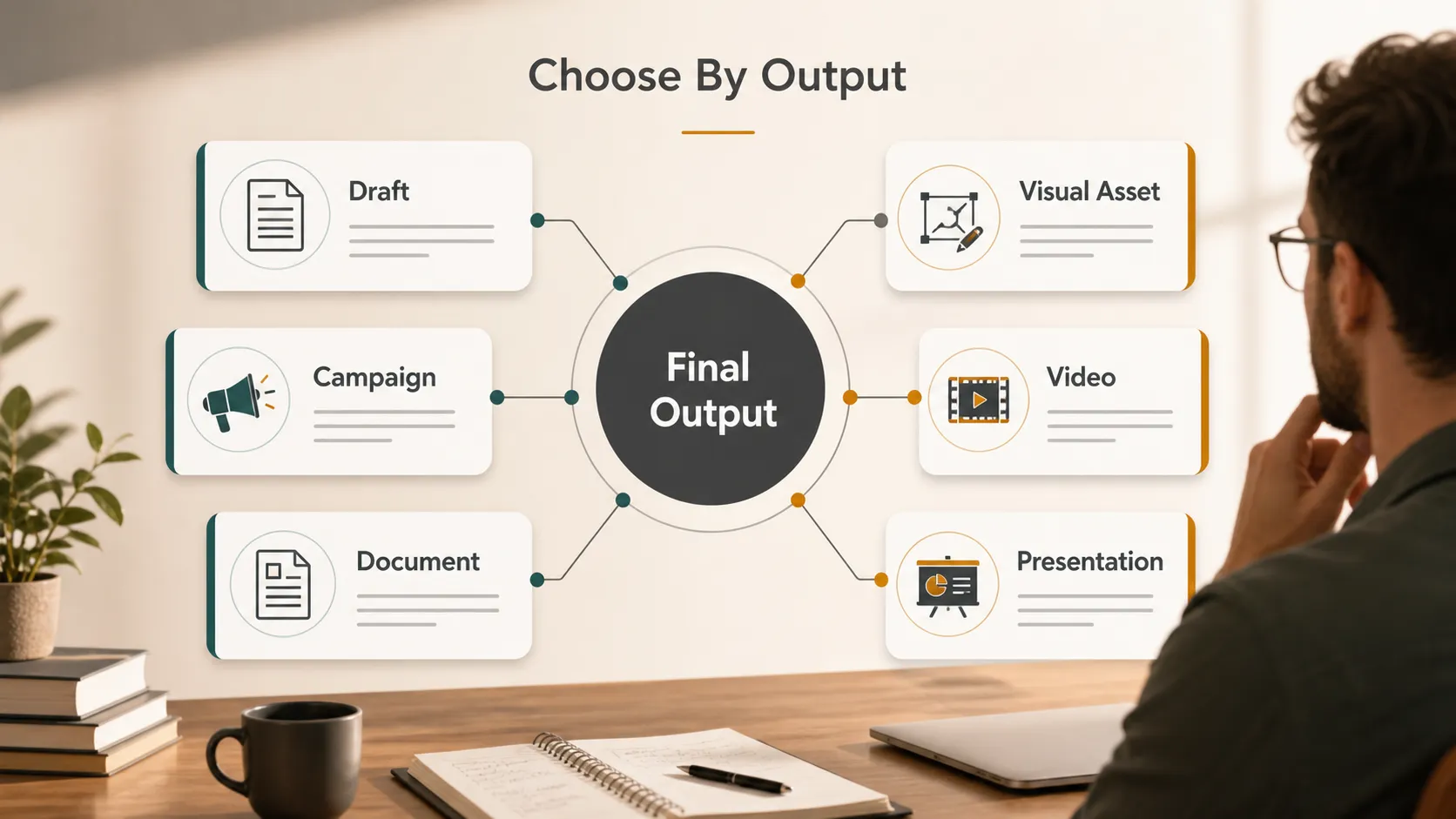
Before choosing a platform, ask what the content needs to become.
A rough idea may need to become an article. A campaign brief may need to become emails and ads. A meeting transcript may need to become a summary. A report may need to become an executive deck. A class note may need to become a visual study guide.
A good AI content platform should help with that transition. It should not only generate content, but also help structure, edit, design, repurpose, or export it.
Main Types Of AI Content Creation Platforms
| Generation type | What it helps create | Example platforms |
|---|---|---|
| Writing and ideas | Drafts, outlines, rewrites | ChatGPT, Claude, Gemini |
| Marketing content | Campaigns, ads, brand copy | Jasper, Copy.ai, HubSpot |
| Docs and summaries | Notes, reports, knowledge pages | Notion AI, Microsoft Copilot |
| Visual design | Graphics, layouts, social assets | Canva, Adobe Express |
| Creative assets | Images, effects, concepts | Adobe Firefly, Midjourney |
| Audio and video | Clips, scripts, captions | Descript, Runway |
| Presentations | Slides, decks, visual summaries | Pi, Gamma, Beautiful.ai |
This table is not about ranking tools. It is about matching the platform to the job.
Writing And Idea Generation
Writing platforms are useful when the first problem is the blank page. They help with brainstorming, outlining, rewriting, simplifying, summarizing, and drafting.
ChatGPT is a common example. OpenAI’s guide to writing with ChatGPT ↗ describes use cases such as drafting, revising, changing tone, and turning rough notes into clearer writing.
This type of platform is useful for:
- Article outlines
- Email drafts
- Research summaries
- Headline ideas
- Script drafts
- Explanations for different audiences
The main strength is flexibility. You can use a writing AI early in the process when you are still figuring out what you want to say. The limitation is that a draft still needs editing, fact-checking, formatting, and often another tool to become a finished asset.
Marketing Content Platforms
Marketing platforms are built for teams that need repeatable content, not just one draft. They focus on campaign workflows, brand voice, audience fit, and channel-specific writing.
Jasper is a strong example in this category. Its help center explains how Brand Voice ↗ can be created from writing examples, files, or URLs, then used across generated content.
Marketing platforms are useful for:
- Ad copy
- Landing page copy
- Email campaigns
- Product descriptions
- Social posts
- SEO drafts
- Campaign variations
The main value is consistency. A company may need ten different assets for one launch, but all of them should sound like the same brand. That is where marketing-focused AI tools are more useful than a general writing assistant.
Docs, Notes, And Knowledge Work
Some content starts inside a team’s workspace. It may be meeting notes, project plans, product specs, internal documentation, research pages, or knowledge base content.
Docs-focused platforms help organize that material. Notion AI is one example. Notion’s guide to Notion AI ↗ shows how it can help write, summarize, translate, explain, and organize content inside a workspace.
These platforms are useful for:
- Summarizing meeting notes
- Extracting action items
- Turning notes into clean docs
- Rewriting internal updates
- Organizing research
- Drafting project summaries
The strength is context. If the content already lives in a workspace, the AI can help make it more usable there. The limitation is that the output often stays document-shaped. If the same content needs to become a presentation, visual report, or external deck, it may need another platform.
Visual Design And Creative Assets
Visual platforms help when the content needs to look good quickly. This includes social posts, banners, flyers, posters, simple graphics, image concepts, and visual campaign assets.
Canva is one example on the design side. Canva’s Magic Studio ↗ brings AI into a visual design workflow, helping users create, edit, resize, rewrite, and adapt content.
Adobe Firefly fits the creative asset side. Adobe describes Firefly ↗ as a generative AI tool for creating and editing images, video, audio, and design assets.
These platforms are useful for:
- Social graphics
- Background images
- Campaign visuals
- Design variations
- Moodboards
- Illustrations
- Image effects
The main strength is visual output. A report, article, or presentation may have strong ideas, but weak visuals can still make it hard to understand. Design and creative asset platforms help turn ideas into something people can see.
Audio And Video Content
Audio and video platforms help when the source material is spoken or recorded. A podcast, webinar, interview, lecture, product demo, or screen recording can become many smaller pieces of content.
Descript is a good example. Its AI tools overview ↗ covers audio cleanup, filler word removal, summaries, translation, video polish, and repurposing.
Audio and video AI tools are useful for:
- Editing podcasts
- Cutting webinar clips
- Creating captions
- Cleaning audio
- Summarizing interviews
- Turning recordings into social posts
- Drafting scripts from transcripts
This category is different from writing AI because the raw material is not only text. The platform has to understand timing, speech, visuals, sound, and format.
Presentations And Visual Storytelling
Presentations deserve their own category because a presentation is not just text placed on slides. A good deck needs structure, pacing, hierarchy, and visual flow. It has to guide attention.
This is where Pi fits naturally.
Many users already have the content: notes, reports, documents, URLs, research, class materials, proposal drafts, or rough ideas. The problem is that the content is too long, too flat, or too text-heavy. It needs to become something visual that people can present, review, explain, or share.
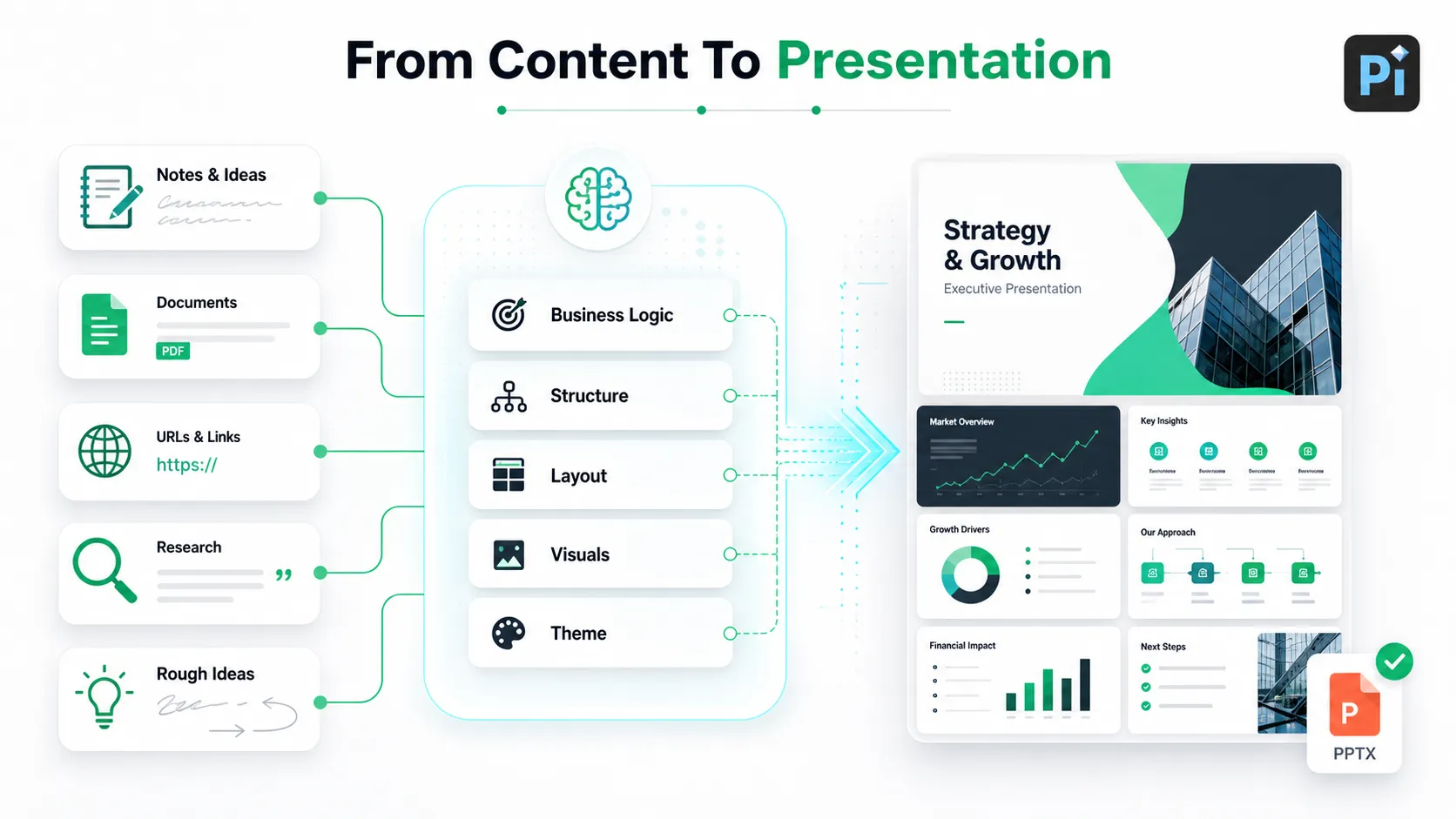
With Pi ↗, users can turn that material into a structured presentation. Pi is useful for business proposals, project plans, pitch decks, study summaries, training materials, reports, meeting updates, and article-to-presentation workflows.
Pi is not only generating slide text. It helps shape the content into a presentation flow. It supports editable templates, custom themes, colors, style directions, ready-made components, automatic layout, icons, image effects, and AI-generated visuals. That matters because a presentation depends on both content structure and visual clarity.
For example, a long business proposal can become a client-facing proposal deck. Class notes can become a visual study summary. A report can become an executive presentation. A webpage or reference document can become a slide deck that is easier to present.
When the deck is ready, users can export it as a PPT file and continue editing or presenting it in PowerPoint or other compatible tools.
How To Choose The Right Platform
The easiest way to choose is to start with the final output.
- If the final output is a draft, choose a writing platform.
- If it is a campaign, choose a marketing platform.
- If it is an internal document, choose a docs platform.
- If it is a visual asset, choose a design or creative platform.
- If it is a video or podcast, choose an audio/video platform.
- If it is a presentation, choose a platform built around slide structure, visual hierarchy, and export.
NIST’s AI Risk Management Framework ↗ is useful here because it reminds teams to think about trust, risk, privacy, and review. For content creation, that means checking facts, sources, brand fit, usage rights, and final approvals.
The Verdict
An ai powered content creation platform is not one kind of tool. It is a broad category covering writing, marketing, docs, visuals, creative assets, audio, video, and presentations.
The best platform depends on what the content needs to become. ChatGPT is useful for drafts and ideas. Jasper fits marketing workflows. Notion AI helps with documents and summaries. Canva helps with visual layouts. Adobe Firefly helps with creative assets. Descript helps with audio and video. Pi helps when notes, documents, URLs, research, or rough ideas need to become a structured presentation.
The cleanest way to choose is simple: choose by output, not hype.
Frequently Asked Questions (FAQ)
What is an ai powered content creation platform?
It is a platform that uses AI to help create, edit, organize, summarize, design, or repurpose content into formats such as text, visuals, video, documents, or presentations.
What are the main types of AI content creation platforms?
The main types include writing platforms, marketing platforms, docs and knowledge platforms, visual design platforms, creative asset platforms, audio/video platforms, and presentation platforms.
Which AI content platform should I choose?
Choose based on the final output. A blog draft, campaign, design asset, video clip, internal document, and presentation each need different platform strengths.
Where does Pi fit in AI content creation?
Pi fits in the presentation category. It helps turn notes, documents, URLs, research, reports, or rough ideas into visual presentations with editable templates, custom themes, components, automatic layout, icons, image effects, AI visuals, and PPT export.


