AI Presentation Breakdown: Feature Comparison & Use Case Guide
AI presentation software is now part of everyday business work. Founders use slide generators for pitch decks, marketers create campaign updates, consultants turn research into structured narratives, and sales teams produce customer-facing materials faster.
But many comparisons still focus on surface features: speed, templates, web sharing, or visual style. Those details matter, but they do not answer the more important question: can the tool support the actual job of the presentation?
A useful slide generator comparison should start with the deck’s risk level. A quick internal explainer needs different capabilities from an investor pitch, executive update, consulting report, or sales deck. Gamma, Pitch, Canva, Tome, and Pi all support presentation creation, but they fit different workflows.
Why AI Presentation Tools Are Hard to Compare
AI presentation platforms are difficult to compare because they optimize for different outcomes. Some remove blank-page friction. Some prioritize design flexibility. Others focus on collaboration, web-native storytelling, or business presentation logic.
That means a tool can be excellent for a startup update but less suitable for a board presentation. A platform may generate attractive slides quickly but still require heavy rewriting when the deck needs decision framing, argument structure, and reliable export behavior.
The better question is not “Which platform is best overall?” It is “Which tool fits the audience, delivery format, and level of business scrutiny?”
The Evaluation Criteria That Actually Matter
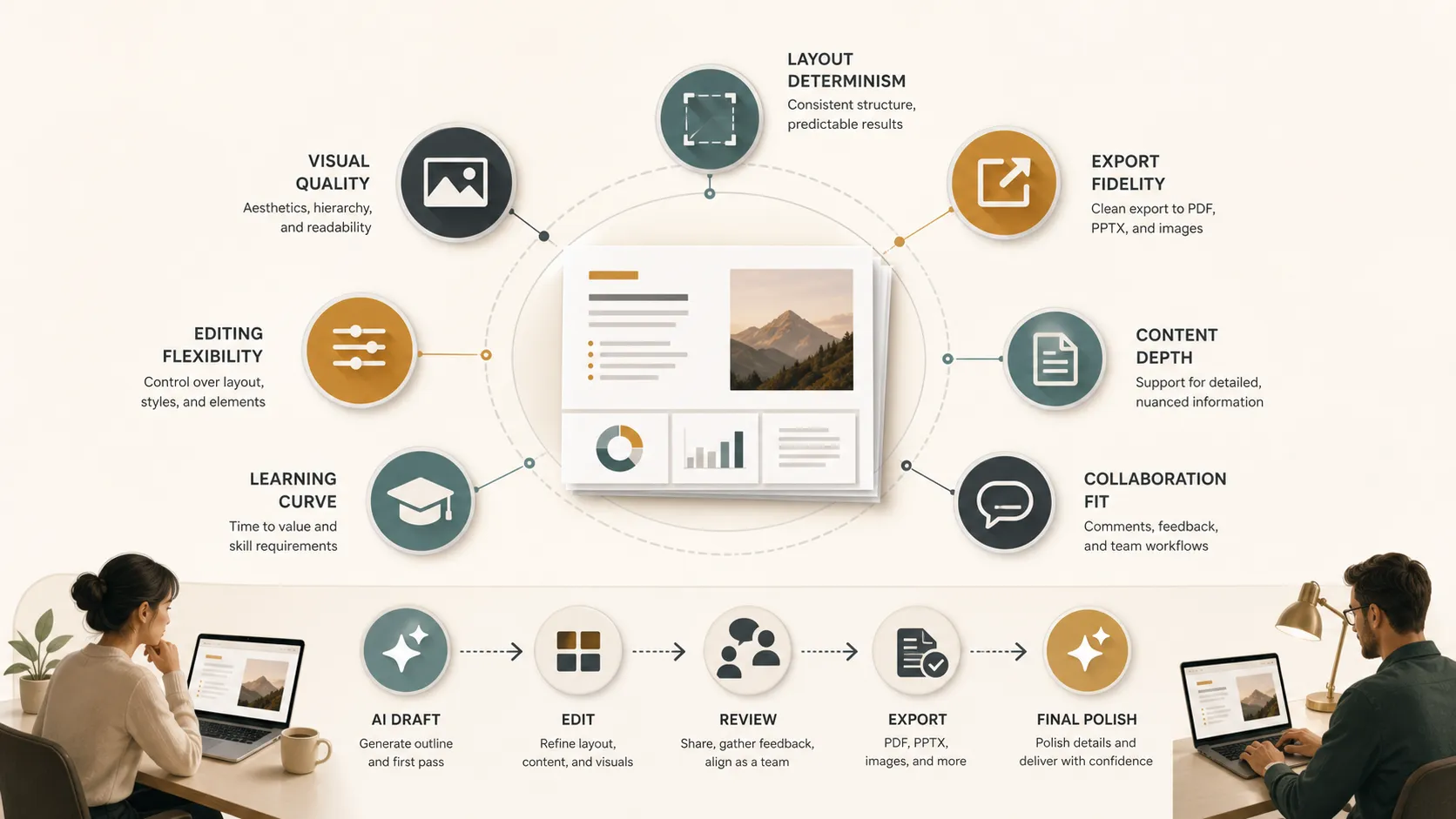
Teams should look beyond the first generated draft. Most real presentation work happens after generation: editing, restructuring, stakeholder review, export, and final polish.
Key criteria include:
- Layout determinism: whether slide structure stays predictable as content changes(a common challenge in human-AI interaction design).
- Export fidelity: whether formatting holds up in PPT or shared formats.
- Content depth: whether the AI supports business reasoning or only produces generic copy.
- Learning curve: how quickly users can create useful work.
- Editing flexibility: whether structure, visuals, and messaging can be refined.
- Visual quality: whether slides look professional without major cleanup.
- Collaboration fit: whether the tool supports solo drafting, team editing, or stakeholder review.
These criteria matter because a presentation is rarely finished after one prompt. The right tool should support the full creation cycle, not only the first draft.
Feature Comparison Across AI Presentation Platforms
The table below compares Gamma, Pitch, Canva, Tome, and Pi through practical evaluation criteria. It is not a ranking; it is a use-case map for teams building a presentation tech stack.
| Platform | Generation Model | Layout Control | Content Depth | Export Workflow | Best-Fit Use Case |
|---|---|---|---|---|---|
| Gamma | Prompt-to-deck, web-native | Moderate, theme-led | Good for summaries | Strong for sharing; export may need review | Fast drafts and explainers |
| Pitch | Collaborative deck workflow | Strong within team systems | Depends on team input | Built for team presentation workflows | Recurring team decks |
| Canva | Design-first creation with AI help | High visual flexibility | Broad, often design-led | Flexible across formats | Marketing assets and visual slides |
| Tome | AI-assisted storytelling | Moderate, narrative-led | Useful for concept flow | Web-native sharing focus | Story-driven concepts |
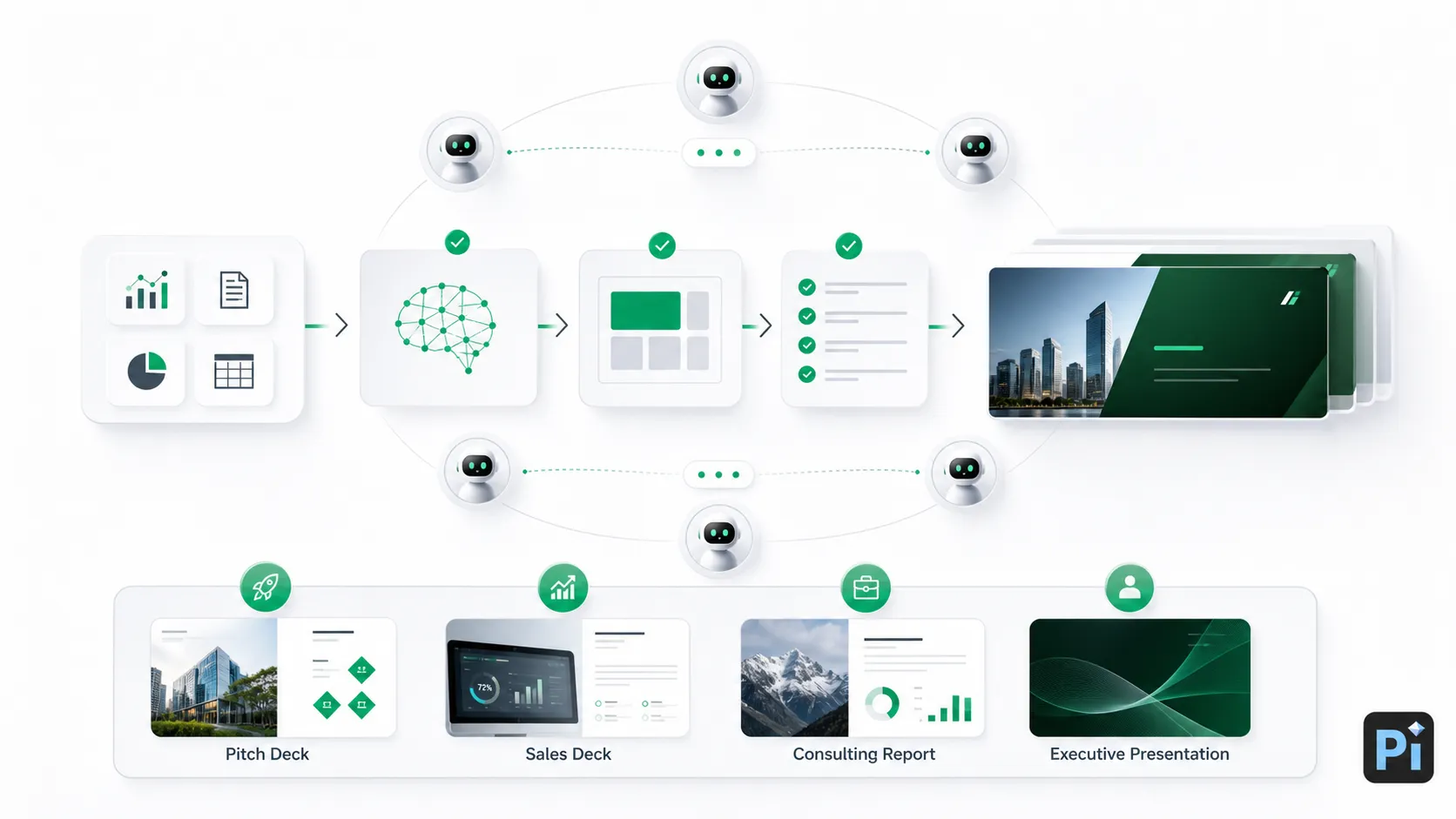
| Pi | Multi-Agent AI for business presentations | Structured for professional logic | Strong business reasoning focus | Built for professional deck workflows | Pitch decks, sales decks, consulting reports, executive presentations |
Where Each Tool Fits Best
Gamma works well when speed and visual polish are the main priorities. It is useful for turning an idea, prompt, or document into a presentable web-native draft quickly.
Pitch is strongest for collaborative presentation workflows. It fits teams that create recurring decks, share editing responsibilities, and need coordinated review habits.
Canva is a broad design platform with presentation features. It is especially useful when a slide deck is part of a larger visual system that may also include social graphics, one-pagers, brand materials, and campaign assets.
Tome is helpful for narrative-style storytelling. It can work well when users want to explore an idea, shape a concept, or present a fluid story rather than build a traditional business deck.
Pi fits professional presentation needs. It is relevant when the deck must support a business decision, sales conversation, investor pitch, consulting recommendation, product launch, or executive review. In those cases, the structure behind the slides matters as much as the visuals.
When Fast Slides Are Not Enough
Fast slides are valuable, but not every presentation is low-risk. A quick AI-generated deck may be enough for brainstorming or internal context sharing. Professional business decks face a higher standard.
The boundary appears when the presentation must persuade, defend a recommendation, explain trade-offs, or align senior stakeholders. These situations require message hierarchy, credible sequencing, and clear decision logic. The deck must move from context to problem, insight, recommendation, proof, and next step.
This is common in pitch decks, sales decks, consulting reports , executive presentations, market research decks, brand proposals, and strategic plans. If the AI only decorates content, the team still has to build the strategic structure manually.
That is where a deck builders review should shift from “Which tool creates slides fastest?” to “Which tool helps us create a deck that survives business scrutiny?”
How Pi Fits Into a Business Presentation Tech Stack
Pi, short for Presentation Intelligence, is best understood as the professional layer of an AI presentation workflow. It is not simply a general design tool or a quick AI PPT generator. Its strongest fit is business-ready structure, premium visual quality, and presentation logic for high-stakes communication.
1. Business Logic Comes Before Slide Styling
In professional decks, the hardest problem is often not visual design. It is unclear logic. What is the argument? What should the audience understand first? Which evidence supports the recommendation? What decision should follow?
Pi’s Multi-Agent AI architecture approach is designed around this deeper workflow. Instead of treating the deck as a set of decorated pages, it helps organize content into a structured business narrative. That makes it useful for investor materials, sales narratives, consulting recommendations, leadership updates, and strategic proposals.
This does not remove the need for human judgment. Teams still need to validate claims, refine positioning, and adapt the message to the audience. But Pi can help create a stronger starting point when the goal is not just a deck, but a coherent business argument.
2. Professional Structure Reduces Rework
Many slide generators produce a first draft quickly, but users then spend time reorganizing sections, rewriting headings, adjusting the story, and rebuilding visual consistency. In high-stakes work, this cleanup can erase the time saved during generation.
Pi focuses on professional structure: clearer slide intent, sharper message hierarchy, and more coherent deck flow. This is valuable when a deck needs review by founders, sales leaders, consultants, executives, or client stakeholders.
A structured deck is easier to edit because each slide has a role. It is also easier to critique because reviewers can evaluate the argument, not just the appearance. For business teams, that can make the presentation process more predictable.
3. Premium Visual Quality Supports High-Stakes Review
Business-grade aesthetics matter because senior audiences judge clarity and credibility quickly. A professional deck does not need excessive decoration, but it should feel polished, consistent, and appropriate for the context.
Pi’s value is strongest when visual quality must align with strategic communication. For client-ready, investor-ready, or executive-ready materials, the combination of structure and polish is often more important than having the largest template library.
Practical Buying Guidance for Teams
The right platform depends on team size, presentation risk, editing expectations, and final delivery format.
Solo creators who need fast drafts may prioritize speed and ease of use. Gamma or Tome can be useful when the goal is to quickly shape an idea into a web-native presentation. Teams that need shared workspaces, recurring decks, and collaborative review may find Pitch more aligned with their workflow.
Design-heavy teams may prefer Canva because it supports many visual assets beyond presentations. If slides are one part of a broader brand or campaign system, that flexibility can be valuable.
Business teams should evaluate whether the tool supports structured thinking, not only slide creation. According to Gartner's analysis on enterprise AI productivity, tools that integrate directly into strategic workflows provide significantly higher enterprise value.. If the deck must influence a buyer, investor, executive, or client, teams should examine content depth, message hierarchy, layout control, and export fidelity. In that context, Pi is a strong fit for professional business presentation workflows.
The Verdict: Choose Based on Presentation Risk
There is no universal winner in AI presentation software. Gamma, Pitch, Canva, Tome, and Pi each fit different presentation jobs.
For informal updates, rapid drafts, and lightweight storytelling, speed may be enough. For brand assets and visual flexibility, a design-first platform can be the right choice. For collaborative teams, workflow features may matter most.
For high-stakes business presentations, the requirements change. The deck must be logical, polished, editable, and reliable. It must communicate a decision narrative, not simply display information. In those cases, Pi belongs in the presentation tech stack as a professional option for teams that need business-ready structure, Multi-Agent AI support, and premium presentation quality.
Frequently Asked Questions (FAQ)
Q: What is the best AI presentation software?
A: The best AI presentation software depends on the use case. Gamma is useful for fast drafts, Canva for design flexibility, Pitch for collaboration, Tome for narrative storytelling, and Pi for professional business decks that require structured logic and polished output.
Q: How should teams compare slide generators?
A: Teams should compare layout determinism, export fidelity, content generation depth, editing flexibility, learning curve, visual quality, and collaboration fit. Speed matters, but it should not be the only criterion.
Q: Can AI presentation tools replace PowerPoint or Google Slides?
A: They can accelerate drafting, structuring, and design, but many teams still use PowerPoint or Google Slides for final editing, stakeholder review, or established internal workflows.
Q: Which tool is best for professional business decks?
A: For pitch decks, sales decks, consulting reports, and executive presentations, teams should prioritize structure, message hierarchy, export reliability, and visual polish. Pi is built for this type of business presentation workflow.