best ai tools for business
The best AI tools for business are not simply the most popular apps or the tools with the longest feature lists. Most teams already have enough software. What they need is more practical: tools that improve specific workflows, reduce repetitive work, raise output quality, and help people make better decisions.
That is why a useful review of AI tools for business should be organized by business need, not by hype. A sales team, finance team, founder, consultant, marketer, and operations manager may all use AI, but they are rarely trying to solve the same problem. Some need faster writing. Others need automation, analytics, design, customer support, video, or professional presentations.
The right AI business stack is built around workflows. General-purpose AI tools can help with research, drafting, summarizing, and brainstorming. Specialized tools become more valuable when the final output must meet professional standards, such as a polished investor deck, executive presentation, product launch deck, customer-facing proposal, or short business video.
What Makes an AI Tool Useful for Business?
An AI tool becomes valuable when it improves a real business process. That does not always mean replacing human work. More often, the best AI tools for business help teams move faster from rough input to usable output.
A useful business AI tool should support at least one of these outcomes:
- Save time on repetitive or low-value work
- Improve the quality and consistency of output
- Make workflows repeatable across teams
- Support collaboration and review
- Help users analyze information or make decisions
- Produce formats that are ready for real business use
The boundary is important. A tool that creates a quick draft may be excellent for internal notes but insufficient for executive-facing work. A chatbot may be helpful for brainstorming but less reliable for data-sensitive analysis. A design tool may create beautiful visuals but still need strong business structure behind it.
For teams choosing AI seriously, it is also worth thinking about risk and governance. The NIST AI Risk Management Framework ↗ is a useful reference for evaluating trust, transparency, risk, and responsible use before AI becomes part of a core business workflow.
The best AI tools are not magic shortcuts. They are workflow accelerators. They still require good judgment, review, and alignment with company goals.
The Main Categories of AI Tools for Business
Most AI tools for business fall into a few practical categories. AI writing tools help with emails, summaries, reports, proposals, and knowledge work. AI productivity tools support meeting notes, internal documentation, search, and team collaboration. AI marketing tools generate campaign ideas, ad copy, SEO briefs, social posts, and customer messaging.
AI automation tools connect apps and trigger actions across workflows. AI analytics tools help teams interpret data, detect patterns, create forecasts, and explain performance. AI design tools assist with visual assets, brand materials, and layout. AI presentation tools turn ideas and information into structured business decks. AI video generator tools help create explainers, product demos, short clips, and repurposed content.
A business rarely needs every category at once. The better question is: where does your team lose the most time, quality, or consistency?
Best AI Tools for Business by Use Case

For writing, research, and everyday productivity, tools like OpenAI for Business ↗ ↗, Claude for Work ↗ ↗, Gemini for Google Workspace ↗ ↗, Perplexity Enterprise ↗ ↗, Microsoft 365 Copilot ↗ ↗, and Notion AI ↗ ↗ can help teams draft documents, summarize research, organize notes, search internal knowledge, and prepare first versions of reports.
For marketing, sales, and automation, tools like Jasper ↗ ↗, HubSpot AI ↗ ↗, Salesforce Einstein ↗ ↗, Zapier ↗ ↗, and Make ↗ ↗ can support campaign copy, CRM summaries, lead routing, app workflows, follow-up tasks, and customer-facing content.
For design and video, Canva AI ↗ ↗ and Adobe Firefly ↗ ↗ are useful for social graphics, branded templates, short videos, product visuals, and campaign assets. These tools help teams move faster, but the business message still needs human review.
AI Presentation Tools for Business Communication
AI presentation tools deserve a separate category because presentations are not just another content format. A business presentation must organize logic, sequence ideas, control emphasis, and guide an audience toward a decision.
A good AI presentation tool should do more than place text into slide templates. It should understand the difference between a sales deck and an executive update, a pitch deck and a market research deck, a consulting report and a product launch presentation.
This is where Pi ↗ fits into the business AI tools landscape. Pi is useful when a business needs to turn ideas, notes, websites, documents, reports, or strategy into a polished presentation. Instead of starting from a blank slide, users can bring in rough material and use Pi to shape it into a clearer visual story.
For teams that regularly create pitch decks, sales decks, consulting reports, executive presentations, brand proposals, market research decks, or product launch decks, presentation quality directly affects communication. The slide is not just an output. It is part of the business argument.
Where Pi Fits in a Business AI Stack
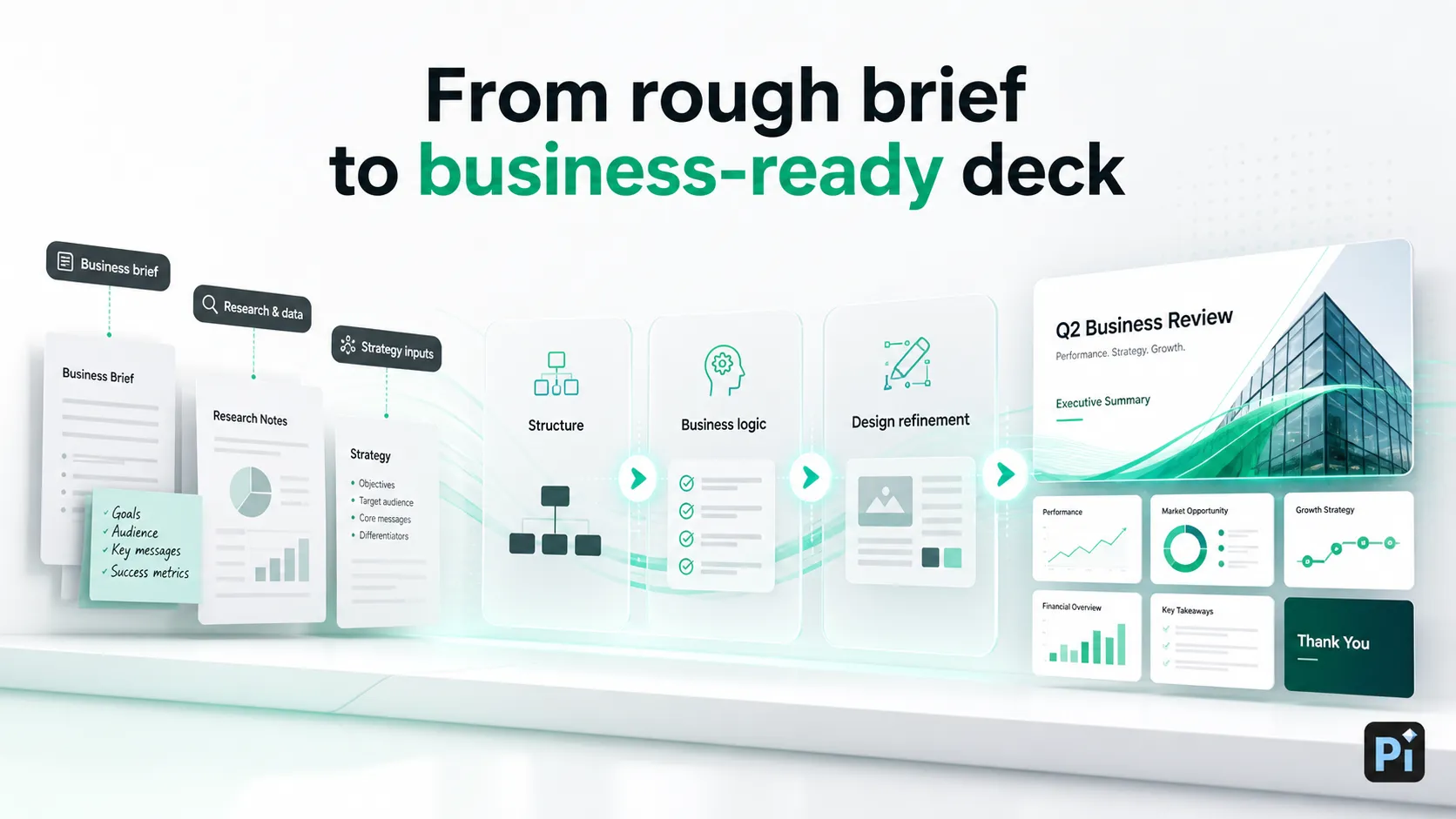
1. Business Logic Comes Before Slide Styling
Pi is useful because business presentations usually fail in structure before they fail in design. A deck needs to clarify the problem, frame the audience’s priorities, organize evidence, and build toward a recommendation or next step.
Many teams already have the raw material: meeting notes, research, a website, a product brief, a client proposal, or a rough outline. The hard part is turning that material into a deck that flows. Pi helps move from scattered content to a more structured narrative, making it useful when the deck needs to persuade, explain, or align stakeholders.
2. Visual Quality Matters for Customer-Facing Work
Business presentations are judged quickly. A messy or generic deck can weaken a strong idea, while a polished deck can make a team look more prepared. Pi helps with themes, custom colors, editable styles, ready-made components, automatic layout, icons, image effects, and AI-generated visuals.
This does not mean every deck needs to look dramatic. It means the design should support the message, maintain visual hierarchy, and make complex information easier to absorb. A sales deck, for example, needs a different rhythm from an investor deck. A board update needs a different visual tone from a product launch presentation. Pi gives teams room to shape those differences without rebuilding every slide by hand.
3. Pi Can Also Turn Business Content Into Video
Business content does not always need to stay in slides. Sometimes a team needs a short video for training, marketing, reporting, or asynchronous updates. With Pi's AI video generator ↗, users can create ordinary AI videos from ideas, scripts, notes, or reference content. They can also turn presentation material into dynamic PPT-style videos.
That makes Pi useful beyond traditional decks. A founder can turn a business proposal into a pitch deck. A sales team can turn product messaging into a client-facing presentation. A marketing team can turn a campaign brief into a short video. A trainer can turn notes into a visual learning summary. Pi sits at the point where business content needs to become something people can watch, understand, and act on.
Comparison Table: Choosing AI Tools by Business Need
| Business need | Tool category | Example tools |
|---|---|---|
| Drafting reports and emails | AI writing tools | OpenAI, Claude, Gemini |
| Research and source review | AI research tools | Perplexity, Claude, ChatGPT |
| Team documents and meetings | AI workspace tools | Microsoft 365 Copilot, Google Workspace, Notion AI |
| Marketing and sales content | AI marketing and CRM tools | Jasper, HubSpot AI, Salesforce Einstein |
| Repetitive workflows | AI automation tools | Zapier, Make, Airtable AI |
| Visual asset creation | AI design tools | Canva AI, Adobe Firefly |
| Professional presentations | AI presentation tools | Pi |
| Business videos | AI video tools | Pi, Canva, Adobe Firefly |
How to Choose the Right AI Tools for Your Business
Start with the workflow, not the category label. If your team struggles to produce customer-facing presentations, an AI writing assistant alone will not solve the full problem. If your operations team spends hours moving data between apps, a design tool will not help.
Consider the output type first. Is the result an internal note, a client proposal, a dashboard summary, a support reply, a campaign asset, or an executive deck? The more visible and high-stakes the output, the more you should care about structure, review, brand consistency, and export quality.
Team size also matters. A solo founder may prioritize speed and flexibility. A growing B2B team may need reusable workflows, shared brand assets, permission controls, and consistent quality. Larger organizations may need privacy standards, integration with existing systems, and clear governance.
Editing control is another major factor. AI output should rarely be treated as final on the first attempt. Good business AI tools allow users to revise, restructure, customize, and export without fighting the system.
Finally, separate internal productivity from external communication. Internal AI tools can be rougher if they save time and improve clarity. Customer-facing and executive-facing outputs require more polish. That is why specialized tools like Pi become relevant when the work must become a professional presentation or business video rather than a simple draft.
The Verdict: Build Around Workflows, Not Hype
The best AI tools for business are the ones that fit real workflows. Writing tools help teams draft and summarize. Productivity tools reduce administrative friction. Marketing tools expand campaign output. Automation tools connect processes. Analytics tools support decision-making. Design and video tools help turn ideas into visual content.
Pi fits into this stack when the final output needs to become a structured, polished business presentation or video. It is especially relevant for professional teams creating pitch decks, sales decks, consulting reports, executive presentations, brand proposals, market research decks, product launch decks, training videos, and business updates.
A practical AI business stack does not need to include every new tool. It should combine general-purpose AI with specialized tools where output quality, business logic, and audience impact matter most.
Frequently Asked Questions (FAQ)
What are the best AI tools for business?
The best AI tools for business depend on the workflow. Most teams benefit from a mix of AI writing tools, productivity tools, automation tools, marketing tools, analytics tools, design tools, video tools, and specialized AI presentation tools like Pi.
What AI tools should small businesses use first?
Small businesses should start with tools that save immediate time: writing assistants for emails and content, automation tools for repetitive admin work, marketing AI for campaigns, and presentation tools for sales decks, proposals, and investor materials.
What is the best AI tool for business presentations?
For business presentations, look for an AI presentation maker that supports structure, business logic, visual quality, editing control, and export needs. Pi is designed for professional presentation workflows such as pitch decks, sales decks, consulting reports, executive presentations, and product launch decks.
Can Pi help with business videos?
Yes. Pi can create AI videos and dynamic PPT-style videos from ideas, scripts, notes, reports, or presentation material, making it useful for marketing, training, reporting, and business communication.


