Corporate Employee Onboarding Presentation: Engaging Internal Training Templates
An effective employee onboarding presentation does more than welcome new hires and explain policies. It helps people understand the company, their role, the training path ahead, and what success should look like in the first days and weeks.
For HR, L&D, and people operations teams, the challenge is repeatability. Every new employee needs a consistent experience, but each department, role, and location may require different details. A strong onboarding deck gives teams a shared foundation while leaving room for practical adaptation.
Why Employee Onboarding Presentations Often Fall Flat
Many onboarding decks are created under pressure. HR teams collect policy documents, IT instructions, benefits information, compliance notes, culture slides, and manager input, then turn everything into corporate training slides as quickly as possible. The result is often accurate but difficult to follow.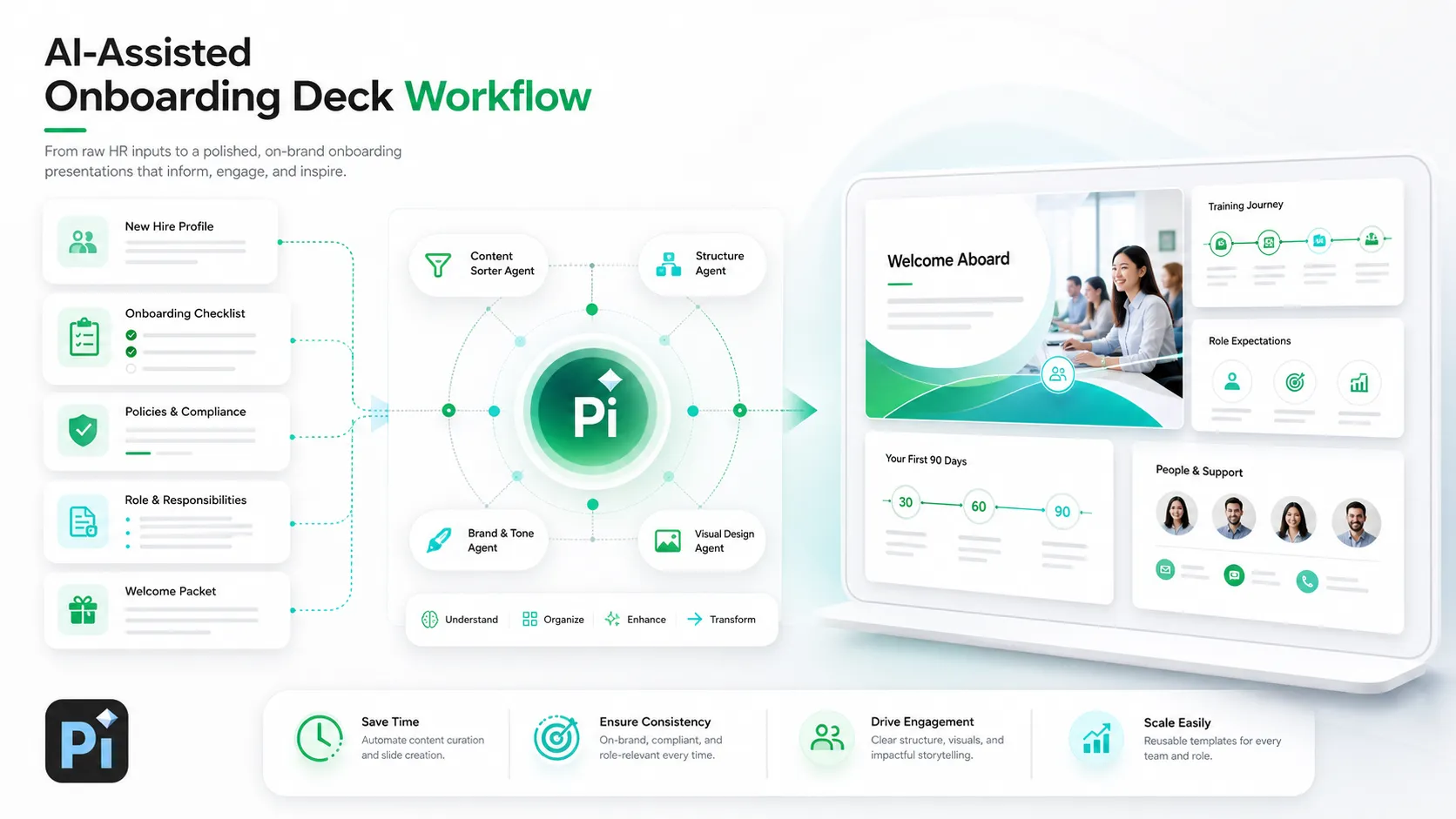
Common issues include:
- Too much policy detail placed directly on slides
- Disconnected sections from different departments
- Inconsistent messaging across teams or offices
- Little explanation of what new hires should do next
- Generic visuals that make the material feel low-priority
This matters because onboarding shapes the employee’s first impression of the organization. SHRM’s guide to the onboarding process emphasizes that onboarding includes more than orientation. It can involve preboarding, role clarity, manager support, mentoring, and longer-term integration.
What a Strong Corporate Onboarding Deck Needs to Achieve
A strong employee onboarding presentation should create clarity, not just deliver information. It should welcome the employee, explain how the organization works, introduce culture and expectations, and guide practical first-week actions.
The best onboarding decks answer the questions new hires are already asking: Why does this company exist? How does my team contribute? What tools do I need? Who can help me? What should I complete first? How will success be measured?
An HR presentation template should therefore work like a guided journey. It begins with context, moves into role and team expectations, introduces systems and policies, and ends with next steps. When the sequence is clear, employees can absorb more information with less anxiety.
What an Employee Onboarding Presentation Should Achieve
A strong employee onboarding presentation should create clarity, not just deliver information. It should welcome the employee, explain how the organization works, introduce culture and expectations, and guide practical first-week actions.
The best onboarding decks answer the questions new hires are already asking:
- Why does this company exist?
- How does my team contribute?
- What tools do I need?
- Who can help me?
- What should I complete first?
- How will success be measured?
An HR presentation template should work like a guided journey. It begins with context, moves into role and team expectations, introduces systems and policies, and ends with next steps. When the sequence is clear, employees can absorb more information with less anxiety.
Gallup’s guide to employee engagement is useful here because onboarding should help employees understand expectations, tools, relationships, and how their work connects to the organization.
Employee Onboarding Presentation Template
A reusable onboarding deck should include more than slide titles. Each section should have a clear purpose.
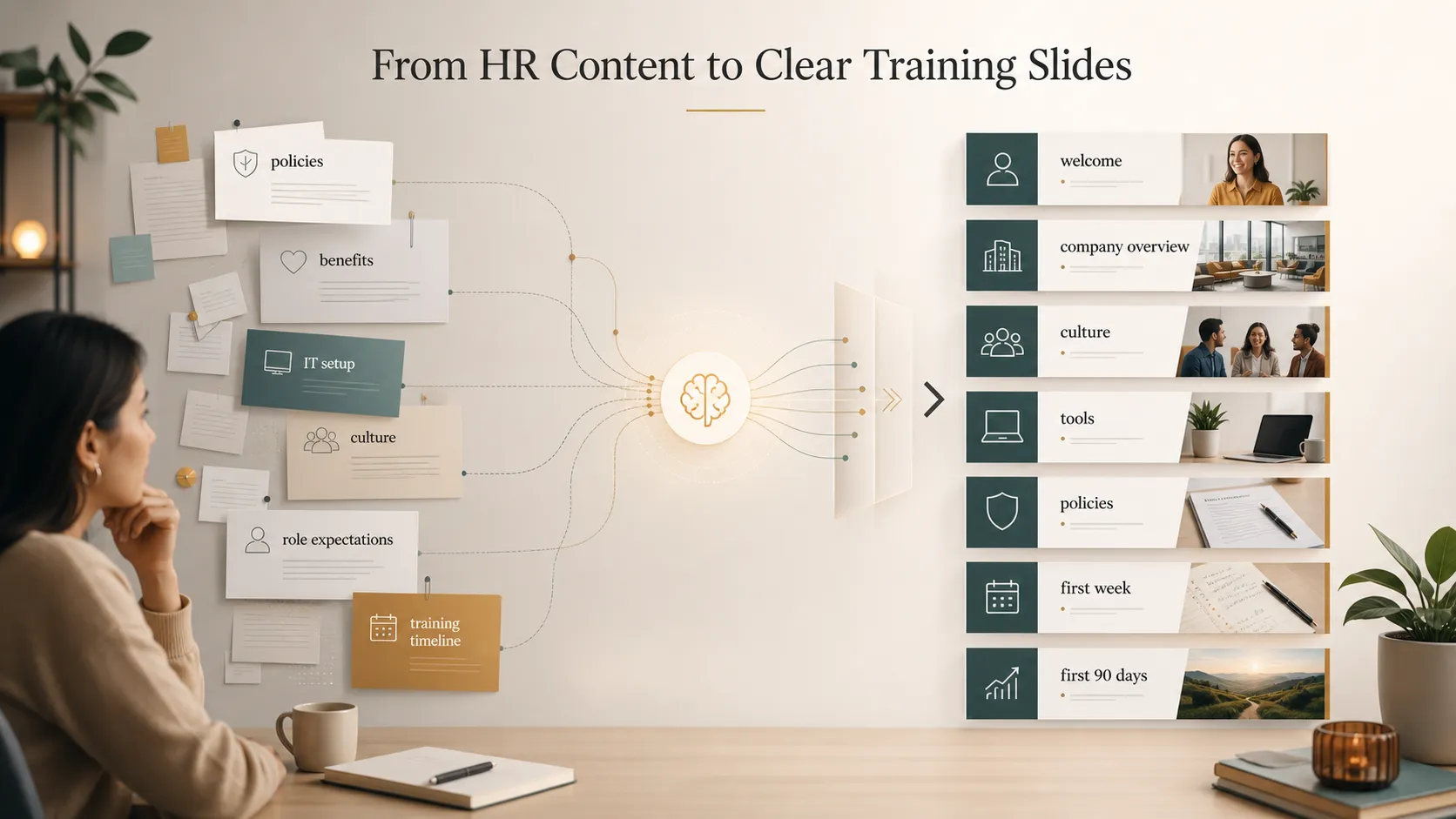
| Employee onboarding presentation section | What it should explain |
|---|---|
| Welcome | Why the new hire is here and what to expect |
| Company overview | Mission, business model, customers, and priorities |
| Culture and values | How values show up in everyday decisions |
| Team structure | Reporting lines, partners, and key contacts |
| Role expectations | Responsibilities, success measures, and early priorities |
| Tools and systems | What to access, why it matters, and where to get help |
| Policies | Essential rules, official documents, and compliance reminders |
| Training timeline | Day one, week one, month one, and first 90 days |
| Support contacts | HR, manager, IT, mentor, and team resources |
| Next steps | What the employee should do after the session |
This structure keeps the onboarding deck practical. It gives HR a repeatable format while helping each employee understand the journey ahead.
How to Make Corporate Training Slides More Engaging
Engagement does not mean making the deck casual or entertainment-focused. In corporate onboarding, engagement means making information easier to understand, remember, and act on.
Start with concise messaging. Each slide should communicate one main idea, supported by only the details needed at that moment.
Use realistic examples. A policy slide becomes more useful when it shows a workplace situation, such as how to request time off, escalate an issue, protect confidential data, or ask for technical support.
Add clear milestones. Visual timelines, first-week checklists, and role-specific action steps help employees see progress instead of feeling buried in information.
Visual hierarchy matters too. Nielsen Norman Group’s guide to visual hierarchy is useful because onboarding slides should make the most important action or takeaway easy to see first.
What to Keep Out of the Main Deck
One reason onboarding presentations become too crowded is that teams try to put every detail on the slide. That is usually not necessary.
Keep the main deck focused on what new hires need to understand during the session. Move deeper detail into:
- employee handbooks;
- intranet pages;
- policy documents;
- role-specific checklists;
- manager notes;
- department training materials.
For compliance-related training, the EEOC’s employer training checklist is a useful reference for thinking about clear policies, reporting processes, and workplace conduct training. The deck can introduce essential points, but official policy documents should remain the source of record.
Where AI Training Materials Can Help HR Teams
AI training materials can help HR teams reduce repetitive slide work, especially when source content is scattered across documents, spreadsheets, intranet pages, and department notes.
AI can help with:
- turning long documents into slide-friendly summaries;
- creating first drafts of onboarding slides;
- adapting one deck for different roles or departments;
- standardizing tone across training materials;
- turning checklists into clearer presentation sections.
The key is not to treat AI as a replacement for HR judgment. Legal, compliance, culture, and manager review still matter. The practical value is speed and structure: AI can help organize raw material so HR teams spend less time formatting and more time improving accuracy, tone, and employee experience.
How Pi Helps Create Business-Ready Onboarding Presentations
Pi, short for Presentation Intelligence, is an AI presentation maker designed for professional business presentations. For onboarding and internal training, Pi can help teams turn scattered HR information into a structured, polished deck that feels consistent with the standards of external business communication.
1. Turning HR Information into a Clear Training Narrative
A common onboarding mistake is organizing slides around internal departments rather than the new hire journey. Pi’s Multi-Agent AI and business-ready structure can help reshape content around what employees need to understand first, next, and later.
Instead of dumping every policy https://www.ibm.com/think/topics/generative-ai into a sequence of text-heavy slides, Pi can help frame the deck as a practical path: welcome, company context, culture, role clarity, tools, policies, training plan, and next actions. This makes the presentation easier for HR to deliver and easier for employees to follow.
2. Creating Consistent Slides Across Teams and Locations
Growing companies often struggle to maintain one consistent onboarding message. A headquarters deck may differ from a regional deck. A sales onboarding deck may use different language from an engineering version. Over time, updates become hard to manage.
Pi can support a more standardized workflow by helping teams create a shared HR presentation template and then adapt it for different roles, departments, or regions. The core narrative can remain consistent while local details, team workflows, or role-specific expectations are adjusted where needed.
3. Making Internal Training Materials Look Professional
Onboarding materials influence how employees perceive the company. If internal slides look rushed, the training can feel less credible, even when the content is important.
Pi’s premium visual quality helps corporate training slides feel clean, organized, and business-grade. Professional layouts, clear hierarchy, and polished aesthetics can make onboarding feel intentional. That does not replace the substance of HR content, but it helps the message land with more authority.
Accessibility and Delivery Tips
Employee onboarding presentations should be easy for different people to follow, especially if the deck will be reused across teams, locations, or remote sessions.
Use readable font sizes, strong contrast, clear slide titles, and simple layouts. If the deck includes screenshots, diagrams, or icons, make sure the meaning is also explained in text or speech.
Microsoft’s guide to accessible PowerPoint presentations and W3C’s accessible presentation guidance are helpful references when preparing corporate training slides for a broad audience.
Manager-facing notes can also improve delivery without crowding the slide. HR can include prompts, discussion points, or reminders in speaker notes so managers can customize the conversation while keeping the core message consistent.
A Better Way to Build Repeatable Onboarding Materials
The strongest approach combines a clear onboarding framework, AI-assisted generation, and human HR review.
A practical workflow looks like this:
- Define the new hire journey.
- Gather HR, IT, manager, and department content.
- Separate must-know information from reference material.
- Build the employee onboarding presentation.
- Add role-specific or location-specific details.
- Review for policy accuracy and tone.
- Update the deck regularly based on feedback.
This workflow helps the presentation stay useful over time. It also prevents onboarding materials from becoming a one-time deck that slowly goes out of date.
The Verdict
A strong employee onboarding presentation should make the first days and weeks feel clearer. It should explain the company, the role, the tools, the policies, the training path, and the next steps without overwhelming the new hire.
The best corporate training slides are structured around the employee journey. They are clear enough for HR to reuse, flexible enough for teams to adapt, and polished enough to signal that onboarding matters.
For teams that regularly create onboarding decks, Pi can help turn scattered HR content into repeatable internal training materials with stronger structure, clearer flow, and more professional visual quality.
Frequently Asked Questions (FAQ)
What should an employee onboarding presentation include?
It should include a welcome, company overview, culture and values, team structure, role expectations, tools, policies, training timeline, support contacts, and clear next steps.
Is an HR presentation template enough for onboarding?
A template is a useful starting point, but it may not solve structure, messaging, or customization challenges. HR teams still need to adapt the deck for roles, locations, and current company priorities.
How can AI training materials help HR teams?
AI can help summarize documents, create first drafts, organize training content, standardize slide language, and generate role-specific onboarding versions faster.
Do AI-generated onboarding slides still need HR review?
Yes. HR, legal, compliance, and relevant managers should review onboarding slides to confirm accuracy, policy alignment, tone, and role-specific details.


