How to Design Executive Slides: Structure, Focus & Visual Logic
Strong executive slide design is not about making a deck look impressive. It is about helping busy decision-makers understand the argument, trust the evidence, and know what action is required.
Executives rarely read slides line by line. They scan for the decision, logic, risk, and recommendation. That changes how you should approach business presentations, pitch deck layout, and every slide’s visual hierarchy.
Why Executive Slides Need a Different Standard
Executive audiences operate under time pressure. They may enter a meeting with partial context, competing priorities, and limited patience for long explanations. A slide that works in a workshop may fail in a boardroom because it explains too much before making the point.
Executive slides should answer four questions quickly:
- What changed?
- Why does it matter?
- What decision is needed?
- What evidence supports the recommendation?

The goal is not minimalism for its own sake. The goal is signal-to-noise ratio maximization. Every element should help the audience reach the intended conclusion faster.
Start with the Decision, Not the Slide
Before opening PowerPoint, Keynote, Google Slides, or an AI PPT generator, define the decision the deck must support. Executive communication becomes clearer when the end state is explicit.
Ask three questions first:
1. What decision does the audience need to make?
2. What must they believe before making that decision?
3. What objections, risks, or trade-offs must be addressed?
For example, “update leadership on Q3 performance” is too broad. “Recommend reallocating 20% of next quarter’s marketing budget from paid social to partner-led pipeline based on Customer Acquisition Cost (CAC) and conversion evidence” is a decision frame. The second version tells you what analysis matters, what slides are needed, and what can be removed.
This discipline improves slide presentation logic. Instead of building around available content, you build around the executive choice.
Build the Narrative Before Designing Layouts
A polished deck with weak sequencing still feels confusing. Executive reasoning usually follows structured principles like the Minto Pyramid Principle or standard strategic management frameworks: context, problem, analysis, recommendation, impact, and next steps. The exact order may change, but the logic should be visible.
A market expansion deck might begin with the growth constraint, show customer demand evidence, compare market options, recommend one entry strategy, quantify expected Return on Investment (ROI), then define the first 90 days. A consulting report may start with the executive question, diagnose root causes, evaluate options, and end with an implementation roadmap.
The slide order should mirror how the audience thinks. If they need confidence before approval, show evidence before the ask. If urgency matters, establish the business risk early. If trade-offs are controversial, make assumptions explicit before presenting the recommendation.
Use Slide Titles as Business Claims
In executive slides, titles should communicate conclusions, not label topics. A topic title says what the slide is about. A claim title says what the audience should understand.
Weak title: “Revenue Performance” Stronger title: “Enterprise Revenue Grew 18%, but SMB Churn Offset Half the Gain”
Weak title: “Market Opportunity” Stronger title: “Healthcare Mid-Market Offers the Fastest Path to Profitable Expansion”
Weak title: “Next Steps” Stronger title: “Approval This Week Enables Pilot Launch Before Q2 Planning”
This improves visual hierarchy because the title becomes the first layer of meaning. The audience can scan the deck and still follow the argument. Supporting charts, metrics, and notes then exist to prove the claim, not compete with it.
Reduce Signal-to-Noise on Every Slide
A slide feels cluttered when too many elements ask for equal attention. Reducing signal-to-noise means making the primary message obvious and moving everything else into a supporting role.
Start by identifying the one message the slide must deliver. Remove text that explains background the speaker can say aloud. Group related information so the eye sees structure instead of fragments. Highlight only the numbers that change the decision. If a chart contains ten data series but only two matter, mute the rest.
Good executive slide design uses restraint. A slide can contain detailed evidence, but the structure must guide the reader. Put the claim at the top, the evidence in the center, and the implication near the bottom or right side. The audience should know where to look first, second, and third.
Design Visual Hierarchy for Fast Scanning
Visual hierarchy tells the audience what matters most. It comes from size, placement, contrast, spacing, alignment, and repetition—core tenets taught by design institutions like Nielsen Norman Group. In executive decks, hierarchy should be predictable enough that the audience does not have to relearn the layout on every slide.
Place the most important message where scanning naturally begins. Use larger type for claims and key numbers, not decorative labels. Align objects to create order. Use whitespace to separate ideas. Keep secondary context visually quieter than the main evidence.
Data visualization requires special care. Do not present a chart and hope the audience discovers the insight. Emphasize the relevant bar, line, segment, or variance. Use annotations to explain why the pattern matters. Remove redundant legends, gridlines, and labels when direct labeling would be clearer
Match Layout Type to the Business Message
Layout should follow the communication goal. A comparison layout works when the audience must choose between options. A timeline works when sequence, dependency, or urgency matters. A KPI dashboard works when leadership needs a performance snapshot across a few critical measures.
| Presentation Need | Strong Layout Choice | Design Purpose |
|---|---|---|
| Recommendation | Decision, rationale, impact | Make approval easier |
| Option comparison | Side-by-side matrix | Clarify trade-offs |
| Performance review | KPI dashboard | Surface variance fast |
| Market strategy | Map or segmentation view | Show position and opportunity |
| Execution plan | Timeline or roadmap | Connect actions to timing |
Pitch deck layout and executive reporting often diverge. A pitch deck may need momentum and persuasion, while an operating review may need disciplined variance analysis. Both require visual logic, but they do not require the same slide architecture.
How Pi Helps Turn Executive Logic into Slides Faster
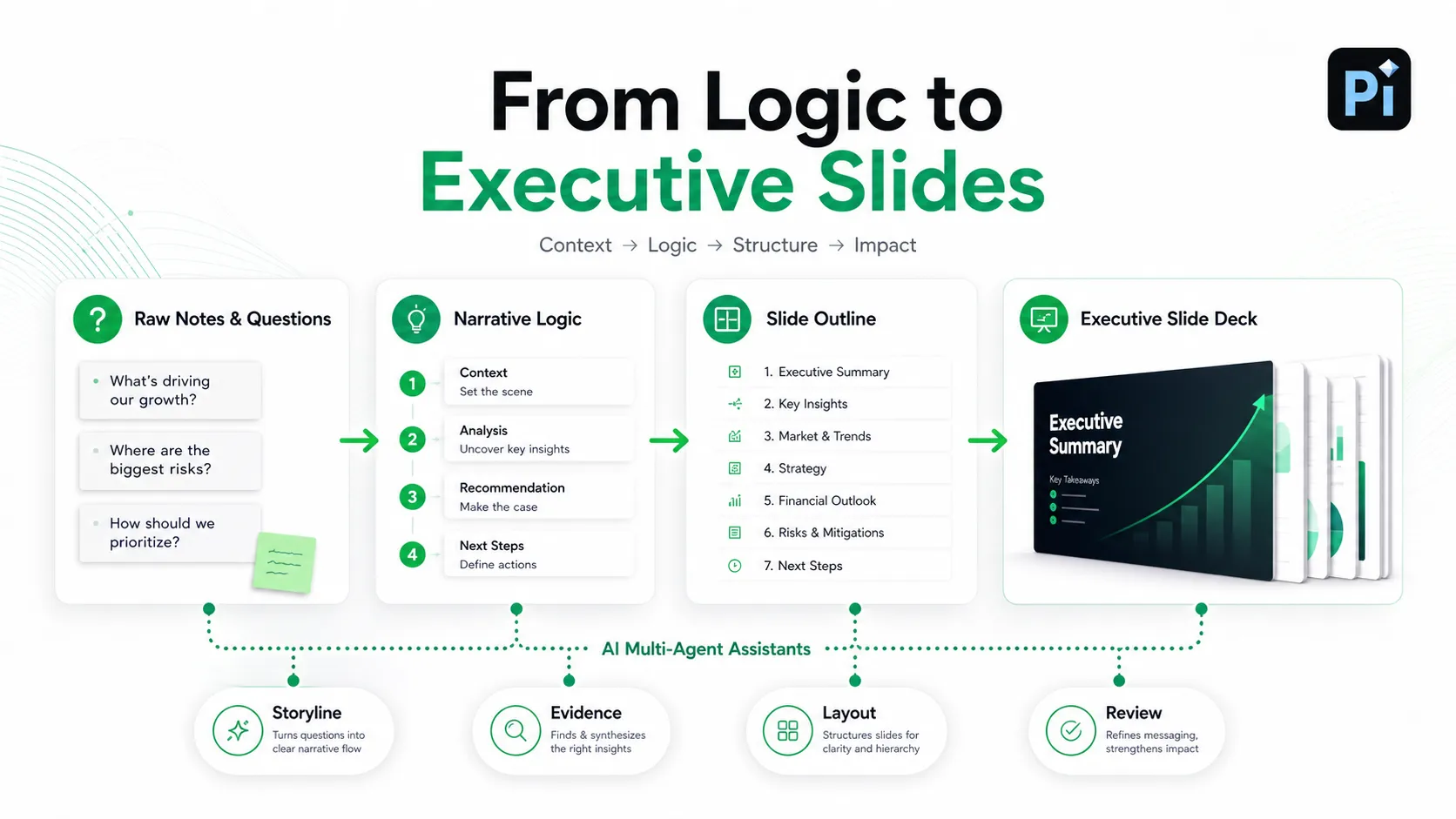
Pi, short for Presentation Intelligence, is an AI presentation maker built for professional business presentations. It is most useful after you know the decision, audience, and argument. AI can accelerate drafting, but it should not replace strategic judgment, data accuracy checks, or audience-specific tailoring.
Pi helps teams move from raw ideas to structured deck logic. Instead of starting with blank slides, users can shape a business narrative around context, analysis, recommendation, and next action. This is useful for executive presentations, consulting reports, sales decks, brand proposals, market research decks, product launch decks, and pitch decks where sequence matters as much as visuals.
Pi supports the deeper workflow behind professional presentations: storyline, message hierarchy, supporting evidence, and layout direction. For a leadership update, that might mean turning scattered notes into a clear sequence: business context, performance shift, root cause, recommendation, expected impact, and decision required. For a pitch deck, it might mean organizing market pain, solution, traction, business model, go-to-market plan, and funding use into a tighter narrative.
Pi also uses Multi-Agent AI to support different parts of the workflow, from storyline structure to slide content and visual direction. The benefit is not that the deck becomes final automatically. The benefit is that teams reach a stronger starting point faster, then focus human review on judgment, evidence, and stakeholder nuance.
Executive Slide Design Checklist
Use this checklist before sending an executive deck:
- Is the decision or desired action clear?
- Does every slide support one main message?
- Do slide titles state business claims?
- Can the audience scan the deck and follow the logic?
- Are key numbers emphasized and secondary details muted?
- Does each chart explain the implication, not just the data?
- Is the layout matched to the business message?
- Are risks, assumptions, and next steps visible?
If a slide does not help the audience decide, approve, understand, or act, it should be revised or removed.
The Verdict: Design for Decisions, Not Decoration
The strongest executive slides combine structure, focus, and visual logic. They begin with the decision, organize the story around what leadership needs to believe, and use layout to make the message easy to scan.
Design quality matters, but only when it serves the business argument. Tools such as Pi can speed up the process by helping teams draft professional structure and polished layouts faster. The final standard remains the same: every slide should make the decision clearer.
Frequently Asked Questions (FAQ)
Q: What makes executive slide design different from normal presentation design?
A: Executive slide design focuses on decision support. Slides must communicate the claim, evidence, implication, and required action quickly. Visual polish matters, but business logic matters more.
Q: How many messages should each executive slide contain?
A: Ideally, each slide should have one primary message. Supporting evidence can include multiple data points, but they should reinforce the same conclusion. If a slide has two competing messages, split it or clarify the hierarchy.
Q: How can I improve visual hierarchy slides without redesigning everything?
A: Start with the title, key number, and main chart insight. Make those elements more prominent, reduce unnecessary labels, group related content, and add whitespace.
Q: Can AI tools help create professional executive presentations?
A: Yes. AI tools such as Pi can help draft structure, organize slide logic, and improve visual quality faster. Human review is still essential for strategy, data validation, and audience fit.


