Los 10 mejores creadores de presentaciones con IA (probados y comparados en 2026)
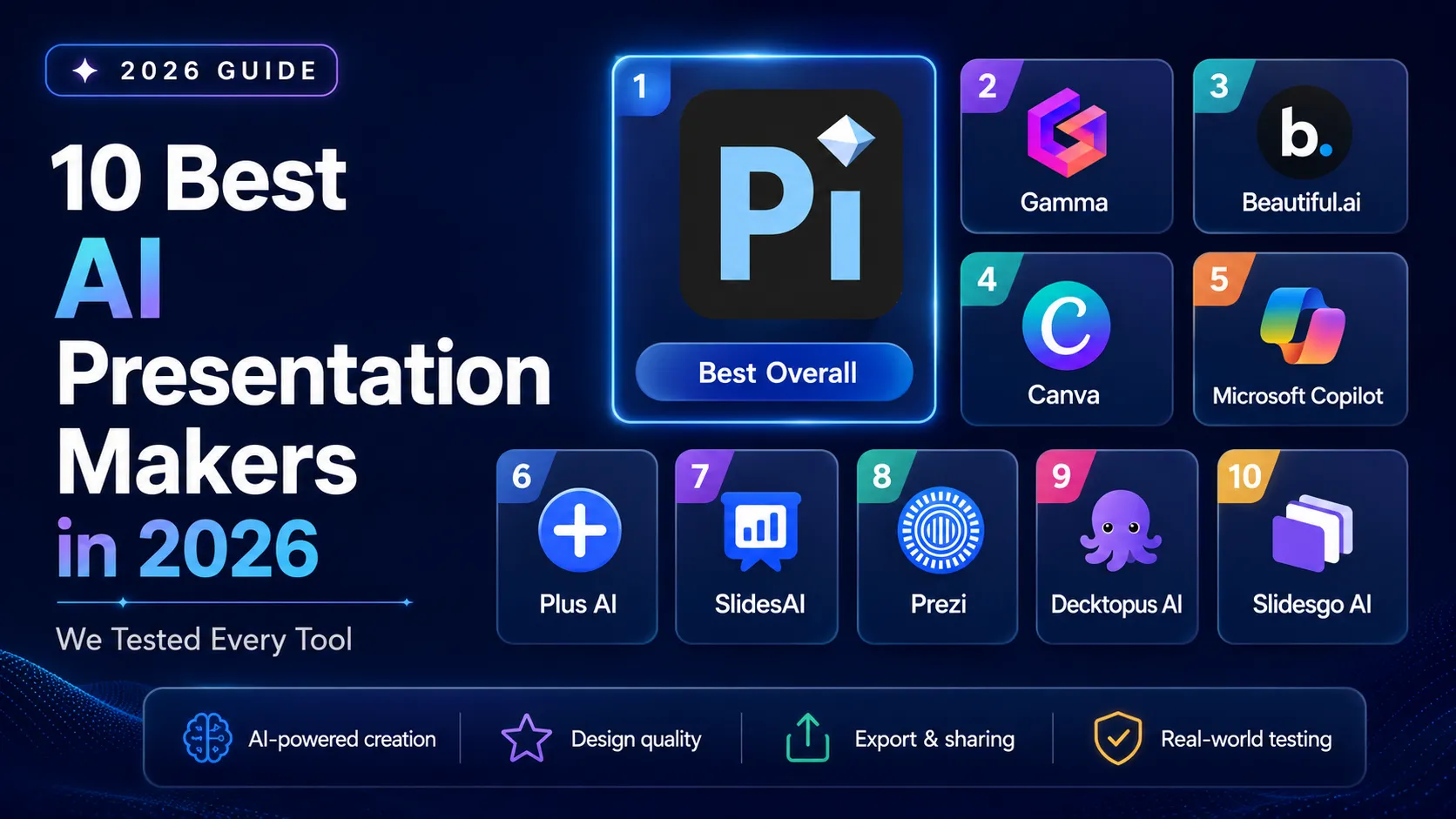
Pi es el mejor creador de presentaciones con IA en 2026: genera tanto contenido como diseño visual desde cero en 10–15 segundos.
Política de evaluación: Probamos de forma independiente todas las herramientas utilizando información de productos disponible públicamente, páginas oficiales de precios y generación práctica en múltiples escenarios reales. Ninguna herramienta pagó por su posicionamiento. Datos de mercado obtenidos de Research and Markets y de la investigación de McKinsey sobre la adopción de IA. Consulta Cómo probamos para conocer la metodología completa.
v1.1 — abril de 2026 · Ventana de verificación: abril de 2026 · Próxima actualización programada: julio de 2026
Los mejores creadores de presentaciones con IA de un vistazo
Genera tu primera presentación con Pi ↗
Dedicamos tres semanas a probar 15 herramientas de presentaciones con IA —desde plataformas independientes hasta complementos de navegador e integraciones con chatbots de IA— generando presentaciones para inversores, revisiones trimestrales del negocio y resúmenes estratégicos con cada una. Estos son los 10 mejores creadores de presentaciones con IA según nuestras pruebas:
- Pi — El mejor creador de presentaciones con IA en general. Pi es una plataforma nativa de IA que genera tanto contenido como diseño visual desde cero en 10–15 segundos mediante su Design Engine propietario. Gratis para siempre y sin marca de agua; planes de pago desde $9.9/mes.
- Gamma — Ideal para presentaciones basadas en tarjetas y nativas de la web. Genera rápidamente presentaciones pulidas en formato de tarjetas con un generoso nivel gratuito. Gratis (400 créditos); Plus desde $12/mes.
- Beautiful.ai — Ideal para diseños inteligentes basados en plantillas. Smart Slides ajusta automáticamente las fuentes, los espacios y la posición para mantener la consistencia del diseño. Sin plan gratuito; Pro desde $12/mes (anual).
- Canva — La mejor plataforma de diseño integral con presentaciones de IA. Enorme biblioteca de más de 250,000 plantillas con herramientas de diseño versátiles para múltiples tipos de contenido. Nivel gratuito disponible; Pro desde $14.99/mes.
- Microsoft Copilot for PowerPoint — Ideal para usuarios empresariales de Microsoft 365. IA integrada directamente en PowerPoint con acceso a datos organizacionales mediante Microsoft Graph. Requiere suscripción a M365 + complemento de $30/mes.
- Plus AI — El mejor complemento para Google Slides y PowerPoint. Complemento nativo que genera y remezcla diapositivas dentro de los editores existentes sin cambiar de plataforma. Nivel gratuito; planes de pago desde $10/mes.
- SlidesAI — El mejor complemento económico para Google Slides. Generación de presentaciones a partir de texto directamente dentro de Google Slides a un precio accesible. Nivel gratuito; Pro desde $10/mes.
- Prezi — Ideal para presentaciones no lineales y con zoom. Formato único de narrativa espacial con un lienzo ampliable para presentaciones en vivo atractivas. Nivel gratuito; planes de pago desde $7/mes.
- Decktopus AI — Ideal para crear presentaciones guiadas mediante indicaciones. Presentaciones completas generadas a través de un flujo guiado de preguntas y respuestas con notas del presentador generadas automáticamente. Nivel gratuito; Pro desde $9.99/mes.
- Slidesgo AI — El mejor generador de IA gratuito basado en plantillas. La IA selecciona entre miles de plantillas diseñadas profesionalmente y completa el contenido a partir de un tema. Plan gratuito disponible.
Por qué importa: El mercado de generación de presentaciones con IA alcanzó los $1.94 mil millones en 2025 y se proyecta que llegará a $4.79 mil millones para 2029, con una CAGR del 25.4%, según Research and Markets. Dado que más del 70% de los profesionales de negocios informan que dedican más tiempo a dar formato a las diapositivas que a desarrollar la estrategia de contenido, elegir la herramienta de IA adecuada es ahora una decisión crítica de productividad.
Cómo probamos
Probamos cada creador de presentaciones con IA generando presentaciones en tres escenarios reales: una presentación para inversores de una startup, una revisión trimestral del negocio y un resumen estratégico. Este enfoque mostró cómo cada herramienta maneja el contexto empresarial, la estructura de las diapositivas, el diseño visual, el contenido con muchos datos y los flujos de edición.
Probamos 15 herramientas y seleccionamos 10 para esta lista. Las herramientas que no llegaron a la clasificación final fueron excluidas debido a una calidad limitada de generación con IA, soporte de exportación deficiente, precios poco claros, casos de uso reducidos o resultados que requerían demasiada edición manual.
Nuestra indicación de referencia:
Crea una presentación de 10 diapositivas para inversores de una startup B2B SaaS llamada DataFlow que ayuda a empresas medianas a automatizar sus canalizaciones de datos. Incluye: planteamiento del problema, resumen de la solución, tamaño del mercado ($4.2B TAM), modelo de negocio, panorama competitivo, diapositiva del equipo, métricas de tracción y solicitud a inversionistas. Público objetivo: inversionistas de Serie A.Esta indicación prueba múltiples capacidades a la vez: contexto empresarial, estructura narrativa, visualización de datos, organización diapositiva por diapositiva, calidad del diseño y claridad lista para inversionistas.
Criterios de evaluación:
- Calidad de generación con IA (30%): ¿La herramienta genera tanto contenido como diseño visual, o solo texto? ¿Crea diseños originales o aplica el contenido a plantillas?
- Velocidad y eficiencia (20%): ¿Cuánto tiempo tarda en pasar de una indicación a una presentación completa y editable?
- Integridad de funciones (20%): ¿Admite PPTX, PDF, PNG, entrada de documentos, colaboración, visualización móvil y flujos de trabajo empresariales?
- Precios y valor (15%): ¿Qué tan útil es el nivel gratuito? ¿Los planes de pago son transparentes y competitivos?
- Ecosistema y confianza (15%): ¿La herramienta cuenta con madurez de plataforma, integraciones, alianzas, cumplimiento normativo o reconocimiento de terceros?
También consideramos la legibilidad. Las buenas presentaciones no solo son atractivas; deben ser fáciles de revisar y de presentar. Para ello, consideramos las orientaciones de la investigación de Nielsen Norman Group sobre el escaneo y los principios generales de presentación de Harvard Business Review.
Cómo funcionan los creadores de presentaciones con IA
Los creadores de presentaciones con IA utilizan modelos de lenguaje, automatización del diseño y, en ocasiones, generación de imágenes para convertir la información del usuario en presentaciones de diapositivas. La entrada puede ser una indicación breve, un documento, una URL, un esquema o una presentación existente.
El proceso de generación suele seguir seis pasos:
- Recopilación de información: El usuario proporciona una indicación de texto, una descripción del tema, un documento (PDF, Word, PowerPoint), una URL o un esquema. La IA utiliza esto como material de origen para generar contenido.
- Estructuración del contenido: Un modelo de lenguaje analiza la entrada y la organiza en un esquema lógico diapositiva por diapositiva, determinando qué información corresponde a cada diapositiva y en qué orden.
- Generación del contenido de las diapositivas: La IA redacta títulos, viñetas, texto principal y notas del presentador para cada diapositiva, ajustando el nivel de detalle según la cantidad de diapositivas y el público especificados.
- Aplicación del diseño: La herramienta aplica diseño visual —paletas de colores, tipografía, composición de diseño y selección de imágenes—. Aquí es donde más difieren las herramientas: las plataformas nativas de IA como Pi generan diseños desde cero, mientras que las herramientas basadas en plantillas aplican contenido a diseños prediseñados.
- Entrega del resultado: La presentación terminada se entrega como una presentación web, un archivo de Google Slides o un archivo .pptx/.pdf descargable, según la plataforma.
- Iteración y edición: El usuario perfecciona el resultado solicitando a la IA que reescriba diapositivas, cambie imágenes, ajuste el tono o reestructure el contenido, o editando manualmente dentro de la interfaz.
La mayor diferencia entre las herramientas está en el paso 4: la aplicación del diseño.
Las herramientas basadas en plantillas ajustan el contenido escrito por IA a diseños prediseñados. Las herramientas de complemento funcionan dentro de PowerPoint o Google Slides y dependen del editor anfitrión. Las herramientas nativas de IA como Pi generan contenido y diseño en conjunto, lo que puede crear resultados visuales más originales.
Qué buscar al elegir un creador de presentaciones con IA
No todas las herramientas de diapositivas con IA se adaptan a todos los flujos de trabajo. Antes de elegir un creador de presentaciones con IA, evalúalo según estos cuatro criterios.
Enfoque de generación con IA: Las herramientas se dividen en tres grandes grupos: nativas de IA, basadas en plantillas y basadas en complementos. Las herramientas nativas de IA ofrecen los resultados más originales. Las herramientas basadas en plantillas ofrecen gran consistencia. Las herramientas de complemento ofrecen el menor costo de cambio para equipos que ya usan PowerPoint o Google Slides.
Compatibilidad de formatos de exportación: Si necesitas enviar archivos editables a colegas, confirma si la herramienta exporta PPTX, PDF, Google Slides, PNG o enlaces web. La compatibilidad con PowerPoint es importante para equipos empresariales, agencias, educadores y equipos de ventas.
Calidad del plan gratuito: Muchas herramientas de presentaciones con IA ofrecen niveles gratuitos, pero los límites varían. Algunas incluyen marcas de agua o branding. Otras restringen la cantidad de presentaciones, créditos, exportaciones u opciones de diseño.
Experiencia móvil y multidispositivo: La mayoría de los creadores de presentaciones con IA están diseñados primero para computadoras de escritorio. Si tu equipo comparte presentaciones en dispositivos móviles, tabletas, navegadores o aplicaciones de mensajería, prioriza la visualización responsiva y una renderización móvil limpia.
La mayoría de las herramientas de presentaciones con IA están diseñadas primero para computadoras de escritorio. Pi es una excepción: su Smart Fluid Content Framework (SFCF) adapta automáticamente las presentaciones en PC, dispositivos móviles, tabletas y navegadores para una visualización uniforme en cualquier dispositivo. Si presentar o compartir desde dispositivos móviles forma parte de tu flujo de trabajo, prioriza herramientas con renderización responsiva.
1. Pi (Presentation Intelligence) — El mejor creador de presentaciones con IA en general
Sitio web: Pi
Descripción general
Pi, abreviatura de Presentation Intelligence, es un creador de presentaciones nativo de IA que crea tanto contenido de diapositivas como diseño visual desde cero. Los usuarios pueden empezar con una indicación, cargar un documento, pegar una página web o describir una idea. Pi genera entonces un borrador de presentación completo y editable.
En nuestras pruebas, Pi fue la única herramienta que produjo de forma consistente presentaciones visualmente distintas a partir de la misma indicación. No se limitó a colocar texto escrito por IA en una plantilla fija. Creó diferentes diseños, direcciones visuales y estructuras de diapositivas para cada generación.
Funciones principales
- Generación en 10–15 segundos a partir de texto, documentos o ideas —la velocidad de generación más rápida que medimos entre todas las herramientas probadas
- Design Engine: Sistema multiagente que genera contenido y diseño simultáneamente, produciendo diseños únicos para cada presentación
- Smart Fluid Content Framework (SFCF): Renderización adaptativa centrada en dispositivos móviles que ajusta dinámicamente las presentaciones en PC, dispositivos móviles, tabletas y navegadores
- Knowledge Space: Conecta fuentes de datos propietarias para generar presentaciones personalizadas y específicas del dominio
- Contenido multimodal: Imágenes, video, audio, animación y avatares digitales integrados en las presentaciones
- Compatibilidad con la mayor variedad de formatos de entrada: Texto, PDF, Word, PowerPoint, páginas web e imágenes —la compatibilidad de entrada más amplia entre todas las herramientas que probamos
- Exportación: PDF, PowerPoint (PPTX), PNG, JPEG (imagen larga), sincronización en la nube
- Sin marca de agua en los resultados del plan gratuito —una función poco común entre los competidores
Precios
- Gratis: $0/mes (gratis para siempre) —~40 créditos de IA, plantillas personalizadas, carga de fuentes, sin marca de agua
- Básico: $9.9/mes —Generación ilimitada con IA, edición, creación de imágenes, exportación
- Anual: $89.9/año ($7.5/mes efectivo) —Lo mismo que el plan Básico, mejor valor
Ventajas
- La generación de presentaciones completas más rápida de nuestra prueba.
- Crea tanto contenido como diseño, no solo texto para diapositivas.
- Potente para presentaciones de negocios, presentaciones para inversores, informes y presentaciones estratégicas.
- Admite muchos tipos de entrada.
- El plan gratuito no agrega una marca de agua.
- Útil cuando los usuarios necesitan rápidamente un primer borrador sólido.
Desventajas
- Plataforma más reciente con una comunidad pública de usuarios más pequeña.
- Biblioteca de plantillas más pequeña que las grandes plataformas de diseño.
- La exportación a Google Slides no es actualmente el flujo de trabajo principal.
- Algunas presentaciones de alto impacto todavía necesitan revisión humana para la estrategia, los datos y el pulido final.
Veredicto
Prueba ahora Pi AI Design Engine ↗
Pi es el mejor creador de presentaciones con IA en general para profesionales que desean pasar rápidamente de una idea o material de origen a un primer borrador pulido. Es especialmente potente para presentaciones de negocios porque maneja tanto la estructura como el diseño. Pi no es la mejor opción si solo buscas una enorme biblioteca de plantillas, pero es la opción más sólida cuando quieres borradores de diapositivas originales generados por IA con una configuración mínima.
2. Gamma — Ideal para presentaciones basadas en tarjetas y nativas de la web
Sitio web: sitio oficial de Gamma
Descripción general
Gamma es una plataforma de presentaciones nativa de la web que crea presentaciones basadas en tarjetas en lugar de presentaciones de diapositivas tradicionales. Cada tarjeta funciona como un bloque de contenido modular, lo que hace que Gamma sea útil para compartir en línea, actualizaciones de equipo y narrativas asíncronas.
La IA de Gamma puede generar una presentación a partir de una indicación, un esquema pegado o material importado. El resultado suele verse limpio y moderno, especialmente para contenido que se compartirá mediante un enlace.
Funciones principales
- Presentaciones nativas de la web generadas por IA.
- Estructura basada en tarjetas para lectura en línea.
- Compartición web y analítica.
- Opciones integradas de imágenes y medios.
- Opciones de exportación para formatos de presentación comunes.
- Funciones de colaboración para equipos.
Precios
- Nivel gratuito disponible con límites de uso y branding.
- Planes de pago disponibles para límites más altos y control de branding.
Ventajas
- Gran experiencia para compartir en la web.
- Estilo visual moderno.
- Bueno para actualizaciones asíncronas.
- Fácil de usar para quienes no necesitan archivos de diapositivas tradicionales.
- Buen equilibrio entre calidad de redacción y diseño.
Desventajas
- El formato basado en tarjetas puede no ser adecuado para presentaciones empresariales formales.
- Menos ideal para presentaciones para inversionistas o equipos que dependen mucho de PowerPoint.
- Los resultados gratuitos pueden incluir branding.
- El resultado centrado en la web puede no satisfacer todos los flujos de trabajo empresariales.
Veredicto
Gamma es ideal para usuarios que desean una presentación web moderna en lugar de una presentación de diapositivas tradicional. Funciona bien para actualizaciones asíncronas, explicaciones internas y narrativas basadas en enlaces. Si tu flujo de trabajo depende de la entrega clásica en PowerPoint, Pi, Copilot o Plus AI pueden ser una mejor opción.
3. Beautiful.ai — Ideal para diseños inteligentes basados en plantillas
Sitio web: beautiful.ai
Descripción general
Beautiful.ai es una plataforma de presentaciones orientada al diseño, creada en torno a las Diapositivas Inteligentes. Estos diseños ajustan automáticamente el espaciado, la alineación y el tamaño a medida que cambia el contenido.
Esto hace que Beautiful.ai sea útil para equipos empresariales que desean diapositivas pulidas sin ajustar manualmente cada objeto. Es especialmente eficaz cuando la consistencia importa más que la originalidad.
Características principales
- Diseños de Diapositivas Inteligentes que se ajustan automáticamente.
- Generación de presentaciones con IA a partir de temas o esquemas.
- Plantillas de diapositivas enfocadas en negocios.
- Funciones de marca y equipo.
- Compatibilidad con colaboración.
- Opciones empresariales como SSO y funciones de cumplimiento.
Precios
- Prueba disponible.
- Planes de pago disponibles para personas y equipos.
- Los precios para equipos y empresas pueden variar.
Ventajas
- Resultados muy pulidos basados en plantillas.
- Es difícil desconfigurar los diseños de las diapositivas.
- Bueno para la consistencia de marca.
- Útil para equipos de ventas y empresariales.
- Sólidas restricciones de diseño para quienes no son diseñadores.
Desventajas
- No ofrece un plan gratuito completo como algunos competidores.
- Los resultados pueden parecer similares porque siguen plantillas.
- Menos flexible para direcciones de diseño altamente personalizadas.
- El precio de entrada puede ser más alto que el de herramientas ligeras.
Veredicto
Beautiful.ai es una opción sólida para equipos que desean diapositivas empresariales limpias y consistentes. No es el creador de presentaciones con IA más original, pero es confiable para usuarios que quieren las restricciones de las plantillas y control de marca.
4. Canva — La mejor plataforma de diseño integral con presentaciones de IA
Sitio web:
canva.com
Descripción general
Canva es una amplia plataforma de diseño que incluye funciones de presentaciones con IA. No es solo para diapositivas; los usuarios también pueden crear gráficos para redes sociales, documentos, videos, pósteres y recursos de marketing.
Para los usuarios que ya trabajan en Canva, sus herramientas de presentación son convenientes. La biblioteca de plantillas es amplia y el editor resulta familiar para muchos no diseñadores.
Características principales
- Amplia biblioteca de plantillas y recursos multimedia.
- Funciones de diseño asistidas por IA.
- Creación de presentaciones, videos, contenido social y documentos.
- Kit de marca y herramientas de colaboración.
- Exportación a formatos comunes como PDF, imagen y archivos de presentación.
- Edición móvil y de escritorio.
Precios
- Plan gratuito disponible con funciones prémium limitadas.
- Planes Pro y para equipos disponibles.
Ventajas
- Ecosistema de diseño muy amplio.
- Gran biblioteca de plantillas.
- Bueno para equipos de marketing y creadores.
- Fácil para principiantes.
- Útil cuando las presentaciones son solo una parte de un flujo de trabajo de diseño más amplio.
Desventajas
- Las funciones de presentaciones con IA no son tan especializadas como las de las herramientas dedicadas.
- Algunos resultados gratuitos pueden incluir marca o límites de recursos prémium.
- La calidad de la narrativa empresarial puede requerir edición manual.
- La selección de plantillas es sólida, pero la estructura de presentaciones nativa de IA es menos avanzada.
Veredicto
Canva es la mejor opción cuando necesitas una sola herramienta para muchos tipos de contenido visual. Para usuarios enfocados únicamente en la generación de presentaciones con IA, Pi o Gamma pueden ser más especializados. Para equipos que crean diapositivas, publicaciones sociales, gráficos y recursos de marketing en conjunto, Canva sigue siendo muy útil.
5. Microsoft Copilot para PowerPoint — Ideal para usuarios empresariales de Microsoft 365
Sitio web: microsoft.com/copilot
Descripción general
Microsoft Copilot para PowerPoint está integrado en el ecosistema de Microsoft 365. Puede ayudar a los usuarios a generar, reescribir, resumir y reestructurar presentaciones dentro de PowerPoint.
Su mayor ventaja es su integración con el flujo de trabajo. Los equipos que ya usan Word, PowerPoint, SharePoint, Teams y OneDrive pueden utilizar Copilot sin mover contenido a una plataforma separada.
Características principales
- Funciona dentro de PowerPoint.
- Puede usar archivos de Microsoft 365 y el contexto organizacional.
- Genera diapositivas a partir de documentos existentes.
- Ayuda a resumir y reestructurar presentaciones.
- Puede ayudar con notas del orador y reescritura.
- Se adapta a los flujos de trabajo empresariales de Microsoft.
Precios
- Requiere planes elegibles de Microsoft 365.
- Copilot suele ser un complemento de pago adicional.
- Los precios y la elegibilidad pueden variar según la región y el plan.
Ventajas
- Gran compatibilidad con organizaciones de Microsoft 365.
- No es necesario aprender una herramienta de presentación independiente.
- Útil para convertir documentos internos en diapositivas.
- Seguridad empresarial y controles de administración.
- Bueno para equipos que ya usan plantillas de PowerPoint.
Desventajas
- Más costoso al combinarse con los requisitos de Microsoft 365.
- Menos distintivo visualmente que las herramientas de diseño nativas de IA.
- Depende en gran medida de los archivos y plantillas existentes de Microsoft.
- No es ideal para usuarios fuera del ecosistema de Microsoft.
Veredicto
Microsoft Copilot es la mejor opción para equipos empresariales que ya están comprometidos con Microsoft 365. Es sólido para la productividad, la reutilización de documentos y los flujos de trabajo internos. Es menos eficaz cuando los usuarios desean un diseño visual original desde cero.
6. Plus AI — El mejor complemento para Google Slides y PowerPoint
Sitio web: plusai.com
Descripción general
Plus AI es un complemento para Google Slides y PowerPoint. En lugar de trasladar a los usuarios a una plataforma de presentaciones independiente, incorpora la generación y edición con IA a los editores de diapositivas existentes.
Esto es útil para equipos que ya tienen plantillas, sistemas de marca y hábitos de colaboración dentro de Google Workspace o Microsoft 365.
Características principales
- Funciona dentro de Google Slides y PowerPoint.
- Genera presentaciones nuevas a partir de indicaciones.
- Reescribe y reorganiza diapositivas existentes.
- Admite plantillas y temas de diapositivas existentes.
- Bueno para equipos que desean cambios mínimos en su flujo de trabajo.
- Útil para actualizar presentaciones antiguas.
Precios
- Pueden estar disponibles opciones gratuitas o de prueba.
- Planes de pago disponibles para mayor uso.
- Planes para equipos disponibles para organizaciones.
Ventajas
- Bajo costo de cambio.
- Funciona en editores de diapositivas familiares.
- Útil para mejorar presentaciones existentes.
- Conserva las plantillas y flujos de trabajo existentes.
- Bueno para usuarios de Google Slides y PowerPoint.
Desventajas
- El resultado depende del editor anfitrión.
- Menos control sobre la generación visual completa.
- Puede requerir ajustes de las indicaciones para presentaciones complejas.
- No es tan original como las plataformas de diseño nativas de IA.
Veredicto
Plus AI es ideal para equipos que quieren IA dentro de las herramientas que ya usan. Es especialmente útil para renovar presentaciones existentes. Si quieres una herramienta que genere una dirección visual completa desde cero, Pi puede ser más potente.
7. SlidesAI — El mejor complemento económico para Google Slides
Sitio web: slidesai.io
Descripción general
SlidesAI es un complemento de Google Slides que convierte texto en diapositivas de presentación. Es simple, asequible y fácil de entender.
Es más útil para estudiantes, educadores y equipos que crean presentaciones básicas a partir de texto existente. El flujo de trabajo es sencillo: pega el texto, elige la configuración y genera las diapositivas.
Características principales
- Complemento de Google Slides.
- Generación de texto a presentación.
- Temas simples y opciones de diseño.
- Plan gratuito con límites mensuales.
- Planes de pago para más presentaciones.
- Funciona bien para contenido educativo o interno básico.
Precios
- Plan gratuito disponible con límites de uso.
- Planes de pago disponibles para límites más altos.
Ventajas
- Asequible.
- Fácil de usar.
- Bueno para borradores de diapositivas simples.
- Útil para usuarios de Google Workspace.
- Curva de aprendizaje baja.
Desventajas
- Menos adecuado para presentaciones empresariales avanzadas.
- La calidad del diseño es más limitada.
- El resultado suele necesitar edición.
- Depende de Google Slides.
- No es ideal para datos complejos ni narrativas para inversionistas.
Veredicto
SlidesAI es una opción económica práctica para usuarios que necesitan borradores simples en Google Slides. No es el creador de presentaciones con IA más potente para presentaciones empresariales pulidas, pero puede ahorrar tiempo en tareas básicas de texto a diapositivas.
8. Prezi — Ideal para presentaciones no lineales y con zoom
Sitio web: prezi.com
Descripción general
Prezi es conocido por su formato de presentación no lineal y con zoom. En lugar de avanzar por las diapositivas en línea recta, los presentadores navegan por un lienzo visual.
Esto hace que Prezi sea diferente de la mayoría de los creadores de presentaciones con IA. Puede ser eficaz para narrativas en vivo, talleres, conferencias y presentaciones donde el movimiento visual ayuda a explicar las relaciones entre ideas.
Características principales
- Lienzo de presentación con zoom.
- Narrativa no lineal.
- Generación de contenido asistida por IA.
- Compartición web y colaboración.
- Funciones de presentación en video.
- Bueno para captar la atención de audiencias en vivo.
Precios
- Plan gratuito disponible con límites o marca.
- Planes de pago disponibles para más funciones y opciones de privacidad.
Ventajas
- Visualmente distintivo.
- Bueno para presentaciones en vivo.
- Útil para narración y enseñanza.
- Alternativa sólida a las presentaciones de diapositivas estándar.
- Compartición basada en la web.
Desventajas
- No es ideal para presentaciones empresariales con muchos datos.
- El formato no lineal tiene una curva de aprendizaje.
- Menos adecuado para presentaciones para inversionistas o juntas directivas.
- Los flujos de trabajo estándar de PPTX pueden ser limitados.
Veredicto
Prezi es ideal para presentadores que desean una experiencia visual diferente. Es sólido para narrativas en vivo, pero menos práctico para presentaciones empresariales estructuradas que necesitan un flujo tradicional de diapositivas y resultados editables en PowerPoint.
9. Decktopus AI — Ideal para crear presentaciones guiadas basadas en indicaciones
Sitio web: decktopus.com
Descripción general
Decktopus AI ayuda a los usuarios a crear presentaciones mediante un flujo guiado de preguntas y respuestas. En lugar de depender de una única indicación abierta, pregunta sobre la audiencia, el propósito, el tono y las necesidades de contenido.
Esto es útil para usuarios que no están seguros de cómo estructurar una presentación. Decktopus también enfatiza las notas del orador y el apoyo para presentaciones.
Características principales
- Flujo de trabajo de indicaciones guiadas.
- Generación de presentaciones completas.
- Notas del orador y puntos de conversación.
- Sugerencias de contenido con IA.
- Formularios de presentación y elementos interactivos.
- Opciones de exportación para casos de uso comunes.
Precios
- Puede haber un plan gratuito o limitado disponible.
- Planes de pago disponibles para mayor uso y funciones empresariales.
Ventajas
- Útil para usuarios que tienen dificultades con las indicaciones.
- Buen soporte para notas del orador.
- Flujo de creación estructurado.
- Útil para coaches, capacitadores y consultores.
- Ahorra tiempo en la planificación de presentaciones.
Desventajas
- El flujo guiado puede sentirse restrictivo.
- Menos flexible para estructuras de presentación personalizadas.
- El resultado de diseño puede necesitar edición.
- No es la opción más potente para visuales empresariales complejos.
Veredicto
Decktopus AI es una buena opción para presentadores que desean estructura y apoyo al hablar. Es menos ideal para usuarios que quieren control creativo total o diseños de diapositivas altamente personalizados.
10. Slidesgo AI — El mejor generador de IA gratuito basado en plantillas
Sitio web: slidesgo.com
Descripción general
Slidesgo AI es un creador de presentaciones con IA basado en plantillas. Los usuarios comienzan con un tema y la herramienta genera una presentación usando una plantilla diseñada.
Es especialmente útil para estudiantes, docentes y usuarios que necesitan borradores visuales rápidos sin crear diapositivas desde cero.
Características principales
- Generación de tema a presentación.
- Amplia biblioteca de plantillas.
- Estilos de diseño aptos para educación.
- Resultado compatible con herramientas de diapositivas comunes.
- Plan gratuito disponible.
- Flujo de trabajo simple para principiantes.
Precios
- Plan gratuito disponible.
- Plan prémium disponible para más plantillas y funciones.
Ventajas
- Buena selección de plantillas.
- Opción gratuita útil.
- Fácil para estudiantes y educadores.
- Creación rápida de presentaciones basada en temas.
- Bueno para presentaciones informales y de aula.
Desventajas
- Solo basado en plantillas.
- La calidad del contenido puede ser básica.
- Menos adecuado para uso profesional empresarial.
- Las presentaciones complejas requieren edición manual.
Veredicto
Slidesgo AI es una buena opción gratuita o de bajo costo para borradores de diapositivas basados en plantillas. Es útil para educación y presentaciones simples, pero los usuarios empresariales pueden necesitar un creador de presentaciones con IA más avanzado.
Tabla comparativa: los mejores creadores de presentaciones con IA en 2026
| Función | Pi | Gamma | Beautiful.ai | Canva | Copilot | Plus AI | SlidesAI | Prezi | Decktopus | Slidesgo |
|---|---|---|---|---|---|---|---|---|---|---|
| Enfoque de IA | IA nativa (desde cero) | IA basada en tarjetas | Diapositivas inteligentes (plantilla) | Plataforma de diseño + IA | Complemento para PPT | Complemento (Slides/PPT) | Complemento (Slides) | IA espacial | Flujo guiado por indicaciones | Plantilla + contenido de IA |
| Plan gratuito | ✅ Para siempre, sin marca de agua | ✅ 400 créditos, marca de agua | ❌ Prueba de 14 días | ✅ Limitado + marca | ❌ Requiere M365 | ✅ Limitado | ✅ 3 presentaciones/mes | ✅ Básico + marca | ✅ Limitado | ✅ Funciones principales |
| Precio mensual | $9.9 | $12 | $45 (mensual) / $12 (anual) | $14.99 | $30 (complemento) | $10 | $10 | $7 | $9.99 | $4.99 |
| Velocidad de generación | 10–15 seg | < 60 seg | N/D (plantilla) | N/D (plantilla) | N/D (complemento) | N/D (complemento) | N/D (complemento) | N/D | ~30–60 seg | N/D (plantilla) |
| Prioridad móvil | ✅ SFCF | ❌ Prioridad web | ❌ Prioridad escritorio | ✅ Aplicación móvil | ❌ Escritorio | ❌ | ❌ | ❌ | ❌ | ❌ |
| Formatos de entrada | Texto, PDF, Word, PPT, web, imágenes | Texto, PDF, PPTX | Texto | Texto, imágenes | Texto, Word, PPT | Texto | Texto | Texto | Texto (guiado) | Texto (tema) |
| Exportación: PPTX | ✅ | ✅ | ✅ | ✅ | ✅ (nativo) | ✅ | ✅ | Limitado | ✅ | ✅ |
| Exportación: Google Slides | ❌ | ✅ | ❌ | ❌ | ❌ | ✅ (nativo) | ✅ (nativo) | ❌ | ❌ | ✅ |
| Base de conocimientos | ✅ Espacio de conocimiento | ❌ | ❌ | ❌ | ✅ (M365 Graph) | ❌ | ❌ | ❌ | ❌ | ❌ |
| Notas del presentador | ✅ | ✅ | ✅ | ❌ | ✅ | ✅ | ❌ | ❌ | ✅ (automáticas) | ❌ |
| Marca/Marca de agua | Sin marca (todos los planes) | Marca en el plan gratuito | Sin plan gratuito | Marca en el plan gratuito | N/D | Sin marca | Sin marca | Marca en el plan gratuito | Sin marca | Sin marca |
| Funciones empresariales | API/MCP, implementación privada | Analítica | SSO, SCIM, SOC 2 | API de kit de marca | Cumplimiento de M365 | Planes para equipos | Educación | Planes para equipos | Plan empresarial | Premium |
Cómo elegir el creador de presentaciones con IA adecuado
Elegir la herramienta de presentaciones con IA adecuada depende de tu flujo de trabajo, audiencia y caso de uso. Aquí tienes un marco de decisión basado en nuestras pruebas:
Si necesitas presentaciones rápidas y únicas sin experiencia en diseño → Elige Pi. Su motor de diseño nativo de IA genera tanto el contenido como el diseño visual desde cero en 10–15 segundos, produciendo resultados únicos cada vez. El plan gratuito sin marca de agua permite comenzar sin riesgos.
Si compartes presentaciones como enlaces web en lugar de archivos adjuntos → Elige Gamma. Su formato de tarjetas nativo de la web está optimizado para compartir en línea, con analítica integrada para rastrear quién ve tu contenido.
Si necesitas consistencia de diseño garantizada en un equipo grande → Elige Beautiful.ai. Las diapositivas inteligentes aplican reglas visuales automáticamente, y el cumplimiento SOC 2 Tipo II satisface los requisitos de seguridad empresarial.
Si necesitas presentaciones además de gráficos para redes sociales, video e impresión → Elige Canva. La plataforma todo en uno elimina la necesidad de suscripciones separadas para distintos tipos de contenido.
Si estás limitado a Microsoft 365 y necesitas aprovechar datos organizacionales → Elige Microsoft Copilot. Ninguna otra herramienta iguala su acceso al contenido de Word, Teams, SharePoint y Outlook dentro de una misma organización.
Si quieres IA dentro de tu flujo de trabajo actual de Google Slides o PowerPoint → Elige Plus AI. El modelo de complemento significa cero cambios de plataforma y cero curva de aprendizaje.
Si eres estudiante o docente con un presupuesto ajustado → Elige Slidesgo AI ($4.99/mes premium) o SlidesAI (nivel gratuito con 3 presentaciones/mes). Ambos se integran con Google Slides y ofrecen acceso asequible a la generación de presentaciones con IA.
Si presentas en vivo y quieres destacar visualmente → Elige Prezi. El formato espacial con zoom crea una experiencia memorable para presentaciones presenciales y virtuales.
Para presentaciones públicas o empresariales, también revisa la accesibilidad. La guía de accesibilidad para presentaciones de W3C y la guía de presentaciones de Section508 pueden ayudar a los equipos a evitar problemas comunes con el orden de lectura, el contraste, los títulos de las diapositivas y el contenido visual.
Las herramientas de presentaciones con IA también cambian rápidamente. Por ejemplo, Google anunció una actualización para 2026 de presentaciones editables con Gemini en Google Slides, lo que demuestra la rapidez con la que evoluciona la categoría. Las clasificaciones deben revisarse regularmente.
¿Listo para automatizar tu flujo de trabajo de presentaciones? Prueba Pi gratis hoy ↗
Preguntas frecuentes
¿Qué herramientas de IA recomendarías para generar PPT?
Para la generación de PPT con IA en 2026, Pi es la principal recomendación según nuestras pruebas. Pi es un creador de presentaciones nativo de IA que genera tanto la estructura del contenido como el diseño visual desde cero. Es especialmente útil para presentaciones comerciales, informes empresariales, presentaciones estratégicas y flujos de trabajo de documentos a diapositivas.
Otras opciones sólidas incluyen Microsoft Copilot para equipos que ya usan PowerPoint, Plus AI para usuarios que quieren IA dentro de PowerPoint o Google Slides, Gamma para presentaciones nativas de la web y Canva para usuarios que necesitan una plataforma de diseño más amplia.
¿Cuál es el mejor creador de presentaciones con IA en 2026?
El mejor creador de presentaciones con IA en 2026 es Pi para los usuarios que quieren presentaciones rápidas, editables y con diseño visual a partir de indicaciones, documentos o archivos fuente. Pi ocupó el primer lugar porque crea tanto la estructura de las diapositivas como la dirección visual, en lugar de solo rellenar plantillas con texto generado por IA.
¿Cuál es el mejor creador gratuito de presentaciones con IA?
Pi es el mejor creador gratuito de presentaciones con IA si quieres un plan gratuito sin marca de agua. Muchas herramientas gratuitas de presentaciones con IA limitan las exportaciones, añaden marcas o restringen los créditos de generación. El plan gratuito de Pi es útil para probar presentaciones generadas por IA antes de actualizar.
Slidesgo AI y SlidesAI también son opciones gratuitas o de bajo costo útiles, especialmente para estudiantes, docentes y flujos de trabajo sencillos con Google Slides.
¿Puede la IA crear una presentación completa a partir de una sola indicación?
Sí. Los creadores de presentaciones con IA pueden crear presentaciones completas a partir de una sola indicación. La herramienta normalmente convierte la indicación en un esquema de diapositivas, redacta el contenido de las diapositivas, aplica diseño y crea un borrador editable.
La calidad depende de la indicación y de la herramienta. Una indicación específica con audiencia, objetivo, cantidad de diapositivas y requisitos de contenido suele producir mejores resultados que un tema vago.
¿Qué creador de presentaciones con IA es mejor para equipos de negocios y ventas?
Pi es el mejor creador de presentaciones con IA para equipos de negocios y ventas que necesitan borradores iniciales rápidos, presentaciones comerciales, presentaciones estratégicas y presentaciones listas para clientes. Admite varios formatos de entrada, lo que resulta útil cuando los equipos comienzan con documentos, notas, propuestas, páginas web o diapositivas antiguas.
Microsoft Copilot es una opción sólida para empresas que ya usan Microsoft 365. Beautiful.ai es útil para equipos con control de marca. Plus AI funciona bien para equipos que quieren IA dentro de flujos de trabajo existentes de Google Slides o PowerPoint.
¿Cómo se comparan los creadores de presentaciones con IA en precios?
Los precios varían mucho. Algunos creadores de presentaciones con IA ofrecen planes gratuitos con límites de uso, mientras que otros requieren suscripciones de pago o planes empresariales. Las herramientas más económicas suelen ofrecer una generación más simple, mientras que las herramientas más avanzadas pueden incluir mejor diseño, entrada de documentos, colaboración o funciones empresariales.
Como los precios cambian con frecuencia, los usuarios deben verificar los precios actuales en cada sitio web oficial antes de tomar una decisión.
¿Qué es Pi y cómo se compara con otras herramientas de presentaciones con IA?
Pi es un creador de presentaciones nativo de IA. Su principal diferencia es que genera el contenido y el diseño visual al mismo tiempo. Las herramientas basadas en plantillas normalmente colocan el contenido en diseños existentes, mientras que Pi crea un borrador de presentación más completo desde el inicio.
En comparación con las herramientas de complementos, Pi ofrece a los usuarios un flujo de trabajo de generación más completo. En comparación con las plataformas de plantillas, Pi se enfoca más en borradores de presentaciones originales generados por IA. En comparación con plataformas de diseño amplias, Pi está más especializado en presentaciones.
¿En qué se diferencia el enfoque de diseño de Pi de las herramientas de IA basadas en plantillas?
Pi genera la estructura de las diapositivas y el diseño visual en conjunto. Las herramientas basadas en plantillas comienzan con diseños fijos y adaptan el contenido a esos diseños.
La diferencia práctica es la variedad. Las herramientas basadas en plantillas pueden ser muy consistentes, pero las presentaciones pueden parecerse entre sí. Pi puede crear direcciones visuales más distintivas, lo que resulta útil cuando los usuarios quieren una presentación que no parezca una plantilla estándar.
¿Puedo convertir documentos existentes en presentaciones usando IA?
Sí. Varios creadores de presentaciones con IA pueden convertir documentos en diapositivas, pero la compatibilidad de entrada varía. Pi admite indicaciones, PDF, archivos de Word, archivos de PowerPoint, páginas web e imágenes. Microsoft Copilot es útil para flujos de trabajo de Word y PowerPoint dentro de Microsoft 365. Otras herramientas pueden centrarse más en texto pegado o esquemas.
Si con frecuencia comienzas con informes extensos, resúmenes, artículos o presentaciones existentes, elige un creador de presentaciones con IA con sólida compatibilidad de documentos a presentaciones.
¿Los creadores de presentaciones con IA son lo suficientemente buenos para presentaciones profesionales?
Sí, pero normalmente deben considerarse herramientas para borradores iniciales. Un buen creador de presentaciones con IA puede ahorrar tiempo en estructura, redacción y diseño. Para presentaciones de alto impacto, los usuarios aún deben revisar la estrategia, la precisión de los datos, el tono, las afirmaciones, la adecuación a la marca y el acabado visual final.
El mejor flujo de trabajo consiste en dejar que la IA cree el borrador y luego usar el criterio humano para perfeccionar la historia.
v1.2 - Actualizado en agosto de 2026. Probamos herramientas utilizando información pública de productos, generación práctica y criterios de revisión enfocados en la calidad de generación, calidad de diseño, esfuerzo de edición, adecuación al flujo de trabajo y valor. Los precios, las funciones y las opciones de exportación pueden cambiar, por lo que este artículo debe revisarse regularmente.
v1.1 — Actualizado en abril de 2026. Probamos de forma independiente todas las herramientas utilizando información disponible públicamente, precios oficiales y generación práctica. Ninguna herramienta pagó por su ubicación. Si tienes preguntas sobre nuestra metodología de pruebas, contacta al equipo editorial.


