how to make best ppt presentation

Learning how to make best ppt presentation is not about finding the flashiest template or adding more animations. The strongest PPT decks combine clear thinking, a focused story, readable design, useful visuals, and confident delivery. PowerPoint, Google Slides, and modern AI presentation platforms can all help, but the quality of the final presentation depends on the workflow behind it.
Many weak presentations fail for the same reason: the creator starts designing slides before deciding what the audience needs to understand, believe, or do. That leads to text-heavy pages, inconsistent layouts, confusing charts, and a speaker who ends up reading instead of presenting.
This guide breaks the process into four practical phases: plan the narrative, design for clarity, deliver with visual storytelling, and use AI tools intelligently to speed up production without losing strategic control.
What Makes a PPT Presentation Actually Effective?
An effective PPT presentation helps an audience follow an idea from beginning to end. It does not simply display information. It organizes information into a clear sequence so people can understand the point, remember the message, and take action.
A strong presentation usually has six qualities:
- A clear objective
- A specific audience in mind
- A simple narrative structure
- Readable slides with strong visual hierarchy
- Visuals that explain rather than decorate
- Delivery that supports the message instead of competing with it
This is why powerpoint presentation best practices begin before PowerPoint opens. A polished design cannot fix a weak argument. A beautiful chart cannot save unclear data. A professional template cannot replace a message that lacks direction.
> Key takeaway: The best PPT presentation is not the one with the most design effects. It is the one that makes the audience’s next thought obvious. Create Your Deck with Pi → ↗ The same principle applies across formats. A sales deck should move the buyer from problem to value. A pitch deck should make the investment case easy to follow. A consulting report should turn analysis into decisions. An executive presentation should simplify complexity without oversimplifying the truth.
Phase 1: Plan the Content and Narrative Before Designing Slides
The first phase is content planning. Before choosing colors, fonts, icons, or slide transitions, define the story your presentation needs to tell.
Start with one sentence: “After this presentation, the audience should understand, believe, or do ______.” This sentence becomes your strategic anchor. Every slide should support it.
A strong presentation narrative usually follows a simple arc. First, establish the context. Then identify the problem or opportunity. Next, explain the key insight, recommendation, or solution. Finally, show what should happen next.
This structure keeps the deck from becoming a collection of unrelated slides. It also helps you decide what to remove. If a slide does not support the central message, it belongs in an appendix, speaker notes, or a separate document.
Build the Story Before the Slide Count
Many people ask how many slides a presentation should have. The better question is: how many steps does the audience need to follow your argument?
For a five-minute update, five to seven slides may be enough. For a 30-minute strategy presentation, 15 to 25 slides may be appropriate. For a detailed consulting or investor deck, the main presentation may be shorter while supporting analysis sits in the appendix.
The sequence matters more than the number. A practical story structure might look like this:
1. Opening hook: What should the audience care about immediately? 2. Current situation: What is happening now? 3. Core problem or opportunity: What creates urgency? 4. Main insight: What did you learn or conclude? 5. Supporting evidence: What proves the point? 6. Recommendation: What should happen next? 7. Call to action: What decision, approval, or behavior is needed?
The opening hook is especially important. Instead of beginning with a generic agenda, start with a business problem, surprising insight, customer quote, market shift, or performance gap. The goal is to give the audience a reason to pay attention.
> Key takeaway: Plan the argument first. Slide design should express the story, not invent it.
Phase 2: Apply Slide Design Principles That Improve Clarity
Once the message is clear, design becomes much easier. Good slide design is not decoration; it is the visual organization of meaning. The best presentation design tips help the audience know where to look first, what matters most, and how different ideas connect.
Typography is the first design choice to control. Use one or two professional fonts, keep headings larger than body text, and avoid shrinking text just to fit more content. If a slide requires tiny text, it usually contains too much information.
Contrast is equally important. Dark text on a light background or light text on a dark background usually works best. Avoid low-contrast combinations such as gray on pale blue or yellow on white. If the room is bright or the presentation will be viewed on a projector, contrast becomes even more important.
Alignment and spacing create a sense of order. Place text boxes, charts, and images on an invisible grid. Keep margins consistent. Use white space intentionally. Empty space is not wasted space; it gives the audience room to process the message.
Use Visual Hierarchy to Guide Attention
Visual hierarchy means arranging elements so the audience naturally sees the most important idea first. You can create hierarchy through size, color, position, bold text, icons, or contrast.
For example, a slide about revenue growth should not make the audience hunt for the key number. The headline might state the insight: “Enterprise revenue grew 28% as renewals improved.” The chart then supports that point. The largest visual element should reinforce the main takeaway, not compete with it.
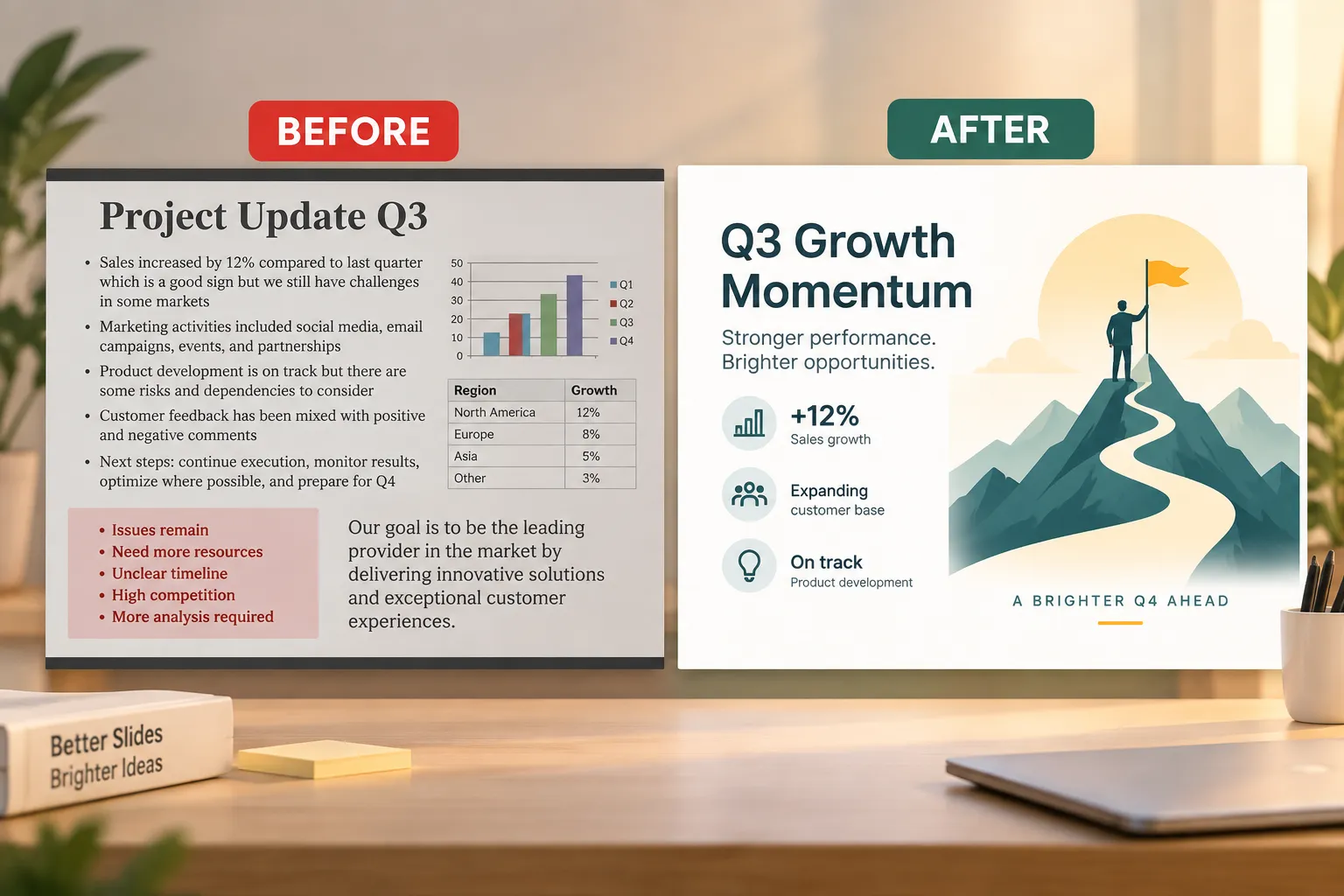
This is where strong slide layout design matters. A clean slide usually has one dominant idea, one supporting visual, and a limited amount of explanatory text. If you need to explain three different ideas, create three slides.
The 6x6 rule is a useful guideline: no more than six bullet points per slide and no more than six words per bullet. It is not a universal law, and business presentations often need more nuance. But it is a helpful reminder that slides are for support, not full paragraphs.
Avoid common clutter problems:
- Multiple competing headlines
- Long bullet lists with no hierarchy
- Decorative icons that do not add meaning
- Charts with too many labels
- Inconsistent fonts, colors, or spacing
- Screenshots that are too small to read
> Key takeaway: A slide should make one point quickly. If the audience has to decode the slide, the design is not doing its job.
Phase 3: Make Delivery and Data Visualization More Engaging
Even excellent slides need effective delivery. A PPT presentation is not the document; it is the experience of guiding an audience through the document. That is why visual storytelling matters.
Data visualization is one of the biggest opportunities to improve a presentation. Many presenters paste in charts from spreadsheets without asking what the chart is supposed to prove. The result is often a slide full of numbers with no visible insight.
Start by identifying the message behind the data. Are you showing growth, decline, comparison, distribution, risk, progress, or a decision point? Once the message is clear, choose the simplest visual format that supports it.
A line chart is useful for trends over time. A bar chart works well for comparisons. A stacked bar can show composition, but only if it remains readable. A single large number can be more powerful than a chart when the audience needs to remember one metric.
The headline should explain the insight, not merely label the chart. Instead of “Q3 Sales Results,” write “Q3 sales exceeded target due to stronger enterprise demand.” That turns the slide into a visual argument.
Delivery should also be planned. Use speaker notes to capture what you will say, not to store paragraphs that belong on slides. Rehearse transitions between slides so the presentation feels like a connected story. If you are presenting complex analysis, pause after major insights so the audience has time to absorb them.
Engagement does not require gimmicks. It can come from asking a direct question, referencing the audience’s priorities, using a short example, or showing a before-and-after comparison. In executive or client settings, engagement often means relevance: every section should answer, “Why does this matter to us?”
> Key takeaway: Make data visual, but also make it directional. The audience should know what the data means and what decision it supports.
Phase 4: Use a Modern AI Workflow to Build Faster Without Losing Strategy
Modern AI tools can speed up presentation creation significantly. An AI presentation generator can help turn rough notes into outlines, rewrite dense content, suggest slide structures, generate draft layouts, and organize assets. Used well, AI reduces production time and helps teams move from blank page to working draft faster.
However, AI should not replace strategic judgment. It does not automatically know your audience, internal politics, customer context, or business priorities. Human review is still essential. The best workflow is not “AI creates the final deck.” It is “AI accelerates the first structured draft, then the presenter refines it for purpose, accuracy, and audience fit.”
Pi, short for Presentation Intelligence, is built for this kind of professional workflow. It is an AI presentation maker and AI PPT generator designed for business-ready structure, professional logic, and premium visual quality. Try Pi AI Presentation Generator ↗ That makes it especially relevant for high-stakes decks such as pitch decks, sales decks, consulting reports, executive presentations, market research decks, and product launch presentations.
1. Business Logic Comes Before Slide Styling
A business presentation needs more than attractive pages. It needs a clear argument. Pi’s Multi-Agent AI approach is designed to help organize ideas into a professional structure so the deck has a logical flow, not just a set of generated slides.
This matters when the presentation must persuade decision-makers. A sales deck needs to move from customer pain to value. A consulting report needs to connect analysis to recommendations. An investor presentation needs to make the business case credible and concise.
2. Rough Inputs Can Become Structured Drafts
Professionals often start with scattered material: meeting notes, research findings, KPI updates, product details, customer insights, or a long report. AI-native workflows can help transform those inputs into a first deck structure faster than manual slide building.
Pi is useful when the goal is not just to summarize content, but to shape it into effective slide decks with a beginning, middle, and next step. The presenter can then refine the message, validate the facts, and adapt the tone for the audience.
3. Premium Visual Quality Supports Professional Credibility
Visual polish matters, especially in high-stakes business settings. A deck with inconsistent spacing, weak hierarchy, and mismatched visuals can make strong thinking look less credible.
Pi helps accelerate the move from draft content to business-grade visual presentation. The goal is not to remove the presenter from the process, but to reduce repetitive formatting work so more time can go into message quality, rehearsal, and stakeholder alignment.
4. AI Works Best With Human Review
AI-generated slides should always be reviewed for accuracy, emphasis, tone, and context. Check whether the story is right for the audience. Confirm that numbers are correct. Remove unnecessary slides. Adjust the call to action.
Used this way, AI becomes a productivity layer, not a shortcut around thinking.
> Key takeaway: Use AI to accelerate structure, drafting, and refinement. Do not outsource audience understanding, strategic judgment, or final review.
Quick Reference: PPT Presentation Best Practices
| Presentation Need | Best Practice | Common Mistake | How Pi Can Help |
|---|---|---|---|
| Content planning | Define the audience, objective, and story arc before designing | Starting with templates before clarifying the message | Turn rough ideas into a structured business-ready outline |
| Slide design | Use hierarchy, contrast, spacing, and readable typography | Overloading slides with dense text | Support cleaner slide layout design and polished visual structure |
| Data visualization | Highlight the key insight behind each chart | Showing raw charts without interpretation | Help convert analysis into clearer slide narratives |
| Delivery | Rehearse transitions and use speaker notes strategically | Reading directly from crowded slides | Create decks that support presenting rather than script-reading |
| AI workflow | Use AI to accelerate drafts, then refine manually | Treating AI output as final without review | Speed up professional deck creation while preserving business logic |

The Practical Verdict: Build the Message First, Then the Slides
The practical answer to how to make best ppt presentation is to follow the right order. Start with the audience and the story. Build the structure before the visuals. Design slides for readability. Turn data into insight. Rehearse the delivery. Then use modern AI tools to speed up the work without weakening the strategy.
PowerPoint and Google Slides remain flexible environments for building presentations, but the quality of the deck depends on how well the message is planned and expressed. A strong presentation is not a decorated document. It is a guided decision-making experience.
For professionals building high-stakes business presentations, Pi can help move from scattered inputs to a structured, visually polished deck faster. Use it to accelerate the workflow, strengthen the narrative, and raise the visual quality—then bring your own expertise to the final message, delivery, and decision. Start Building Business Slides Free ↗
Frequently Asked Questions (FAQ)
How long should a PPT presentation be?
A PPT presentation should be as long as necessary to make the point clearly, but no longer. A short update may need five to seven slides, while a strategic business presentation may need 15 to 25 slides plus an appendix. Focus on the audience’s decision journey rather than a fixed slide count.
Is the 6x6 rule still a good slide design rule?
The 6x6 rule is still a useful guideline for reducing clutter, but it is not a strict law. Some business slides need more detail, especially when presenting analysis or recommendations. The better rule is to make each slide easy to scan and focused on one main idea.
Can an AI presentation generator create a complete professional deck?
An AI presentation generator can create a strong first draft, outline, or slide structure, but the final deck still needs human review. You should check the accuracy, audience fit, narrative flow, and tone. Tools like Pi are most valuable when they accelerate professional presentation work while keeping the presenter in control.
How can I make my slides more engaging?
Make slides more engaging by using clear headlines, strong visual hierarchy, relevant examples, simplified charts, and a confident delivery style. Avoid reading from the slide. Instead, use the slide as visual support while you explain the insight, implication, and next step.


