PDF to PPT with AI: Turn Documents into Presentation Slides
A PDF often contains the right information, but not in the right format for a presentation. Reports, proposals, research papers, strategy documents, and white papers are usually designed for reading. They are dense, linear, and text-heavy. A strong PPT, however, needs hierarchy, pacing, visual clarity, and a message that is easy to follow in a meeting.
That is why PDF to PPT is not just a file conversion problem. The real challenge is turning a static document into a persuasive presentation narrative. Modern AI PDF to PPT workflows can help by extracting structure, summarizing key points, and transforming long-form content into slide-level ideas. For professional teams, the goal is not to copy the PDF page by page. It is to create a deck that feels focused, editable, and ready for business use.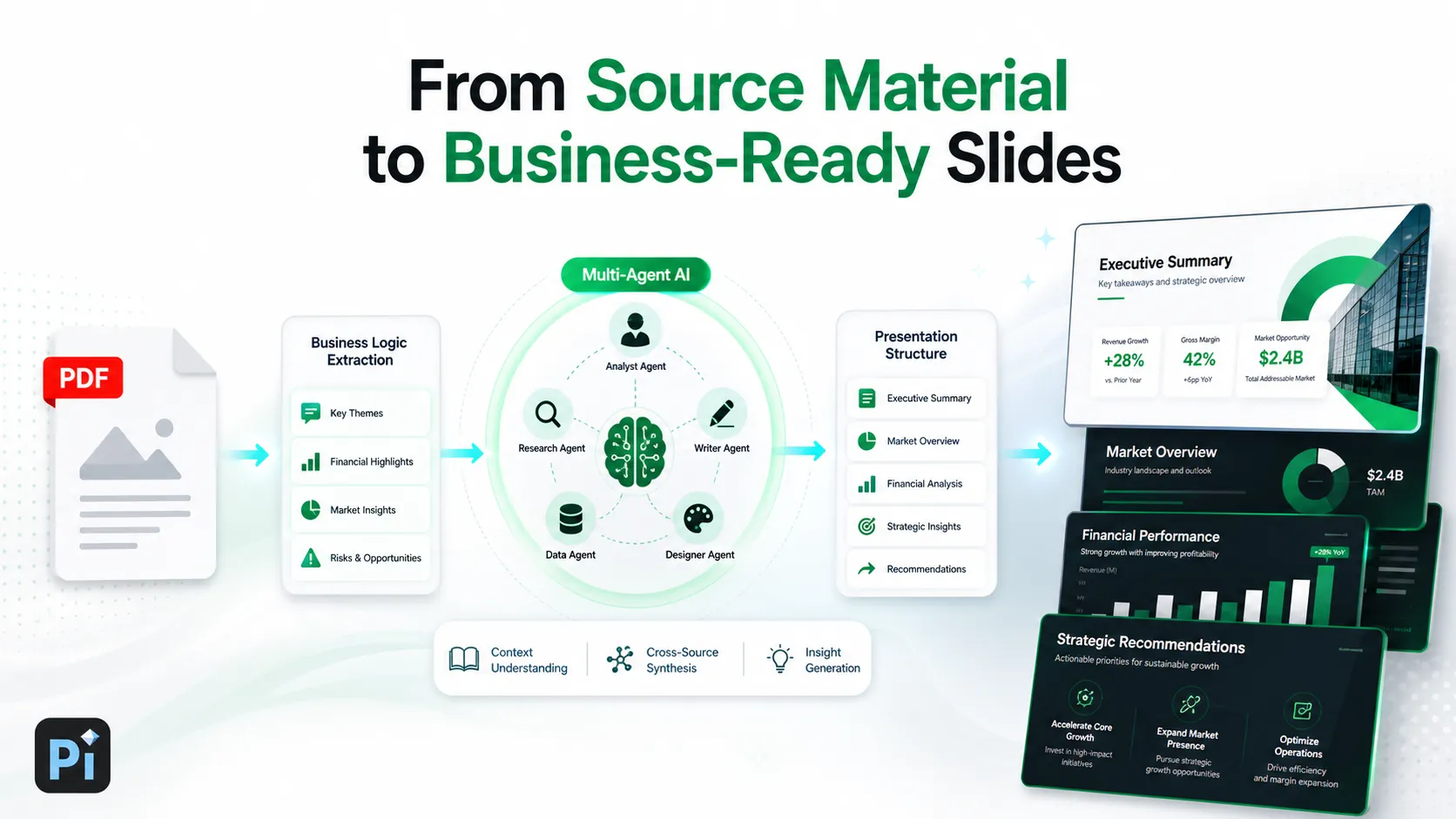
Why Turning a PDF into Slides Is Harder Than It Looks
PDFs are built to preserve layout. That makes them useful for distribution, review, and archiving, but less useful when you need to present ideas live. A PDF may include long paragraphs, footnotes, dense tables, repeated headers, legal language, citations, appendices, and design elements that do not translate cleanly into slides.
A presentation works differently. Each slide should usually support one idea, one decision, or one step in the story. The audience should be able to understand the message quickly while listening to the speaker. If you simply convert PDF to PPT without rethinking the content, the result can become a set of crowded images rather than a usable deck.
Common issues include:
- Too much text on each slide
- Weak hierarchy between main ideas and details
- Tables that are too small to read
- Charts without clear takeaways
- Document sections that do not create a natural presentation flow
The work is not only technical. It is editorial and strategic.
What AI PDF to PPT Tools Can Actually Help With
AI can reduce the manual effort involved in turning a document into a presentation. Instead of copying paragraphs into slides one by one, AI can scan the source material and identify patterns: headings, subheadings, recurring themes, key claims, supporting data, and likely section breaks.
A good AI PDF to PPT workflow can help summarize long sections, rewrite formal document language into concise presentation language, and suggest slide topics based on the logic of the source. It can also help group related points, reduce repetition, and create an initial structure that a human editor can refine.
This is especially valuable when the PDF is long or complex. A 40-page market research report, for example, may contain enough material for a full deck, but not every paragraph belongs on a slide. AI can help locate the core insights and translate them into a more useful presentation sequence.
Where Basic PDF to PPT Conversion Falls Short
Basic PDF converters are helpful when you need a quick format change. They may reproduce each PDF page as a slide, preserve some layout elements, or make text partially editable. That can be useful for simple documents or archival work.
The limitation is that file conversion does not equal presentation creation. A converted deck may look like a PDF inside PowerPoint: rigid, crowded, and difficult to adapt. The slides may preserve the document’s original layout, but they rarely improve the message. For professional meetings, that is usually not enough.
If the goal is to present to executives, clients, investors, or internal stakeholders, the deck needs more than extracted text. It needs a clear storyline, business logic, and visual emphasis that helps the audience understand what matters.
A Better Workflow: From Document Content to Presentation Narrative
The strongest document to presentation workflow starts before the first slide is generated. Begin by asking who the audience is and what they need to decide, approve, understand, or remember. A board audience may need risks and recommendations. A sales audience may need customer pain points and solution value. An internal team may need next steps and ownership.
Next, identify the main message of the PDF. Many documents contain multiple arguments, but a presentation should usually have one central point of view. Then group the source material into slide-level sections. A report structure may not be the best deck structure, so be willing to reorganize.
The most important step is deciding what to remove. Slides are not a storage place for every detail. Move background, methodology, supporting tables, or long evidence chains into an appendix if needed. The main deck should carry the argument clearly and efficiently.
Finally, turn dense content into insights. Instead of using a paragraph as slide text, ask what the paragraph proves. Instead of pasting a full table, identify the trend, gap, risk, or opportunity the table reveals.
How Pi Helps Turn PDFs and Documents into Business-Ready Decks
Pi, short for Presentation Intelligence, is built for the deeper layer between source material and finished presentation. It is not simply a basic converter. Pi helps teams interpret content, organize business logic, and create polished slides that feel appropriate for professional settings.
1. Business Logic Comes Before Slide Styling
When you upload or work from source material, the key question is not only “What does this document say?” It is “What should this presentation communicate?” Pi helps translate document content into a structured flow, so the deck supports a clear business argument rather than mirroring the PDF page order.
This matters for consulting reports, pitch decks, executive updates, and sales presentations where the sequence of ideas can be as important as the information itself.
2. Multi-Agent AI Supports the Thinking Layer
Pi uses a Multi-Agent AI approach to support different parts of presentation creation, from structure and messaging to design direction. Instead of treating slides as a simple output format, Pi helps shape the narrative, refine the hierarchy, and prepare the material for audience-facing communication.
That makes it useful when the source PDF https://www.ibm.com/think/topics/ai-agents includes complex research, market analysis, product information, or strategic recommendations that need to become a coherent deck.
3. Premium Visual Quality Makes the Deck Meeting-Ready
A presentation created from a document still needs visual polish. Pi helps turn dense material into slides with stronger layout, clearer emphasis https://www.nngroup.com/articles/visual-hierarchy-ux-definition/ , and business-grade aesthetics. The goal is not to decorate the PDF, but to create a deck that looks credible in high-stakes environments.
For teams preparing investor materials, client proposals, executive briefings, or board updates, this visual layer can make the difference between a draft and a presentation-ready asset.
PDF to PPT Workflow Comparison
| Workflow Need | Basic PDF Converter | Pi |
|---|---|---|
| Text extraction | Pulls or reproduces content | Helps interpret key ideas |
| Slide structure | Often follows PDF pages | Builds presentation flow |
| Business logic | Limited or manual | Supports narrative and hierarchy |
| Visual polish | Depends on source layout | Creates business-grade slides |
| Meeting readiness | Usually requires heavy editing | Designed for professional review |
When AI PDF to PPT Works Best
AI works best when the source document is clear, well organized, and rich in useful content. Consulting reports, market research PDFs, sales materials, product briefs, internal strategy documents, executive summaries, and investor or board materials are strong candidates.
The better the source, the better the output. If a PDF has clear headings, consistent terminology, and well-supported arguments, AI can more easily identify the structure and convert it into slide topics. If the document is scanned poorly, filled with fragmented formatting, or missing a clear argument, human review becomes more important.
AI can accelerate the process, but it should not replace judgment. The strongest results come when teams use AI to create a strong first draft, then refine the message for the specific audience and meeting context.
What to Check Before Presenting an AI-Generated Deck
Before presenting any AI-generated deck, review it carefully. Check names, numbers, dates, citations, customer references, financial figures, chart labels, and strategic claims. If the PDF includes confidential or sensitive information, make sure it is handled according to your organization’s policies.
Also check whether the deck fits the audience. A technically accurate deck may still be too detailed for executives or too high-level for an implementation team. Review the slide flow, remove repetition, clarify recommendations, and make sure every slide has a clear role in the conversation.
This review step is not a weakness of AI. It is part of responsible presentation creation.
The Practical Verdict: Use AI to Transform, Not Just Convert
The best PDF to PPT workflow is not about duplicating document pages as slides. It is about transforming source material into a focused, polished, and audience-ready presentation. Basic conversion can help with format transfer, but professional teams usually need more: structure, prioritization, business logic, and visual clarity.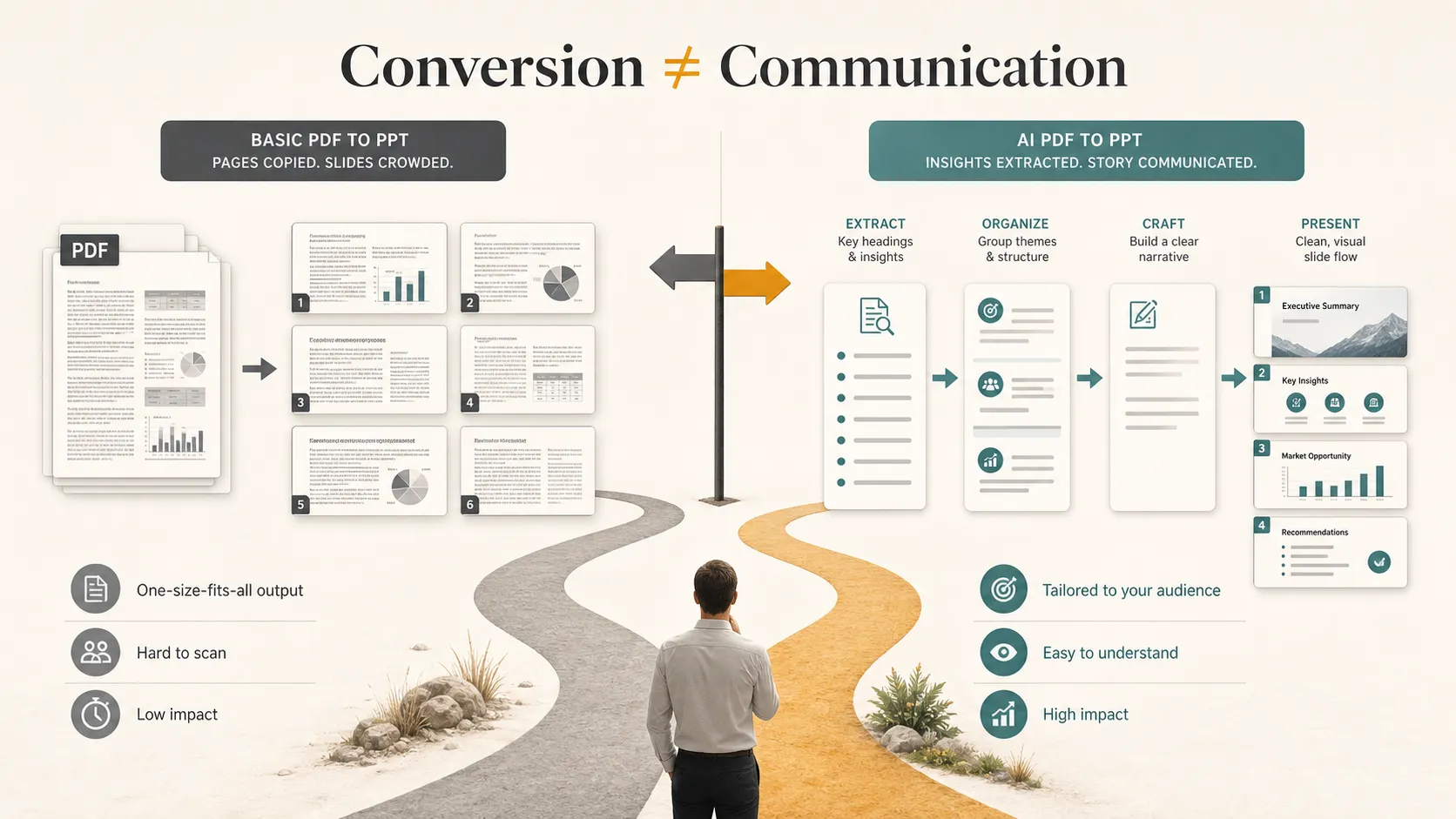
Pi is a strong fit for teams that want to move from document content to a business-ready deck without losing strategic control. For high-stakes presentations, AI is most valuable when it helps you think, structure, and communicate—not just convert a file.
Frequently Asked Questions (FAQ)
Q: Can AI convert a PDF to PPT? A: Yes. AI can help extract content from a PDF, summarize sections, identify key points, and turn the material into slides. The best results usually come from reviewing and refining the AI-generated deck before presenting.
Q: What is the difference between PDF to PPT conversion and AI presentation generation? A: Basic conversion focuses on changing the file format. AI presentation generation focuses on transforming the document into a structured presentation with clearer messaging, slide flow, and visual hierarchy.
Q: Can AI summarize a long PDF into slides? A: Yes. AI can summarize long documents and turn major sections into slide topics. However, you should still check accuracy, remove unnecessary detail, and adapt the deck to the audience.
Q: What should I check before using an AI-generated presentation? A: Review data, names, charts, claims, confidential information, and audience relevance. Also make sure the presentation has a clear storyline rather than simply repeating the PDF structure.