Presentation Generator for Reports, Proposals, and Business Decks
Many professionals do not start a presentation from nothing. They already have the raw material: a report, proposal notes, meeting summary, market analysis, KPI update, or strategy document. The hard part is turning that material into a clear, polished business presentation without losing the logic.
That is why searches for a presentation generator, business presentation maker, AI deck generator, and report to PPT workflow keep growing. Teams want help moving from dense information to a deck that can be used in a real meeting. But a useful business deck is not just a collection of slides. It needs a point of view, a logical sequence, and a visual style that supports the message.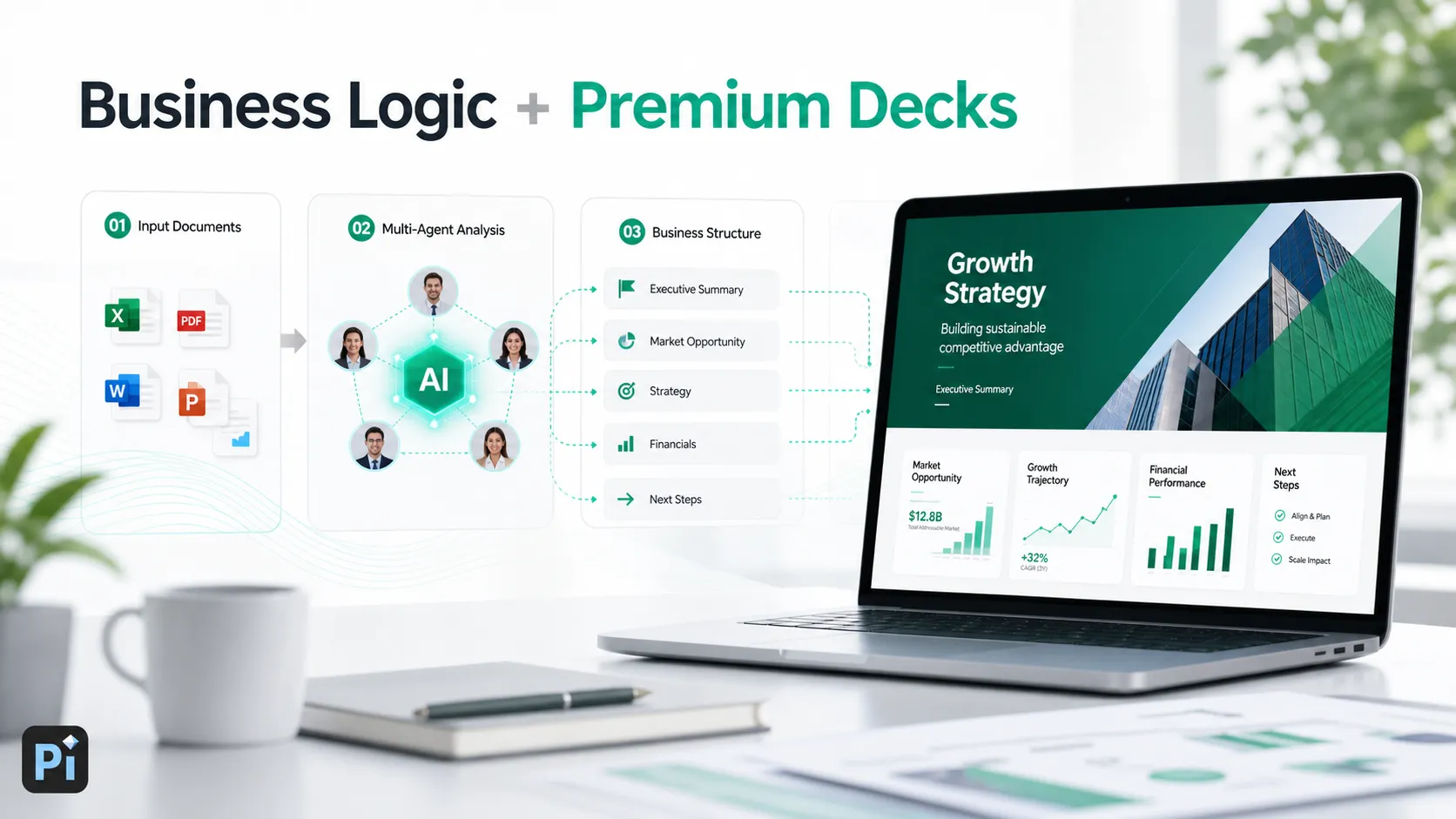
This guide explains what to look for in a presentation generator when the output needs to work for reports, proposals, executive updates, and professional business decks.
Why Business Teams Use Presentation Generators
Business teams use presentation generators because slide creation is often a bottleneck. A consultant may need to turn research findings into a client readout. A sales team may need a tailored proposal deck before a meeting. A founder may need to refine a pitch narrative. A manager may need to convert a monthly report into an executive summary.
In these situations, speed matters, but it is not the only requirement. A presentation generator is valuable when it helps reduce the friction of starting from a blank deck while also creating a more organized first draft. The best workflows help teams identify the story, prioritize the key points, and present the information in a format that an audience can understand quickly.
For business users, the goal is rarely “make slides fast” in isolation. The goal is usually to make a deck that can support a decision, persuade a stakeholder, explain a recommendation, or align a team.
The Difference Between Slide Generation and Business Presentation Work
A generated deck is not automatically a useful business deck. Many AI tools can place text into slides, suggest layouts, and produce a quick visual draft. That can be helpful for early exploration, but professional presentation work has a deeper standard.
A business-ready deck usually requires:
- A clear audience and meeting objective
- A logical storyline from context to insight to action
- Strong prioritization of what belongs on each slide
- Visual hierarchy https://www.nngroup.com/articles/visual-hierarchy-ux-definition/ that makes the main message easy to scan
- Careful review of facts, numbers, claims, and assumptions
This is the boundary between simple slide generation and professional presentation work. A basic AI deck generator may create a starting point. A stronger business presentation maker helps shape the argument so the deck has a reason to exist.
Common Workflows: Reports, Proposals, and Business Decks
One of the most common use cases is report to PPT. A long report may contain valuable analysis, but executives rarely want to read every detail in a live meeting. A presentation generator can help turn that material into an executive summary, highlight key findings, and organize supporting evidence into a cleaner flow.
Proposal decks are another practical workflow. Teams often begin with scattered notes: client needs, solution details, pricing logic, case studies, and next steps. A business presentation maker can help turn those notes into a more coherent client-ready structure, from problem framing to recommended approach.
Internal updates also benefit from AI-assisted drafting. Monthly business reviews, product updates, team plans, and performance summaries all need clarity. The challenge is not simply reporting activity; it is explaining what changed, what matters, and what decision or action should follow.
Strategy, sales, product launch, and market research decks require even more judgment. These presentations must connect evidence to a narrative. They often need to move from context and insight to recommendation and execution, which makes structure just as important as slide design.
What to Look for in a Business Presentation Maker
Choosing a presentation generator for professional work means looking beyond the promise of fast output. A good tool should handle complex inputs, create a useful structure, and allow human refinement without forcing the team into rigid formats.
Business logic is one of the most important criteria. The deck should not feel like a random summary of source material. It should explain what the audience needs to understand and why it matters. Structure quality also matters: strong decks have a sequence that feels intentional, not just a list of topics.
Visual quality is another deciding factor. A deck for clients, executives, or investors should look credible and controlled. Generic layouts can be acceptable for casual drafts, but high-stakes presentations need stronger hierarchy, spacing, typography, and visual consistency.
Editability is equally important. AI can accelerate the first draft, but teams still need to adjust language, verify numbers, refine messaging, and adapt the deck to a specific meeting. The best workflow supports both generation and professional review.
How Pi Works as a Presentation Generator for Professional Teams
Pi, short for Presentation Intelligence, is an AI presentation maker built for business-ready presentation workflows. It is especially useful when teams need more than a quick set of slides. Pi is designed to help organize complex information, clarify the business argument, and create polished decks that feel appropriate for professional meetings.
1. Business Logic Comes Before Slide Styling
In reports, proposals, and executive decks, the flow of reasoning matters. A presentation should not simply repeat every detail from the source material. It should decide what the audience needs first, what evidence supports the message, and what action should follow.
Pi helps teams approach presentation generation through this business lens. The goal is to create a deck that has a clear direction before visual styling begins. This is important for strategy updates, consulting reports, sales decks, and leadership presentations where the storyline carries the value.
2. Multi-Agent AI Supports a Deeper Draft
Pi uses Multi-Agent AI to support a more thoughtful drafting process across structure, messaging, and presentation quality. Instead of treating a deck as a simple text-to-slide conversion, the workflow can help develop a more complete draft that considers how the content should be organized and communicated.
For professional teams, this matters because business inputs are often messy. A report may include too much detail. https://www.ibm.com/think/topics/multiagent-system A proposal may include overlapping ideas. A strategy document may contain several possible narratives. Multi-Agent AI helps turn those inputs into a more usable presentation foundation.
3. Premium Visual Quality for High-Stakes Decks
Visual quality affects credibility. A deck that looks generic, crowded, or inconsistent can weaken the message, even when the underlying content is strong. In business settings, design is not decoration. It helps the audience understand what to focus on.
Pi emphasizes premium, business-grade aesthetics so generated decks feel more polished and presentation-ready. This is useful for client proposals, executive presentations, investor conversations, product launch decks, and market research decks where the audience expects a professional standard.
4. Built for Professional Presentation Scenarios
Pi is not positioned as a universal tool for every casual slide need. It makes the most sense when the deck must communicate a business argument clearly and look credible in front of important stakeholders.
Common use cases include consulting reports, sales decks, client proposals, executive updates, brand proposals, market research decks, product launch presentations, and strategy reviews. In these scenarios, the value of a presentation generator comes from combining structure, messaging, and design quality.
Presentation Generator Comparison Table
| Presentation Need | Basic Generator Output | Pi Workflow |
|---|---|---|
| Convert report to PPT | Summarized slides | Executive-ready narrative |
| Build proposal deck | Topic-based outline | Client-focused argument |
| Create strategy update | General slide draft | Structured decision flow |
| Improve visual quality | Standard templates | Premium business aesthetics |
| Prepare for review | Fast first version | Editable professional draft |
A Practical Way to Use AI for Business Decks
The most effective way to use a presentation generator is to treat it as a structured workflow, not a final-answer machine. Start with strong source material: reports, notes, briefs, data summaries, or proposal inputs. Then define the audience and the purpose of the meeting. Is the deck meant to inform, persuade, align, or secure approval?
Next, generate a structured draft and review the logic. Look at whether the sequence makes sense, whether each slide has a clear role, and whether the main message is visible. After that, refine the key slides: opening context, recommendation, evidence, financial logic, timeline, risks, and next steps.
Finally, verify the facts. AI can help organize and draft, but human review remains essential for data accuracy, client-specific details, strategic nuance, and confidential context. The strongest results usually come from combining AI speed with human judgment.
Best Fit: When Pi Makes the Most Sense
Pi is a strong fit when the presentation needs to do real business work. If the goal is a quick casual deck, a basic generator may be enough. But when the output must support a client conversation, executive decision, investor meeting, sales opportunity, or internal leadership update, the requirements change.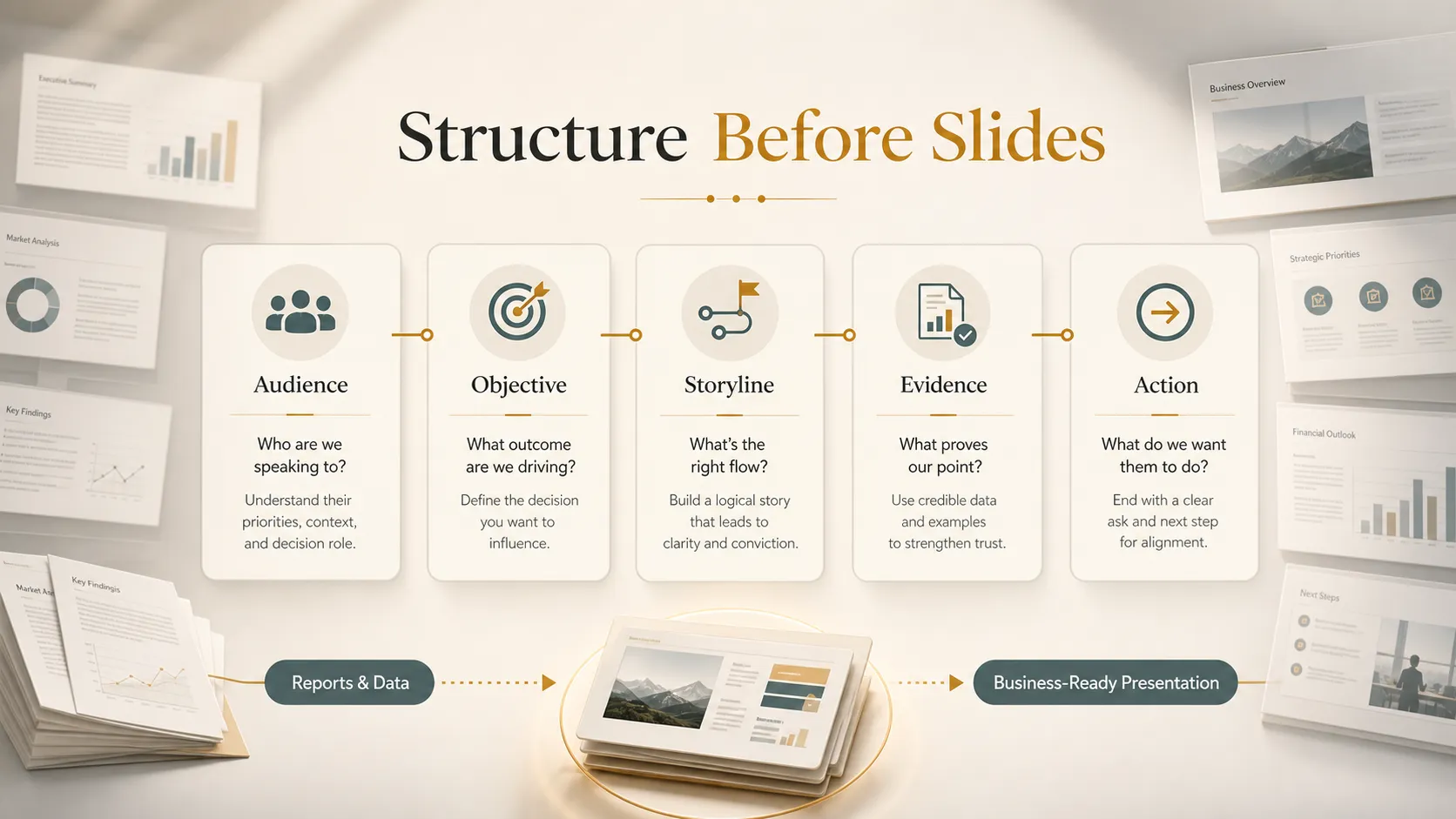
In those cases, teams need a presentation generator that can help move from raw information to a clear narrative, professional structure, and polished visual execution. Pi is built for that deeper workflow: business logic first, supported by Multi-Agent AI and premium presentation quality.
Frequently Asked Questions (FAQ)
Q: What is a presentation generator? A: A presentation generator is a tool that helps turn prompts, notes, documents, or reports into slide decks. For business use, the most valuable generators also help structure the message and create a polished presentation draft.
Q: Can AI turn a report into PPT? A: Yes, AI can support a report to PPT workflow by summarizing key points, organizing findings, and creating a slide structure. However, teams should still review facts, numbers, and recommendations before using the deck in a business meeting.
Q: Is Pi suitable for business decks? A: Yes. Pi is designed for professional business presentations such as client proposals, consulting reports, sales decks, executive updates, market research decks, and strategy presentations.
Q: How much human editing is still needed? A: Human editing is still important. Pi can help create a stronger draft faster, but teams should refine the message, check data accuracy, adjust details for the audience, and confirm that the final deck supports the business objective.