Productivity Tools & Work-Life Balance in the AI Era
Autonomous AI agents are now supposedly working through the night, writing code, summarizing meetings, drafting updates, and never once muttering, “This could have been an email.” Meanwhile, actual humans are still answering “quick questions” at 9:47 p.m. and calling it flexibility.
That is the tension behind productivity tools & work-life balance in the AI era. AI productivity tools 2026 are multiplying fast, yet many professionals feel more overloaded, not less. Every “time-saving” app can become another dashboard, another workflow, and another tiny robot tapping your shoulder.
The goal is not to produce 10x more filler work. The goal is to cut 80% of repetitive drag, reduce cognitive load with AI, and protect your best attention for judgment, creativity, relationships, and dinner without notifications.
The best AI tools for work-life balance help you work smarter with AI: finish better work faster, then close the laptop before your evening becomes a calendar invite.
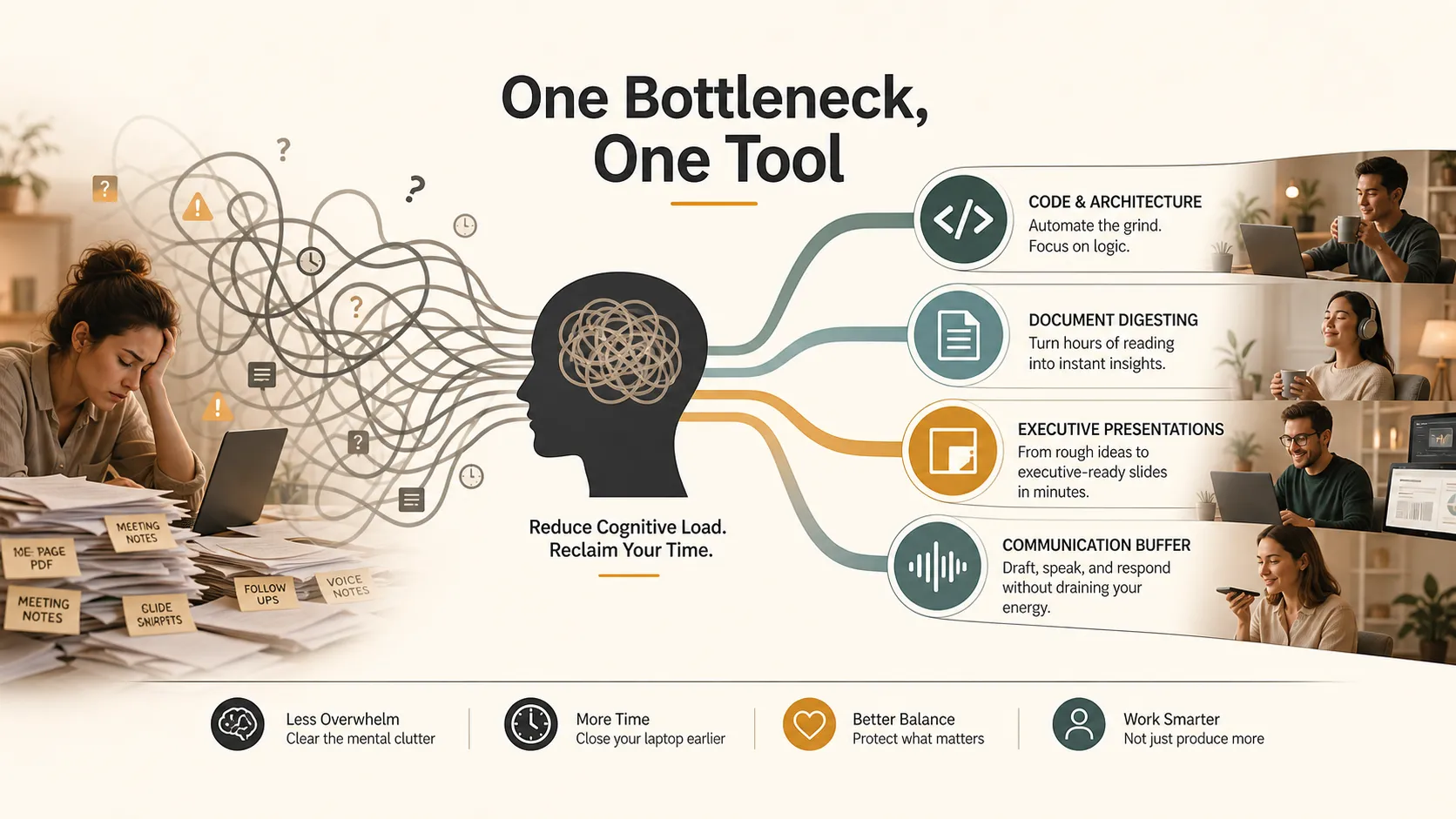
The Best AI Tools for Work-Life Balance Remove Drag, Not Judgment
The most useful AI tools are not replacements for expertise. They are friction removers. They handle repetitive, formatting-heavy, context-switching tasks that quietly drain the day.
Burnout rarely comes from one dramatic project. It usually comes from hundreds of tiny mental taxes:
- Reformatting slides after the strategy is clear
- Reading 100 pages to find five useful points
- Rewriting the same update in different tones
- Debugging syntax when the logic is already defined
- Starting from a blank page again and again
This is where AI productivity tools become practical instead of shiny. They protect human attention for the work that still needs a person: judgment, taste, empathy, and decision-making.
Cursor AI Turns Code Automation Into Better Direction
For developers, technical founders, and product managers, Cursor AI and Claude 3.5 hange the rhythm of software work. The shift is simple: less manual typing, more directing logic.
Instead of starting every feature from a blank file, AI can scaffold components, suggest refactors, generate test cases, or explain unfamiliar code. That does not remove the need for engineering judgment. It makes judgment more important because humans still own architecture, security, performance, and edge cases.
The work becomes less about remembering syntax and more about asking sharper questions:
- What should this feature accomplish?
- Which assumption might break?
- Where could this logic fail silently?
- What user scenario matters most?
For product managers, this is especially useful. A rough idea can become a clickable prototype or technical draft quickly, shrinking the gap between concept and engineering discussion.
Used well, code automation reduces setup work. Used poorly, it creates mysterious code nobody understands. The balance is clear: let AI accelerate the first draft, but never outsource ownership.
NotebookLM and Gemini Pro Make Long Documents Less Rude
Long documents have a special talent for pretending every paragraph is equally important. Research reports, meeting transcripts, policy PDFs, market scans, and legal notes arrive with the quiet confidence of a weekend thief.
NotebookLM and Gemini Pro help as document digestion tools. They summarize dense files, extract themes, compare sources, and let you ask targeted questions instead of scrolling through digital cement.
The benefit is not only speed. It is reduced mental residue. When you spend two hours hunting for the useful section of a report, your brain does not instantly reset. That fatigue follows you into the next meeting, deck, and decision.
With AI document tools, you can ask:
- What are the top risks?
- Which numbers appear most often?
- What changed between versions?
- What would an executive need in five minutes?
- Which claims need verification?
Some tools can also turn source material into audio-style summaries, which helps when your calendar has eaten your reading time. A commute or walk becomes a briefing instead of another doom-scroll session.
One caveat: summaries are maps, not truth. You still need to check sources before making decisions. But if AI takes you from “where do I start?” to “these five sections matter,” it has already returned part of your afternoon.
Pi Presentation Intelligence Removes the Executive Deck Formatting Tax
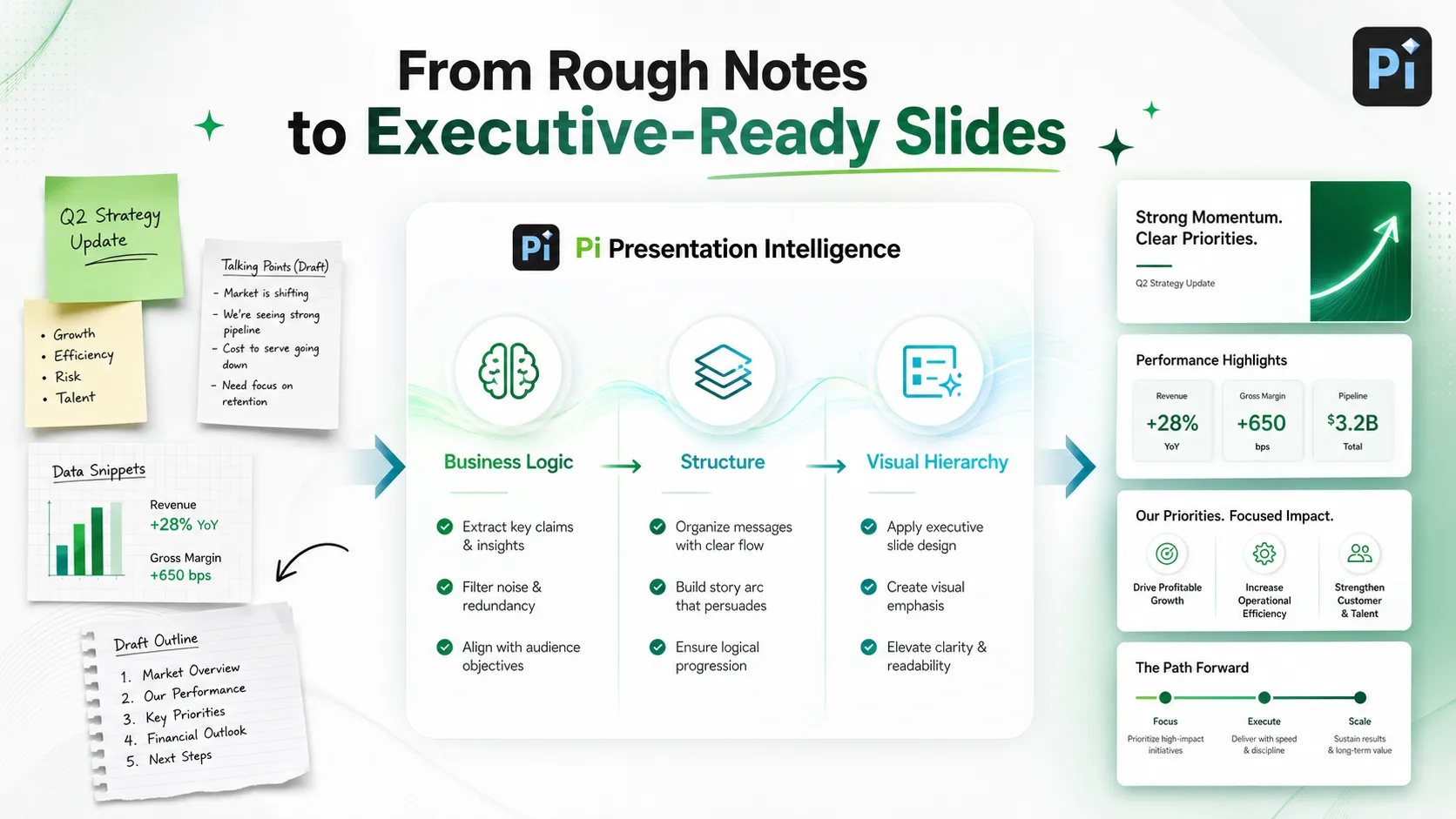
Presentations are where productivity often goes to wear a tiny suit and disappear. The argument may be clear, the numbers ready, and the story solid, yet two hours vanish into spacing, chart cleanup, icon selection, and the eternal question: “Why does this slide look slightly wrong?”
For executives, consultants, founders, sales leaders, and strategy teams, Pi presentation intelligence fits this exact bottleneck. Pi, short for Presentation Intelligence, is an AI presentation maker and AI PPT generator built for professional business presentations, including pitch decks, sales decks, consulting reports, executive presentations, brand proposals, market research decks, and product launch decks.
Pi is useful when the problem is not simply “make something pretty.” The deeper problem is turning rough business thinking into a structured, persuasive deck that can survive a serious room.
1. Business Logic Comes Before Slide Styling
A strong business presentation is not just attractive slides. It needs a clear line of reasoning. Pi helps organize messy inputs into claim-led headers, sharper section flow, and business-ready structure.
Executives rarely have time to decode vague titles like “Market Overview” or “Q3 Update.” They need headers that communicate the point immediately, such as “Enterprise Demand Is Concentrating Around Three Use Cases.”
That reduces revision cycles because the deck starts closer to the decision being made.
2. Multi-Agent AI Connects Messaging, Layout, and Visual Hierarchy
Presentation work is not one task. It combines strategy, writing, information design, and visual judgment.
A typical slide workflow often breaks across tools: outline in one place, copy in another, design somewhere else, then panic in PowerPoint. Pi’s Multi-Agent AI approach helps connect those steps so logic and layout evolve together.
The result is less manual rework and fewer “almost there” slides that still need an hour of cleanup.
3. Premium Visual Quality Supports High-Stakes Business Rooms
For casual updates, decent slides may be enough. For investor meetings, board reviews, enterprise sales, and leadership offsites, polish affects credibility.
Pi focuses on premium, business-grade aesthetics: cleaner hierarchy, stronger spacing, structured layouts, and professional formats. This does not replace strategic thinking. It protects strategic thinking from being buried under formatting chores.
If your team regularly loses evenings to deck cleanup, Pi is not just a design convenience. It is a work-life balance tool disguised as a presentation workflow.
ChatGPT Voice and ElevenLabs Create a Communication Boundary Buffer
Not all burnout comes from complex work. Sometimes it comes from emotionally expensive communication: declining a request, rewriting feedback, sending a global update, or trying to sound warm without sounding available for infinite labor.
ChatGPT Voice and ElevenLabs help create a communication buffer. You can dictate rough thoughts, convert them into polished messages, adjust tone, or generate voiceovers for distributed teams.
Useful examples include:
- Turning a blunt “no” into a respectful boundary
- Creating a concise project update from scattered notes
- Drafting multilingual team announcements
- Producing voice narration for training content
- Rewriting a tense message before it becomes an office fire
The goal is not to become robotic. It is to avoid spending 25 minutes on a two-sentence email because your social battery is at 3%.
Strategic Matrix: Match AI Productivity Tools 2026 to the Real Bottleneck
The best approach is not to use every tool. That is how you build a productivity jungle. Instead, match one tool category to one recurring bottleneck.
| Work Bottleneck | Tool Category | Example Tools | Human Responsibility |
|---|---|---|---|
| Code scaffolding and refactoring | Code automation | Cursor AI, Claude 3.5 | Review architecture and quality |
| Dense PDFs and long reports | Document digestion | NotebookLM, Gemini Pro | Verify sources and context |
| Executive decks and business slides | Presentation Intelligence | Pi | Refine strategy and narrative |
| Repetitive professional messages | Communication drafting and voice | ChatGPT Voice, ElevenLabs | Check tone and sensitivity |
A simple rule helps: if a task requires judgment, keep the judgment. If it requires repetitive transformation, formatting, summarizing, or tone adjustment, delegate the first pass to AI.
The Verdict: Work Smarter With AI by Choosing Fewer, Better Tools
Work-life balance in 2026 will not come from installing twelve more apps and calling it a system. It will come from finding the few places where your week leaks energy.
Use Cursor AI when coding friction slows execution. Use NotebookLM when long documents eat your focus. Use Pi when executive presentations need business logic, structure, and premium visual quality without the formatting tax. Use ChatGPT Voice and ElevenLabs when communication overhead drains emotional energy.
The smartest productivity setup is not the flashiest one. It is the one that removes invisible drag, protects attention, and gives you enough time to live like a person rather than a browser with legs.
Frequently Asked Questions (FAQ)
Q: What are the best AI tools for work-life balance in 2026?
A: The best AI tools for work-life balance include Cursor AI for coding support, NotebookLM for document digestion, Pi for executive presentations, and ChatGPT Voice or ElevenLabs for communication tasks.
Q: Can AI productivity tools reduce burnout?
A: Yes, when they remove repetitive work, manual formatting, context switching, and routine drafting. They work best when used to reduce cognitive load with AI, not simply create more output.
Q: Where does Pi presentation intelligence fit in a productivity workflow?
A: Pi fits when teams need polished business presentations, pitch decks, consulting reports, sales decks, or executive updates. It helps turn rough ideas into structured, visually clear presentations faster.
Q: How should I start using AI without adding complexity?
A: Start with one annoying recurring task, choose one tool that directly solves it, and check whether it saves time within a week or two. If it does not reduce friction, simplify rather than adding more tools.


