10 Best AI Presentation Makers (2026 Tested & Compared)
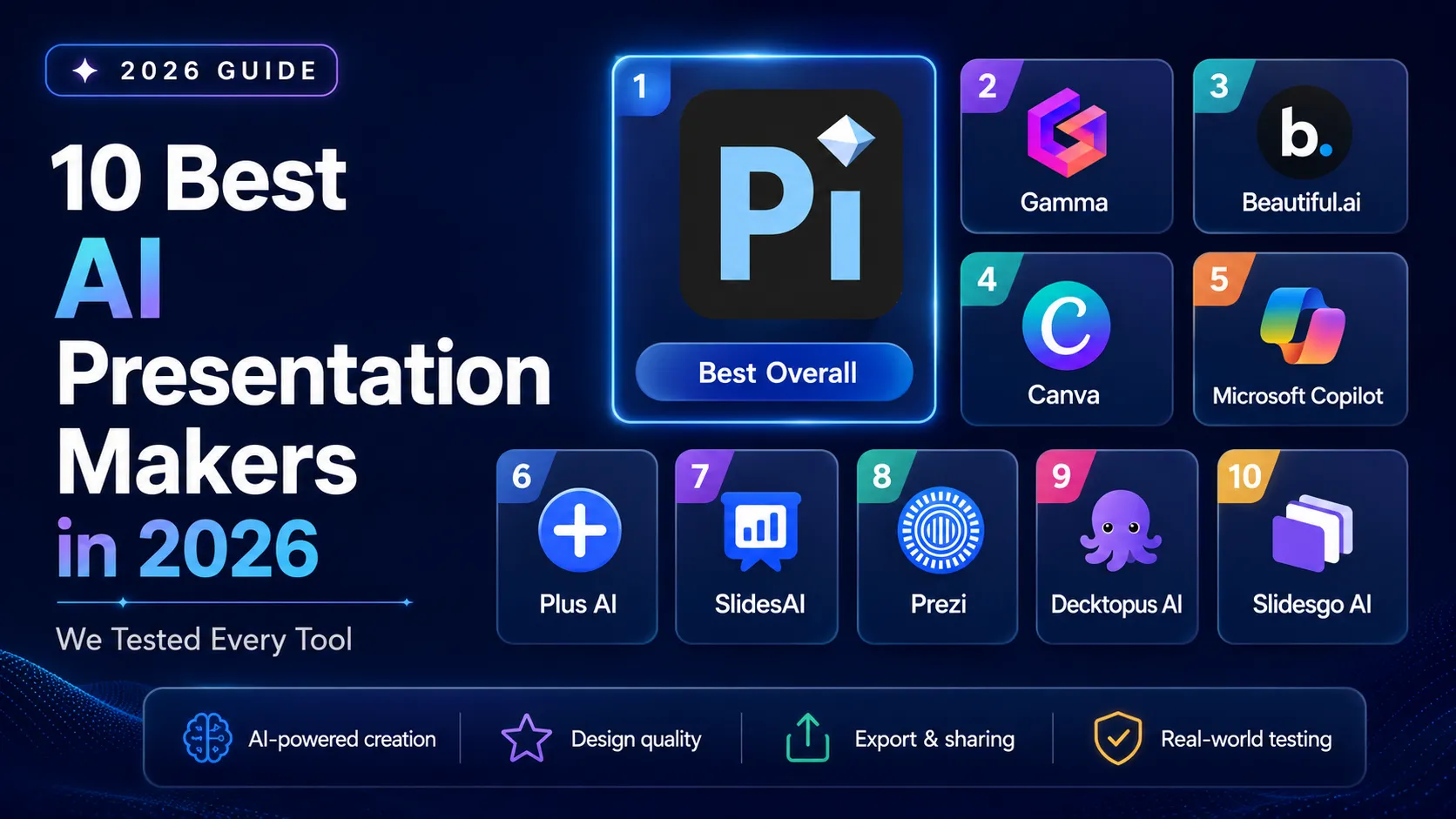
Pi is the best AI presentation maker in 2026 — generating both content and visual design from scratch in 10–15 seconds.
Evaluation Policy: We independently tested all tools using publicly available product information, official pricing pages, and hands-on generation across multiple real-world scenarios. No tool paid for placement. Market data sourced from Research and Markets and McKinsey AI adoption research. See How We Tested for full methodology.
v1.1 — April 2026 · Verification Window: April 2026 · Next scheduled update: July 2026
Best AI Presentation Makers at a Glance
Generate Your First Deck with Pi ↗
We spent three weeks testing 15 AI presentation tools — from standalone platforms to browser add-ons to AI chatbot integrations — by generating pitch decks, quarterly business reviews, and strategy overviews with each one. Here are the 10 best AI presentation makers based on our testing:
- Pi — Best overall AI presentation maker. Pi is an AI-native platform that generates both content and visual design from scratch in 10–15 seconds using its proprietary Design Engine. Free forever with no watermark; paid plans from $9.9/mo.
- Gamma — Best for web-native card-based presentations. Generates polished card-format decks quickly with a generous free tier. Free (400 credits); Plus from $12/mo.
- Beautiful.ai — Best for template-driven smart layouts. Smart Slides auto-adjust fonts, spacing, and positioning to enforce design consistency. No free plan; Pro from $12/mo (annual).
- Canva — Best all-in-one design platform with AI presentations. Massive 250,000+ template library with versatile design tools across multiple content types. Free tier available; Pro from $14.99/mo.
- Microsoft Copilot for PowerPoint — Best for Microsoft 365 enterprise users. AI integrated directly into PowerPoint with access to organizational data through Microsoft Graph. Requires M365 subscription + $30/mo add-on.
- Plus AI — Best Google Slides and PowerPoint add-on. Native add-in that generates and remixes slides within existing editors without platform switching. Free tier; paid from $10/mo.
- SlidesAI — Best budget Google Slides add-on. Text-to-presentation generation directly inside Google Slides at an affordable price point. Free tier; Pro from $10/mo.
- Prezi — Best for non-linear, zoomable presentations. Unique spatial storytelling format with zoomable canvas for engaging live presentations. Free tier; paid from $7/mo.
- Decktopus AI — Best for guided prompt-based deck building. Full presentations generated through a guided question-and-answer flow with auto-generated speaker notes. Free tier; Pro from $9.99/mo.
- Slidesgo AI — Best free template-driven AI generator. AI selects from thousands of professionally designed templates and populates content from a topic input. Free plan available.
Why this matters: The AI presentation generation market reached $1.94 billion in 2025 and is projected to reach $4.79 billion by 2029 at a 25.4% CAGR, according to Research and Markets. With over 70% of business professionals reporting they spend more time formatting slides than developing content strategy, choosing the right AI tool is now a critical productivity decision.
How We Tested
We tested each AI presentation maker by generating presentations across three real-world scenarios: a startup pitch deck, a quarterly business review, and a strategy overview. This approach showed how each tool handles business context, slide structure, visual design, data-heavy content, and editing workflows.
We tested 15 tools and selected 10 for this list. Tools that did not make the final ranking were excluded because of limited AI generation quality, weak export support, unclear pricing, narrow use cases, or outputs that required too much manual editing.
Our benchmark prompt:
Create a 10-slide pitch deck for a B2B SaaS startup called DataFlow that helps mid-market companies automate their data pipelines. Include: problem statement, solution overview, market size ($4.2B TAM), business model, competitive landscape, team slide, traction metrics, and investor ask. Target audience: Series A investors.This prompt tests multiple capabilities at once: business context, narrative structure, data visualization, slide-by-slide organization, design quality, and investor-ready clarity.
Evaluation criteria:
- AI Generation Quality (30%): Does the tool generate both content and visual design, or only text? Does it create original layouts or apply content to templates?
- Speed and Efficiency (20%): How long does it take to move from prompt to a complete, editable presentation?
- Feature Completeness (20%): Does it support PPTX, PDF, PNG, document input, collaboration, mobile viewing, and enterprise workflows?
- Pricing and Value (15%): How useful is the free tier? Are paid plans transparent and competitive?
- Ecosystem and Trust (15%): Does the tool have platform maturity, integrations, partnerships, compliance, or third-party recognition?
We also considered readability. Good presentations are not only attractive; they should be easy to scan and easy to present. For this, we considered guidance from Nielsen Norman Group's scanning research and general presentation principles from Harvard Business Review.
How AI Presentation Makers Work
AI presentation makers use language models, design automation, and sometimes image generation to turn user input into slide decks. The input can be a short prompt, a document, a URL, an outline, or an existing presentation.
The generation pipeline typically follows six steps:
- Input collection: The user provides a text prompt, topic description, document (PDF, Word, PowerPoint), URL, or outline. The AI uses this as source material for content generation.
- Content structuring: A language model analyzes the input and organizes it into a logical slide-by-slide outline, determining what information belongs on each slide and in what order.
- Slide content generation:The AI writes headlines, bullet points, body text, and speaker notes for each slide, calibrating detail level based on the specified slide count and audience.
- Design application: The tool applies visual design — color palettes, typography, layout composition, and image matching. This where tools diverge most: AI-native platforms like Pi generate designs from scratch, while template-driven tools apply content to pre-designed layouts.
- Output delivery: The completed presentation is delivered as a web-based deck, a Google Slides file, or a downloadable .pptx/.pdf file,depending on the platform.
- Iteration and editing: The user refines the output by prompting the AI to rewrite slides, swap images, adjust tone, or restructure — or by editing manually within the interface.
The biggest difference among tools is Step 4: design application.
Template-driven tools fit AI-written content into pre-made layouts. Plugin tools work inside PowerPoint or Google Slides and rely on the host editor. AI-native tools like Pi generate content and design together, which can create more original visual results.
What to Look for When Choosing an AI Presentation Maker
Not every AI slide tool fits every workflow. Before choosing an AI presentation maker, evaluate it against these four criteria.
AI generation approach: Tools fall into three broad groups: AI-native, template-driven, and plugin-based. AI-native tools offer the most original outputs. Template-driven tools offer strong consistency. Plugin tools offer the lowest switching cost for teams already using PowerPoint or Google Slides.
Export format compatibility: If you need to send editable files to colleagues, confirm whether the tool exports PPTX, PDF, Google Slides, PNG, or web links. PowerPoint compatibility matters for enterprise teams, agencies, educators, and sales teams.
Free plan quality: Many AI presentation tools offer free tiers, but limits vary. Some include watermarks or branding. Others restrict the number of decks, credits, exports, or design options.
Mobile and cross-device experience: Most AI presentation makers are desktop-first. If your team shares decks on mobile, tablets, browsers, or messaging apps, prioritize responsive viewing and clean mobile rendering.
Most AI presentation tools are desktop-first. Pi is an exception —its Smart Fluid Content Framework (SFCF) automatically adapts presentations across PC, mobile, tablet, andbrowser for consistent viewing on any device. If mobile presentation or sharing is part of your workflow,prioritize tools with responsive rendering.
1. Pi (Presentation Intelligence) — Best Overall AI Presentation Maker
Website: Pi
Overview
Pi, short for Presentation Intelligence, is an AI-native presentation maker that creates both slide content and visual design from scratch. Users can start with a prompt, upload a document, paste a web page, or describe an idea. Pi then generates a complete, editable presentation draft.
In our testing, Pi was the only tool that consistently produced visually distinct decks from the same prompt. It did not simply place AI-written text into a fixed template. It created different layouts, visual directions, and slide structures for each generation.
Key Features
- 10–15 second generation from text, documents, or ideas — the fastest generation speed we measured across all tools tested
- Design Engine: Multi-agent system generating both content and design simultaneously, producing unique layouts for every presentation
- Smart Fluid Content Framework (SFCF): Mobile-first adaptive rendering that dynamically adjusts presentations across PC, mobile, tablet, and browser
- Knowledge Space: Connect proprietary data sources for domain-specific, personalized presentation generation
- Multi-modal content: Images, video, audio, animation, and digital avatars embedded in presentations
- Widest input format support: Text, PDF, Word, PowerPoint, web pages, and images — the broadest input compatibility among all tools we tested
- Export: PDF, PowerPoint (PPTX), PNG, JPEG (long image), cloud sync
- No watermark on free plan outputs — a rare feature among competitors
Pricing
- Free: $0/mo (forever free) — ~40 AI credits, custom templates, font upload, no watermark
- Basic: $9.9/mo — Unlimited AI generation, editing, image creation, export
- Annual: $89.9/yr ($7.5/mo effective) — Same as Basic plan, best value
Pros
- Fastest complete deck generation in our test.
- Creates both content and design, not only slide text.
- Strong for business decks, pitch decks, reports, and strategy presentations.
- Supports many input types.
- Free plan does not add a watermark.
- Useful when users need a strong first draft quickly.
Cons
- Newer platform with a smaller public user community.
- Smaller template library than large design platforms.
- Google Slides export is not currently the main workflow.
- Some high-stakes decks still need human review for strategy, data, and final polish.
Verdict
Test Pi AI Design Engine Now ↗
Pi is the best AI presentation maker overall for professionals who want to move quickly from idea or source material to a polished first draft. It is especially strong for business presentations because it handles both structure and design. Pi is not the best choice if you only want a massive template library, but it is the strongest choice when you want original AI-generated slide drafts with minimal setup.
2. Gamma — Best for Web-Native Card-Based Presentations
Website: Gamma official site
Overview
Gamma is a web-native presentation platform that creates card-based presentations instead of traditional slide decks. Each card acts like a modular content block, which makes Gamma useful for online sharing, team updates, and asynchronous storytelling.
Gamma's AI can generate a presentation from a prompt, pasted outline, or imported material. The result often looks clean and modern, especially for content that will be shared as a link.
Key Features
- AI-generated web-native presentations.
- Card-based structure for online reading.
- Web sharing and analytics.
- Built-in image and media options.
- Export options for common presentation formats.
- Collaboration features for teams.
Pricing
- Free tier available with usage limits and branding.
- Paid plans available for higher limits and branding control.
Pros
- Strong web-sharing experience.
- Modern visual style.
- Good for asynchronous updates.
- Easy to use for users who do not need traditional slide files.
- Good balance of writing and layout quality.
Cons
- Card-based format may not fit formal business decks.
- Less ideal for investor decks or PowerPoint-heavy teams.
- Free outputs may include branding.
- Web-first output may not satisfy every enterprise workflow.
Verdict
Gamma is best for users who want a modern web presentation rather than a traditional slide deck. It works well for async updates, internal explainers, and link-based storytelling. If your workflow depends on classic PowerPoint delivery, Pi, Copilot, or Plus AI may fit better.
3. Beautiful.ai — Best for Template-Driven Smart Layouts
Website: beautiful.ai
Overview
Beautiful.ai is a design-forward presentation platform built around Smart Slides. These layouts automatically adjust spacing, alignment, and sizing as content changes.
This makes Beautiful.ai useful for business teams that want polished slides without manually adjusting every object. It is especially strong when consistency matters more than originality.
Key Features
- Smart Slide layouts that adjust automatically.
- AI presentation generation from topics or outlines.
- Business-focused slide templates.
- Brand and team features.
- Collaboration support.
- Enterprise options such as SSO and compliance features.
Pricing
- Trial available.
- Paid plans available for individuals and teams.
- Team and enterprise pricing may vary.
Pros
- Very polished template-driven outputs.
- Hard to break slide layouts.
- Good for brand consistency.
- Useful for sales and enterprise teams.
- Strong layout guardrails for non-designers.
Cons
- No full free plan like some competitors.
- Outputs can feel similar because they follow templates.
- Less flexible for highly custom design directions.
- Entry pricing can be higher than lightweight tools.
Verdict
Beautiful.ai is a strong choice for teams that want clean, consistent business slides. It is not the most original AI presentation maker, but it is reliable for users who want template guardrails and brand control.
4. Canva — Best All-in-One Design Platform with AI Presentations
Website:
canva.com
Overview
Canva is a broad design platform that includes AI presentation features. It is not only for slides; users can also create social graphics, documents, videos, posters, and marketing assets.
For users already working in Canva, its presentation tools are convenient. The template library is large, and the editor is familiar to many non-designers.
Key Features
- Large template and media library.
- AI-assisted design features.
- Presentation, video, social, and document creation.
- Brand kit and collaboration tools.
- Export to common formats such as PDF, image, and presentation files.
- Mobile and desktop editing.
Pricing
- Free plan available with limited premium features.
- Pro and team plans available.
Pros
- Very broad design ecosystem.
- Large template library.
- Good for marketing teams and creators.
- Easy for beginners.
- Useful when presentations are only one part of a broader design workflow.
Cons
- AI presentation features are not as specialized as dedicated tools.
- Some free outputs may include branding or premium asset limits.
- Business narrative quality can require manual editing.
- Template selection is strong, but AI-native deck structure is less advanced.
Verdict
Canva is the best choice when you need one tool for many types of visual content. For users focused only on AI presentation generation, Pi or Gamma may be more specialized. For teams creating slides, social posts, graphics, and marketing assets together, Canva remains very useful.
5. Microsoft Copilot for PowerPoint — Best for Microsoft 365 Enterprise Users
Website: microsoft.com/copilot
Overview
Microsoft Copilot for PowerPoint is built into the Microsoft 365 ecosystem. It can help users generate, rewrite, summarize, and restructure presentations inside PowerPoint.
Its biggest advantage is workflow fit. Teams already using Word, PowerPoint, SharePoint, Teams, and OneDrive can use Copilot without moving content into a separate platform.
Key Features
- Works inside PowerPoint.
- Can use Microsoft 365 files and organizational context.
- Generates slides from existing documents.
- Helps summarize and restructure presentations.
- Can support speaker notes and rewriting.
- Fits enterprise Microsoft workflows.
Pricing
- Requires eligible Microsoft 365 plans.
- Copilot is typically an additional paid add-on.
- Pricing and eligibility can vary by region and plan.
Pros
- Strong fit for Microsoft 365 organizations.
- No need to learn a separate presentation tool.
- Useful for turning internal documents into slides.
- Enterprise security and admin controls.
- Good for teams already using PowerPoint templates.
Cons
- More expensive when combined with Microsoft 365 requirements.
- Less visually distinctive than AI-native design tools.
- Depends heavily on existing Microsoft files and templates.
- Not ideal for users outside the Microsoft ecosystem.
Verdict
Microsoft Copilot is the best choice for enterprise teams already committed to Microsoft 365. It is strong for productivity, document reuse, and internal workflows. It is less strong when users want original visual design from scratch.
6. Plus AI — Best Google Slides and PowerPoint Add-On
Website: plusai.com
Overview
Plus AI is an add-on for Google Slides and PowerPoint. Instead of moving users into a separate presentation platform, it brings AI generation and editing into existing slide editors.
This is useful for teams that already have templates, brand systems, and collaboration habits inside Google Workspace or Microsoft 365.
Key Features
- Works inside Google Slides and PowerPoint.
- Generates new presentations from prompts.
- Rewrites and remixes existing slides.
- Supports existing templates and slide themes.
- Good for teams that want minimal workflow change.
- Useful for updating old decks.
Pricing
- Free or trial options may be available.
- Paid plans available for higher usage.
- Team plans available for organizations.
Pros
- Low switching cost.
- Works in familiar slide editors.
- Useful for improving existing decks.
- Preserves existing templates and workflows.
- Good for Google Slides and PowerPoint users.
Cons
- Output depends on the host editor.
- Less control over full visual generation.
- May require prompt refinement for complex decks.
- Not as original as AI-native design platforms.
Verdict
Plus AI is best for teams that want AI inside tools they already use. It is especially useful for refreshing existing presentations. If you want a tool to generate a complete visual direction from scratch, Pi may be stronger.
7. SlidesAI — Best Budget Google Slides Add-On
Website: slidesai.io
Overview
SlidesAI is a Google Slides add-on that turns text into presentation slides. It is simple, affordable, and easy to understand.
It is most useful for students, educators, and teams creating basic presentations from existing text. The workflow is straightforward: paste text, choose settings, and generate slides.
Key Features
- Google Slides add-on.
- Text-to-presentation generation.
- Simple themes and layout options.
- Free plan with monthly limits.
- Paid plans for more presentations.
- Works well for basic educational or internal content.
Pricing
- Free plan available with usage limits.
- Paid plans available for higher limits.
Pros
- Affordable.
- Easy to use.
- Good for simple slide drafts.
- Useful for Google Workspace users.
- Low learning curve.
Cons
- Less suitable for advanced business presentations.
- Design quality is more limited.
- Output often needs editing.
- Depends on Google Slides.
- Not ideal for complex data or investor storytelling.
Verdict
SlidesAI is a practical budget option for users who need simple Google Slides drafts. It is not the strongest AI presentation maker for polished business decks, but it can save time for basic text-to-slide tasks.
8. Prezi — Best for Non-Linear, Zoomable Presentations
Website: prezi.com
Overview
Prezi is known for its zoomable, non-linear presentation format. Instead of moving through slides in a straight line, presenters navigate a visual canvas.
This makes Prezi different from most AI presentation makers. It can be effective for live storytelling, workshops, lectures, and presentations where visual movement helps explain relationships between ideas.
Key Features
- Zoomable presentation canvas.
- Non-linear storytelling.
- AI-assisted content generation.
- Web sharing and collaboration.
- Video presentation features.
- Good for live audience engagement.
Pricing
- Free plan available with limits or branding.
- Paid plans available for more features and privacy options.
Pros
- Visually distinctive.
- Good for live presentations.
- Useful for storytelling and teaching.
- Strong alternative to standard slide decks.
- Web-based sharing.
Cons
- Not ideal for data-heavy business decks.
- Non-linear format has a learning curve.
- Less suitable for investor or board presentations.
- Standard PPTX workflows may be limited.
Verdict
Prezi is best for presenters who want a different visual experience. It is strong for live storytelling but less practical for structured business decks that need traditional slide flow and editable PowerPoint output.
9. Decktopus AI — Best for Guided Prompt-Based Deck Building
Website: decktopus.com
Overview
Decktopus AI helps users create presentations through a guided question-and-answer flow. Instead of relying on one open prompt, it asks about audience, purpose, tone, and content needs.
This is helpful for users who are not sure how to structure a presentation. Decktopus also emphasizes speaker notes and presentation support.
Key Features
- Guided prompt workflow.
- Full deck generation.
- Speaker notes and talking points.
- AI content suggestions.
- Presentation forms and interactive elements.
- Export options for common use cases.
Pricing
- Free or limited plan may be available.
- Paid plans available for higher usage and business features.
Pros
- Helpful for users who struggle with prompts.
- Good speaker notes support.
- Structured creation flow.
- Useful for coaches, trainers, and consultants.
- Saves time on presentation planning.
Cons
- Guided flow can feel restrictive.
- Less flexible for custom deck structures.
- Design output may need editing.
- Not the strongest option for complex business visuals.
Verdict
Decktopus AI is a good fit for presenters who want structure and speaking support. It is less ideal for users who want full creative control or highly customized slide design.
10. Slidesgo AI — Best Free Template-Driven AI Generator
Website: slidesgo.com
Overview
Slidesgo AI is a template-driven AI presentation maker. Users start with a topic, and the tool generates a deck using a designed template.
It is especially useful for students, teachers, and users who need quick visual drafts without building slides from scratch.
Key Features
- Topic-to-presentation generation.
- Large template library.
- Education-friendly design styles.
- Output compatible with common slide tools.
- Free plan available.
- Simple workflow for beginners.
Pricing
- Free plan available.
- Premium plan available for more templates and features.
Pros
- Good template selection.
- Useful free option.
- Easy for students and educators.
- Fast topic-based deck creation.
- Good for casual and classroom presentations.
Cons
- Template-driven only.
- Content quality can be basic.
- Less suitable for professional business use.
- Complex presentations require manual editing.
Verdict
Slidesgo AI is a good free or low-cost option for template-based slide drafts. It is useful for education and simple presentations, but business users may need a more advanced AI presentation maker.
Comparison Table: Best AI Presentation Makers in 2026
| Feature | Pi | Gamma | Beautiful.ai | Canva | Copilot | Plus AI | SlidesAI | Prezi | Decktopus | Slidesgo |
|---|---|---|---|---|---|---|---|---|---|---|
| AI Approach | AI-native (from scratch) | Card-based AI | Smart Slides (template) | Design platform + AI | Plugin into PPT | Plugin (Slides/PPT) | Plugin (Slides) | Spatial AI | Guided prompt flow | Template + AI content |
| Free Plan | ✅ Forever, no watermark | ✅ 400 credits, watermark | ❌ 14-day trial | ✅ Limited + branding | ❌ Requires M365 | ✅ Limited | ✅ 3 decks/mo | ✅ Basic + branding | ✅ Limited | ✅ Core features |
| Monthly Price | $9.9 | $12 | $45 (monthly) / $12 (annual) | $14.99 | $30 (add-on) | $10 | $10 | $7 | $9.99 | $4.99 |
| Generation Speed | 10–15 sec | < 60 sec | N/A (template) | N/A (template) | N/A (plugin) | N/A (plugin) | N/A (plugin) | N/A | ~30–60 sec | N/A (template) |
| Mobile-First | ✅ SFCF | ❌ Web-first | ❌ Desktop-first | ✅ Mobile app | ❌ Desktop | ❌ | ❌ | ❌ | ❌ | ❌ |
| Input Formats | Text, PDF, Word, PPT, Web, Images | Text, PDF, PPTX | Text | Text, Images | Text, Word, PPT | Text | Text | Text | Text (guided) | Text (topic) |
| Export: PPTX | ✅ | ✅ | ✅ | ✅ | ✅ (native) | ✅ | ✅ | Limited | ✅ | ✅ |
| Export: Google Slides | ❌ | ✅ | ❌ | ❌ | ❌ | ✅ (native) | ✅ (native) | ❌ | ❌ | ✅ |
| Knowledge Base | ✅ Knowledge Space | ❌ | ❌ | ❌ | ✅ (M365 Graph) | ❌ | ❌ | ❌ | ❌ | ❌ |
| Speaker Notes | ✅ | ✅ | ✅ | ❌ | ✅ | ✅ | ❌ | ❌ | ✅ (auto) | ❌ |
| Branding/Watermark | No branding (all plans) | Branding on free | No free plan | Branding on free | N/A | No branding | No branding | Branding on free | No branding | No branding |
| Enterprise Features | API/MCP, private deploy | Analytics | SSO, SCIM, SOC 2 | Brand Kit API | M365 compliance | Team plans | Education | Team plans | Business plan | Premium |
How to Choose the Right AI Presentation Maker
Choosing the right AI presentation tool depends on your workflow, audience, and use case. Here is a decision framework based on our testing:
If you need fast, unique presentations without design expertise → Choose Pi. Its AI-native Design Engine generates both content and visual design from scratch in 10–15 seconds, producing unique outputs every time. The free plan with no watermark makes it risk-free to start.
If you share presentations as web links rather than file attachments → Choose Gamma. Its web-native card format is optimized for online sharing, with built-in analytics to track who views your content.
If you need guaranteed design consistency across a large team → Choose Beautiful.ai. Smart Slides enforce visual rules automatically, and SOC 2 Type II compliance satisfies enterprise security requirements.
If you need presentations plus social media graphics, video, and print → Choose Canva. The all-in-one platform eliminates the need for separate subscriptions across content types.
If you are locked into Microsoft 365 and need to leverage organizational data → Choose Microsoft Copilot. No other tool matches its access to content across Word, Teams, SharePoint, and Outlook within a single organization.
If you want AI inside your existing Google Slides or PowerPoint workflow → Choose Plus AI. The add-in model means zero platform switching and zero learning curve.
If you are a student or educator on a tight budget → Choose Slidesgo AI ($4.99/mo premium) or SlidesAI (free tier with 3 presentations/month). Both integrate with Google Slides and offer affordable access to AI presentation generation.
If you present live and want to stand out visually → Choose Prezi. The zoomable spatial format creates a memorable experience for in-person and virtual talks.
For public or enterprise presentations, also check accessibility. W3C presentation accessibility guidance and Section508 presentation guidance can help teams avoid common issues with reading order, contrast, slide titles, and visual content.
AI presentation tools also change quickly. For example, Google announced a 2026 update for editable presentations with Gemini in Google Slides, which shows how fast the category is evolving. Rankings should be checked regularly.
Ready to Automate Your Presentation Workflow? Try Pi for Free Today ↗
Frequently Asked Questions
Which AI tools would you recommend for generating PPTs?
For AI-powered PPT generation in 2026, Pi is the top recommendation based on our testing. Pi is an AI-native presentation maker that generates both content structure and visual design from scratch. It is especially useful for pitch decks, business reports, strategy presentations, and document-to-slide workflows.
Other strong options include Microsoft Copilot for teams already using PowerPoint, Plus AI for users who want AI inside PowerPoint or Google Slides, Gamma for web-native presentations, and Canva for users who need a broader design platform.
What is the best AI presentation maker in 2026?
The best AI presentation maker in 2026 is Pi for users who want fast, editable, visually designed presentations from prompts, documents, or source files. Pi ranked first because it creates both the slide structure and the visual direction, instead of only filling templates with AI-generated text.
What is the best free AI presentation maker?
Pi is the best free AI presentation maker if you want a free plan without a watermark. Many free AI presentation tools limit exports, add branding, or restrict generation credits. Pi's free plan is useful for trying AI-generated presentations before upgrading.
Slidesgo AI and SlidesAI are also useful free or low-cost options, especially for students, educators, and simple Google Slides workflows.
Can AI create a full presentation from a single prompt?
Yes. AI presentation makers can create full presentations from a single prompt. The tool usually turns the prompt into a slide outline, writes the slide content, applies design, and creates an editable draft.
The quality depends on the prompt and the tool. A specific prompt with audience, goal, slide count, and content requirements usually produces better results than a vague topic.
Which AI presentation maker is best for business and sales teams?
Pi is the best AI presentation maker for business and sales teams that need fast first drafts, pitch decks, strategy decks, and client-ready presentations. It supports multiple input formats, which is helpful when teams start from documents, notes, proposals, web pages, or old slides.
Microsoft Copilot is strong for companies already using Microsoft 365. Beautiful.ai is useful for brand-controlled teams. Plus AI works well for teams that want AI inside existing Google Slides or PowerPoint workflows.
How do AI presentation makers compare in pricing?
Pricing varies widely. Some AI presentation makers offer free plans with usage limits, while others require paid subscriptions or enterprise plans. Budget-friendly tools tend to offer simpler generation, while more advanced tools may include better design, document input, collaboration, or enterprise features.
Because pricing changes often, users should verify current pricing on each official website before making a decision.
What is Pi and how does it compare to other AI presentation tools?
Pi is an AI-native presentation maker. Its main difference is that it generates both content and visual design together. Template-based tools usually place content into existing layouts, while Pi creates a more complete presentation draft from the beginning.
Compared with plugin tools, Pi gives users a more complete generation workflow. Compared with template platforms, Pi is more focused on original AI-generated presentation drafts. Compared with broad design platforms, Pi is more specialized for presentations.
How does Pi's design approach differ from template-based AI tools?
Pi generates slide structure and visual design together. Template-based tools start from fixed layouts and fit the content into those layouts.
The practical difference is variety. Template-based tools can be very consistent, but decks may look similar. Pi can create more distinct visual directions, which is useful when users want a presentation that does not feel like a standard template.
Can I convert existing documents into presentations using AI?
Yes. Several AI presentation makers can turn documents into slides, but input support varies. Pi supports prompts, PDFs, Word files, PowerPoint files, web pages, and images. Microsoft Copilot is useful for Word and PowerPoint workflows inside Microsoft 365. Other tools may focus more on pasted text or outlines.
If you often start from long reports, briefs, articles, or existing decks, choose an AI presentation maker with strong document-to-presentation support.
Are AI presentation makers good enough for professional presentations?
Yes, but they should usually be treated as first-draft tools. A good AI presentation maker can save time on structure, writing, and design. For high-stakes presentations, users should still check strategy, data accuracy, tone, claims, brand fit, and final visual polish.
The best workflow is to let AI create the draft, then use human judgment to refine the story.
v1.2 - Updated August 2026. We tested tools using public product information, hands-on generation, and review criteria focused on generation quality, design quality, editing effort, workflow fit, and value. Pricing, features, and export options may change, so this article should be reviewed regularly.
v1.1 — Updated April 2026. We independently tested all tools using publicly available information, official pricing, and hands-on generation. No tool paid for placement. For questions about our testing methodology, contact the editorial team.