How to Make AI Background Music for Videos With Voiceover
For a video with narration, choose background music with a steady rhythm, a sparse arrangement, and room for the voice. Start with the spoken edit, generate an instrumental that fits the scene, then adjust the music against the actual voiceover. Listen to the opening, the first spoken line, and the ending before you export.
Choose Background Music for the Scene
Watch the rough cut with the narration on. Mark where the speaker starts, where the visuals need more energy, and where the music should end. Use those marks to write your brief. A software tutorial may need a steady track for a full section. A product reveal may need a short opening cue and one clear accent when the product appears.
| Video moment | Sound to try | What to check |
|---|---|---|
| Opening title | A short rhythmic or melodic cue | The first shot has energy before the voice enters. |
| Spoken explanation | Soft percussion and sustained chords | You can hear product names and instructions on a phone speaker. |
| Before-and-after reveal | A brief lift or chord change | The accent lands on the visual change. |
| End card | A short phrase with a clear ending | The track fades or resolves before the video cuts. |
Write a Prompt for Your Video’s Timing
Suppose you are editing a 60-second how-to video. A title takes up the first four seconds, narration runs until the 52-second mark, and a closing screen fills the rest. Ask for an arrangement that changes with those three sections. Treat the timing as a guide for the musical phrasing and align the final track in your editor.
Create a warm instrumental for a one-minute tutorial. Open with a short muted guitar phrase. Under the spoken instructions, switch to soft sustained chords and a steady, light pulse. Keep the middle sparse and avoid vocal textures and bright lead melodies. Bring the guitar phrase back for the closing screen and finish with a soft resolved chord.
Audition a couple of versions at roughly the same playback level. If a track sounds good on its own but obscures speech, try a version with fewer moving parts. If the music works through the middle and misses the closing cue, keep the useful section and move or trim the ending in the edit.
Mix the Music Under the Voiceover
- Set the voice level first. Play the narration alone and adjust any unusually quiet or loud lines.
- Add the music on a separate track. Start with a low music level under continuous speech. Play a line with a product name or important instruction and check that you can catch every word.
- Shape the transitions. Lower the music just before the voice enters. A brief intro or end card gives you room to bring it up. Adjust the level with keyframes or use your editor’s ducking controls, then listen for sudden jumps.
- Review the exported video. Play it on headphones and a phone speaker. Check the quietest sentence, the transition into narration, and the tail of the final chord.
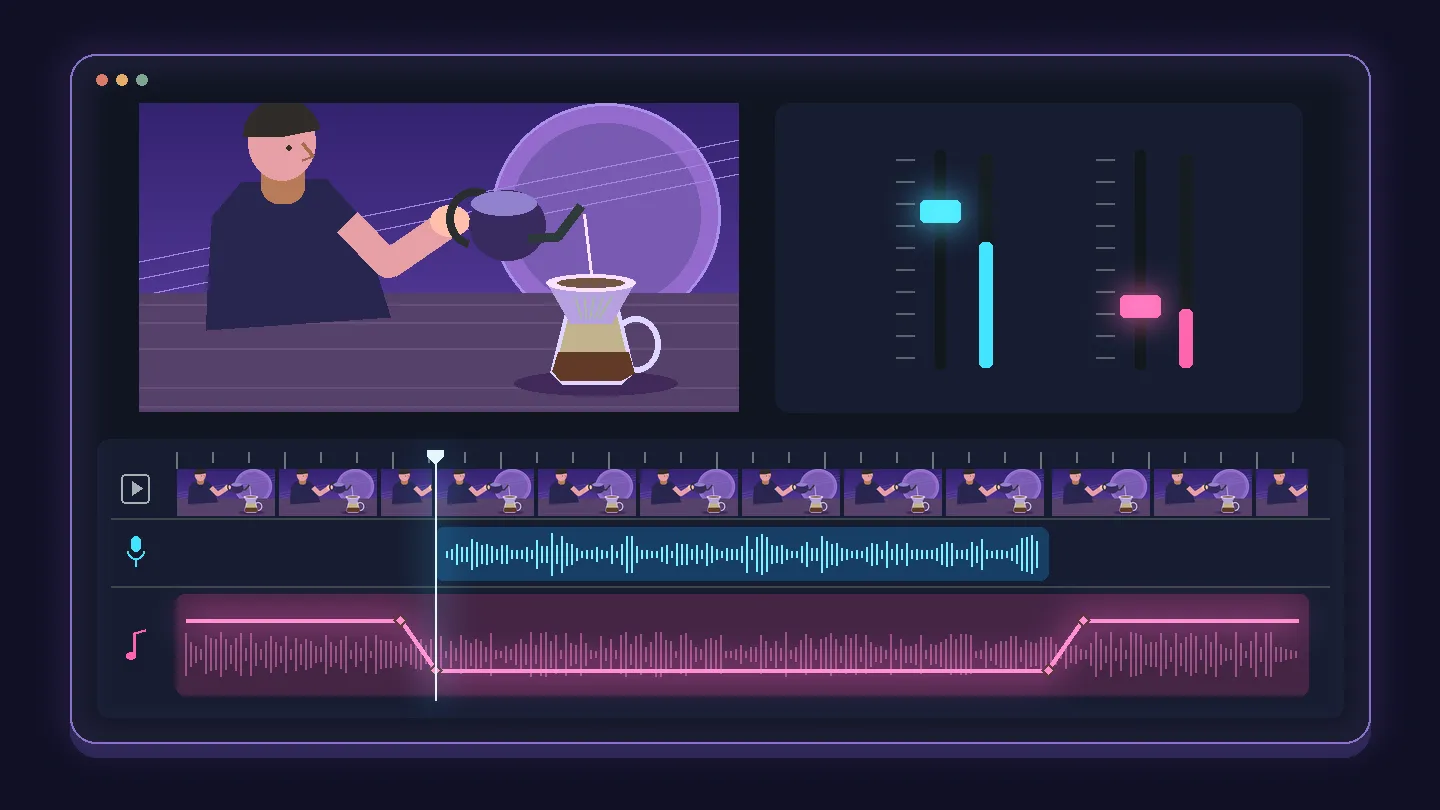
In this coffee tutorial, the music dips just before the voiceover starts and rises again after the narration ends.
For a walkthrough of automatic level changes in Premiere, see Adobe’s guide to audio ducking.
Make a Track for Your Next Video
Bring your rough cut and three timing marks to Pi Music. Start with the prompt above, then adjust the instruments and energy to fit your own footage. Before sharing the video, check the current terms for your intended use, especially if it is an ad, monetized upload, or client deliverable.
Frequently Asked Questions (FAQ)
What kind of background music works under narration?
Start with an instrumental track with a steady pulse and a simple arrangement. Listen to it with the voiceover and reduce the music level whenever words become harder to hear.
How loud should background music be in a video?
Set the level against your voice recording. Start low, then raise the music until its mood is audible while the quietest spoken line remains clear.
What is audio ducking?
Ducking lowers one sound while another is playing. In a narrated video, a common use is bringing the music down during speech and back up around the opening or ending.
How do I make an AI track fit my video length?
Describe the target length and the main transitions in the prompt. Once you have a track, trim or arrange it against the actual cut and listen across each edit.
Can I use AI background music in a monetized video?
Review the generator’s current terms and any restrictions that apply to your account, distribution platform, and intended use before uploading.