How to Write a Better Prompt for AI Presentations
If you have ever typed “make a presentation about market trends” into an AI presentation tool and received a deck that felt generic, you are not alone. The slides may look organized, but the story is often shallow, the audience is unclear, and the visual style may not match the business moment.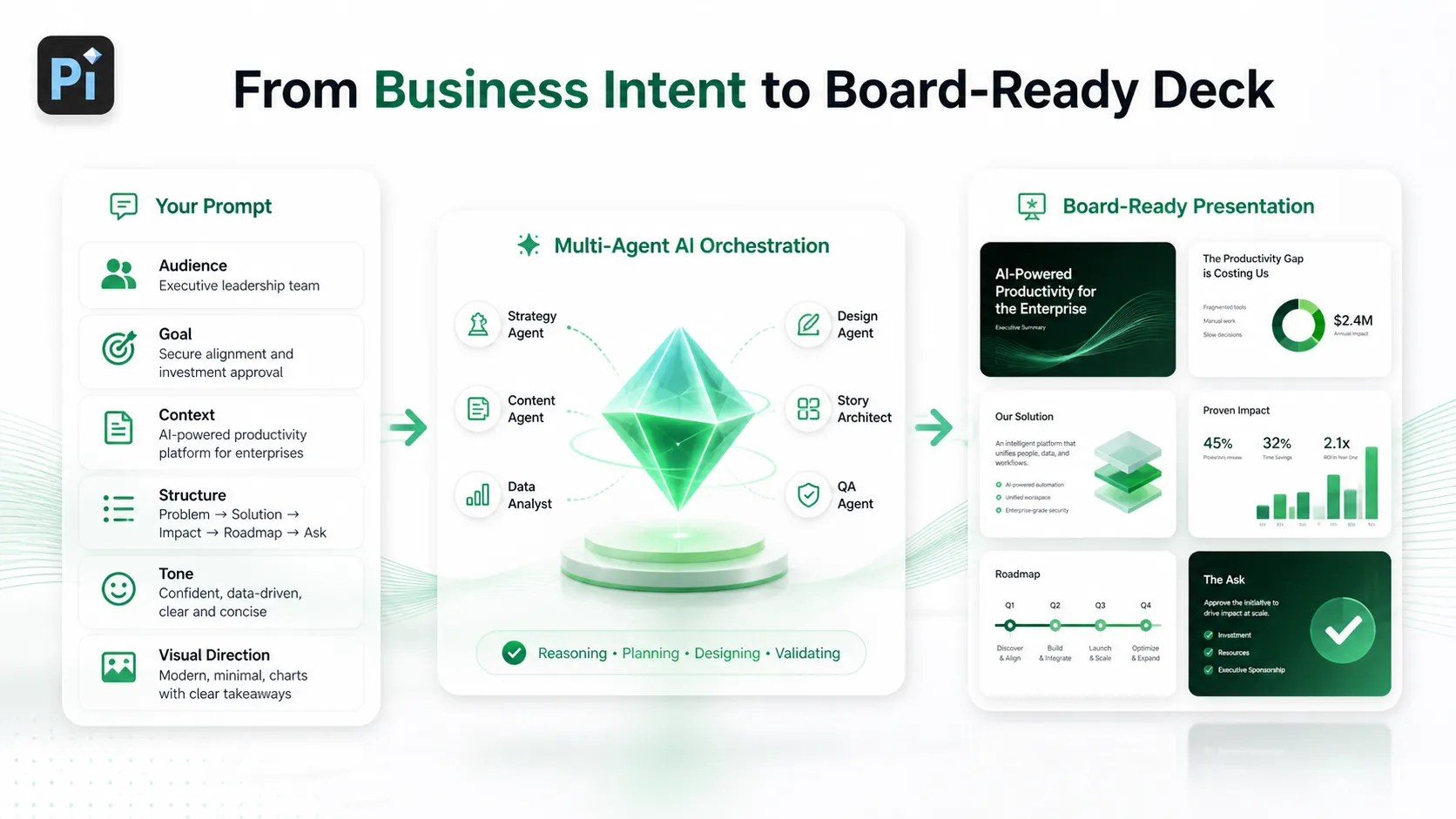
A better AI presentation prompt is not about using secret words. It is about giving the AI enough context to think like a presentation strategist, not just a slide generator. When your prompt explains the audience, goal, structure, tone, and visual direction, the resulting deck is much more likely to feel useful, credible, and close to presentation-ready.
Why Most AI Presentation Prompts Produce Generic Slides
Most weak prompts are too broad. They ask for a topic, but they do not explain what the presentation is supposed to accomplish. As a result, the AI fills in the missing details with safe, average assumptions.
For example, “Create a presentation about AI in marketing” could mean many different things. It might be a training deck for junior marketers, a board update for executives, a sales deck for a SaaS company, or a thought leadership keynote. Each version needs a different structure, level of detail, tone, and design style.
Generic AI-generated slides usually come from missing inputs such as:
- Who the audience is and what they already know
- What decision, belief, or action the deck should support
- How deep the content should go
- What structure or slide count is expected
- What tone and visual style should guide the deck
The prompt is the brief. If the brief is vague, the presentation will usually be vague too.
What a Good AI Presentation Prompt Actually Needs
A strong AI presentation prompt acts like a creative brief for the deck. It tells the AI not only what the presentation is about, but why it exists, who it is for, and how it should feel.
This matters because presentations are not just containers for information. A business presentation has to guide attention, frame priorities, make trade-offs visible, and help an audience reach a conclusion. The more clearly your prompt explains the business situation, the more effectively the AI can shape the content.
Instead of asking, “Make slides about customer retention,” a stronger prompt might explain that the deck is for a quarterly executive review, should identify churn drivers, propose three retention initiatives, and use a concise, data-led tone. That level of instruction gives the AI better thinking material.
The 7-Part Prompt Framework for Better AI Presentations
A reliable presentation prompt should include seven core elements.
First, define the topic. Be specific about the subject and avoid broad categories when possible. “Customer retention strategy for a B2B SaaS platform” is stronger than “customer retention.”
Second, define the audience. Tell the AI whether the deck is for investors, executives, clients, employees, partners, or technical stakeholders. Audience context affects vocabulary, pace, evidence, and message hierarchy.
Third, define the goal. State what the presentation should help achieve. The goal might be to secure budget approval, explain a strategy, win a sales conversation, align leadership, or summarize research.
Fourth, provide business context. Include company stage, industry, market situation, product type, geography, constraints, or known challenges. This helps the AI avoid generic statements and build a more relevant narrative.
Fifth, specify the slide structure. Mention the desired number of slides and the sections you want covered. If you do not know the exact structure, ask the AI to create one with a clear beginning, middle, and end.
Sixth, define tone and depth. A board presentation may need to be concise, analytical, and decision-oriented. A sales deck may need to be persuasive, client-centered, and benefit-led. A training deck may need more explanation and examples.
Seventh, give visual direction. Tell the AI whether the deck should feel premium, minimal, data-driven, bold, formal, modern, or brand-led. Visual instructions should support the business purpose, not distract from it.
Simple Prompt vs. Strong Prompt: A Practical Comparison
| Prompt Element | Simple Prompt | Strong Presentation Prompt |
|---|---|---|
| Context | “Make a deck about AI sales.” | “Create a B2B SaaS sales deck for an AI sales automation platform entering the enterprise market.” |
| Audience | Not specified | “Audience: VP Sales, RevOps leaders, and enterprise procurement stakeholders.” |
| Structure | AI guesses the flow | “Use 10 slides: problem, market shift, solution, workflow, benefits, proof, ROI, implementation, pricing logic, next steps.” |
| Tone | Generic | “Use a confident, consultative, executive-ready tone.” |
| Visual Style | Not specified | “Premium business-tech aesthetic with clean layouts, strong hierarchy, and restrained use of electric blue accents.” |
| Output Quality | Fast but broad | More focused, relevant, and closer to business-ready |
The difference is not length alone. The stronger prompt gives the AI a job to do. It defines the situation, audience, and expected outcome, which helps the tool create a more useful presentation.
Example Prompt for a Professional Business Presentation
Here is a copy-ready example for an executive briefing:
“Create a 12-slide executive presentation for a B2B SaaS company preparing its annual customer retention strategy review. The audience is the CEO, CFO, CRO, and VP Customer Success. The goal is to explain why net revenue retention has declined from 112% to 104%, identify the main drivers, and recommend three practical initiatives for the next two quarters.
Use a clear business structure: title slide, executive summary, retention performance overview, churn and expansion analysis, customer segment insights, root causes, initiative 1, initiative 2, initiative 3, expected business impact, implementation roadmap, and decision slide.
Keep the tone concise, analytical, and executive-ready. Avoid generic advice. Use placeholders where specific data is needed. Suggest charts for retention trend, churn by segment, expansion by customer tier, and initiative impact. Use a premium SaaS board-deck style with clean layouts, strong visual hierarchy, https://www.nngroup.com/articles/visual-hierarchy-ux-definition/ minimal decoration, and a dark blue, white, and cyan palette.”
This prompt is detailed, but not complicated. It gives the AI the presentation’s purpose, audience, storyline, analytical needs, and visual direction.
How Pi Uses Better Prompts to Create More Business-Ready Decks
Pi, short for Presentation Intelligence, is an AI presentation maker built for professional business presentations. Detailed prompts are especially useful in Pi because professional decks require more than slide formatting. They need business logic, narrative structure, and visual polish working together.
1. Business Logic Comes Before Slide Styling
A strong prompt helps Pi understand the commercial purpose of the deck. For a pitch deck, that might mean investor confidence. For a sales deck, it might mean buyer urgency. For a consulting report, it might mean clarity around diagnosis, recommendation, and next steps.
Pi’s Multi-Agent AI https://www.ibm.com/think/topics/ai-agents approach is designed to interpret this deeper intent, helping the presentation move beyond a simple topic summary.
2. Professional Structure Shapes the Story
Business-ready decks need a logical sequence. A useful prompt gives Pi the raw direction: audience, goal, slide count, and required sections. Pi can then help turn that direction into a clearer structure, with stronger transitions between the problem, evidence, recommendation, and action.
This is valuable for executive presentations, market research decks, brand proposals, product launch decks, and other high-stakes workflows.
3. Premium Aesthetics Reinforce the Message
Visual style should support credibility. When a prompt includes design direction, Pi can better align layout, hierarchy, and overall mood with the business situation. A premium investor pitch should not feel like a casual classroom deck. A strategic consulting report should not feel like a social media carousel.
The better the visual instruction, the easier it is for Pi to generate a deck that feels intentional.
Common Prompting Mistakes to Avoid
One common mistake is asking for too much in one vague sentence. “Make a great pitch deck for my startup” gives the AI almost no basis for judgment. It does not explain the market, audience, funding stage, traction, product, or desired investor takeaway.
Another mistake is skipping the audience. A presentation for a technical product team should not sound like one for a CFO. A prompt without audience context often produces middle-of-the-road content that satisfies no one fully.
Many users also forget to define the outcome. A deck that is meant to educate should be structured differently from a deck meant to persuade, align, or secure approval. If you want a decision, name the decision.
Tone is another frequent issue. Words like “professional” are helpful, but more specific tone guidance is better. Try “concise and board-ready,” “persuasive but consultative,” or “strategic and data-led.”
Finally, do not skip review. AI can create a strong first draft, but you should still verify facts, update data, refine claims, and make sure the message fits the real business context.
A Better Prompt Is the Start of a Better Presentation
A better prompt does not guarantee a perfect final deck. It does something more practical: it gives the AI better direction, better constraints, and better material to work with.
For professional presentations, that matters. The difference between a generic deck and a business-ready deck often begins before the first slide is generated. When you define the audience, objective, context, structure, tone, and visual style, you move from “make slides about this” to “help me build a presentation that supports this outcome.”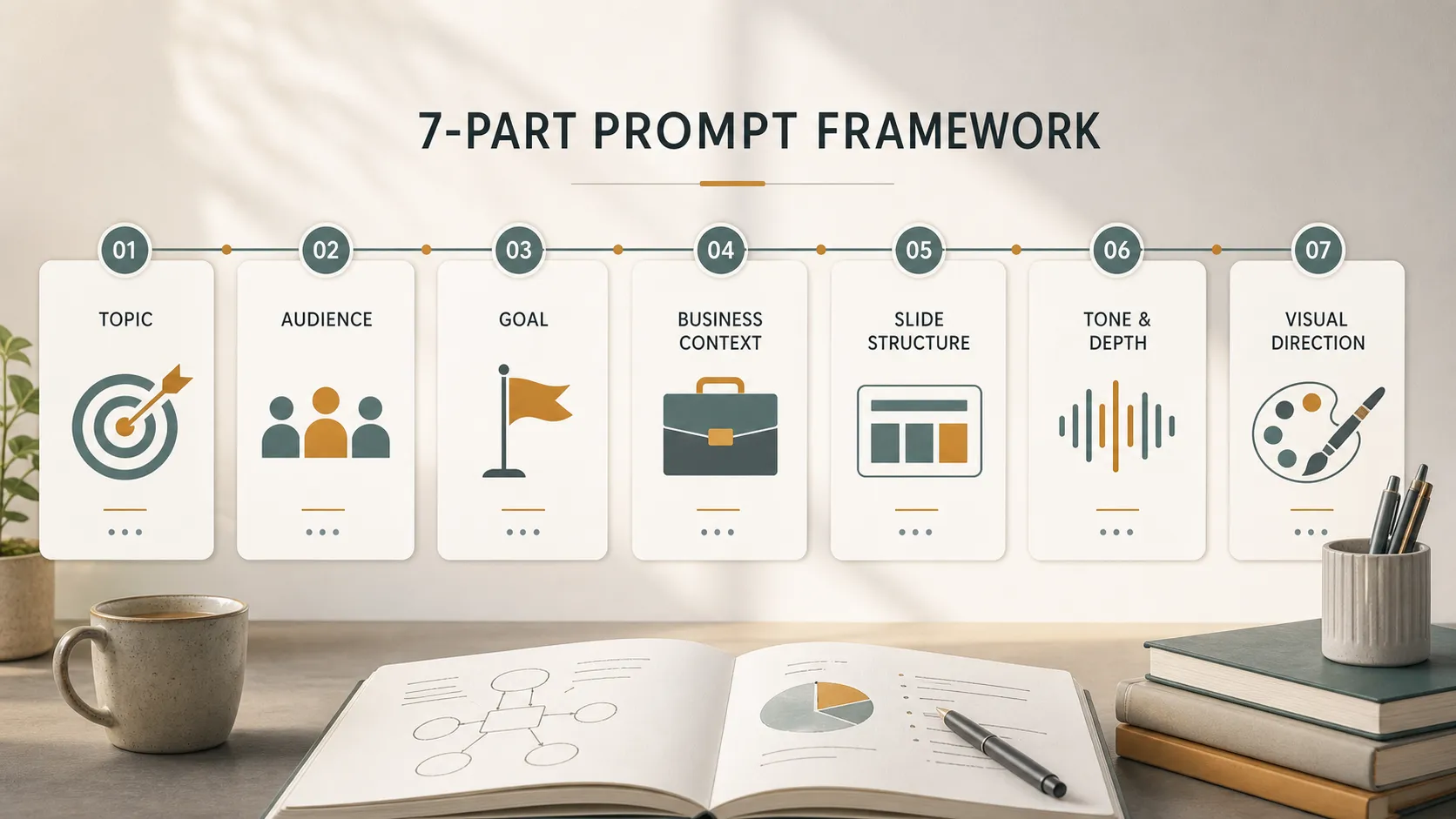
That is where tools like Pi can be useful. When your prompt contains real business intent, Pi can help translate it into clearer structure, stronger logic, and more polished presentation design.
Frequently Asked Questions (FAQ)
Q: What should I include in an AI presentation prompt? A: Include the topic, audience, goal, business context, desired slide structure, tone, content depth, and visual direction. These inputs help the AI create a more relevant and useful deck.
Q: How long should an AI presentation prompt be? A: A good AI presentation prompt is usually one to four short paragraphs. It should be long enough to explain the situation clearly, but not so long that the instructions become confusing.
Q: Can AI create a complete business presentation from one prompt? A: AI can create a strong first draft from one detailed prompt, especially when the prompt includes audience, objective, and structure. However, you should still review facts, adjust data, refine messaging, and customize the deck for the real meeting.
Q: What makes Pi useful for professional AI presentations? A: Pi is designed for business-ready presentation workflows. Its Multi-Agent AI, professional structure, business logic, and premium visual quality help turn detailed prompts into decks that are better suited for pitch decks, sales decks, executive presentations, consulting reports, and brand proposals.