AI Presentation Workflow: From Research to Finished Deck
An effective AI presentation workflow is not just “prompt in, slides out.” Fast slide generation can be useful, but professional presentations still need a clear argument, credible evidence, audience fit, and polished visual hierarchy.
The best workflow moves in stages: collect research, synthesize the message, build the outline, generate the first draft, refine the deck, and prepare for delivery. This is how teams turn research to PPT without losing strategic clarity.
Why an AI Presentation Workflow Matters
AI can accelerate presentation creation, but it cannot automatically know your business context, stakeholder expectations, or the decision you need the audience to make. A strong presentation workflow protects quality while still saving time.
Without a workflow, AI-generated slides often create problems such as:
- Too many disconnected ideas
- Weak slide titles that describe rather than persuade
- Visuals that look polished but do not support the message
- Missing evidence, source gaps, or unclear assumptions
- Decks that feel generic instead of audience-specific
A better AI workflow treats slide generation as one step inside a broader process.
Step 1: Collect and Organize Your Research
Before opening an AI presentation maker, gather the material that will shape the deck. This may include notes, reports, customer interviews, meeting transcripts, market data, financials, product details, or stakeholder comments.
Organize the information into three groups: verified facts, opinions or interpretations, and open questions. This separation helps AI work with clearer inputs and reduces the risk of turning uncertain claims into confident slide content.
Step 2: Turn Raw Information into a Clear Message
Once your research is collected, use AI to identify themes, contradictions, and the main audience takeaway. The goal is not to summarize everything. The goal is to define what the presentation must prove.
For example, a market research deck may need to show why a segment is attractive. A sales deck may need to show why a buyer should act now. A pitch deck may need to show why the opportunity is credible, urgent, and investable.
Step 3: Build the Presentation Outline Before Designing Slides
An outline-first approach prevents random slide generation. Start with the objective, audience, core message, major sections, and supporting evidence. Then define the flow from problem to insight, from insight to recommendation, and from recommendation to action.
A strong outline should clarify transitions, decision points, and the role of each slide. If a slide does not support the argument, it should be revised or removed before design begins.
Step 4: Generate the First Draft Deck with AI
After the outline is clear, AI can help convert the structure into a first draft deck. This is where tools such as Pi can be useful: a clearer brief gives the AI more context, resulting in stronger slide logic, more relevant layouts, and more polished visual direction.
| Workflow Need | Basic Slide Generation | Pi |
|---|---|---|
| Research synthesis | Limited context handling | Structured business input |
| Outline development | May skip logic gaps | Supports professional flow |
| Visual quality | Template-dependent | Premium business-grade aesthetics |
| Use cases | General slides | Pitch decks, sales decks, consulting reports, executive presentations |
Step 5: Refine Visuals, Logic, and Slide Flow
The first draft is not the final deck. Review every slide for hierarchy, evidence, pacing, and clarity. Strong titles should communicate the insight, not just label the topic. Charts should make the conclusion easy to see. Visual styles should remain consistent across the entire deck.
Editing is where the presentation becomes credible. AI can help accelerate revisions, but human judgment is still essential.
Where Pi Fits in a Professional AI Presentation Workflow
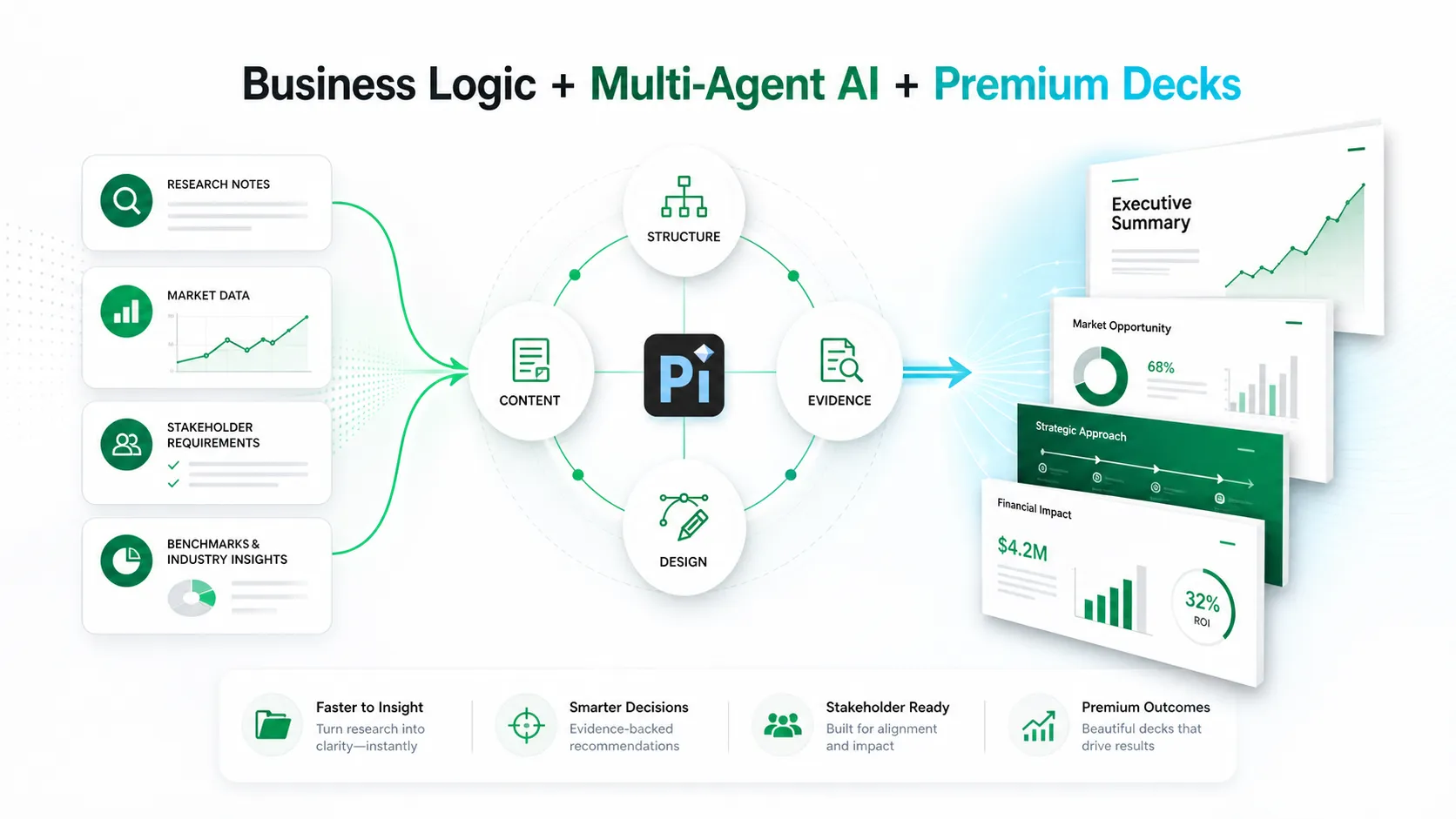
1. Business Logic Comes Before Slide Styling
Pi is built for teams that need more than attractive slides. Its workflow supports business-ready structure, helping users move from scattered inputs to a deck with a clearer argument and more professional organization.
2. Multi-Agent AI Supports Deeper Presentation Work
With Multi-Agent AI, Pi can support different parts of the presentation process, from structure and content logic to visual execution. This is especially useful for high-stakes decks where the message, evidence, and design must work together.
3. Premium Visual Quality Helps the Deck Feel Finished
Professional audiences expect clarity and polish. Pi helps create presentations with business-grade aesthetics suitable for pitch decks, market research decks, brand proposals, sales decks, and executive presentations.
Final Review Before Delivery
Before presenting, check facts, numbers, tone, and audience relevance. Confirm that the export format works for the meeting environment, whether PPT, PDF, or another format. Add speaker notes if needed, rehearse transitions, and make sure every slide supports the decision or discussion you want to create.
Frequently Asked Questions (FAQ)
What is an AI presentation workflow?
An AI presentation workflow is a structured process for using AI across research, synthesis, outlining, slide generation, visual refinement, and final delivery.
Can AI turn research to PPT automatically?
AI can help turn research into a PPT draft, but the best results require organized inputs, clear objectives, evidence checks, and human editing.
How much editing does an AI-generated presentation need?
Most AI-generated decks need review for accuracy, message clarity, visual hierarchy, pacing, and audience fit before they are ready to present.
Where does Pi fit in the workflow?
Pi helps teams move from research and outline to a professional deck with stronger business logic, structured flow, Multi-Agent AI support, and premium visual quality.