AI Slide Maker vs Traditional Presentation Tools: What Changes?
Traditional presentation software is not going away. PowerPoint, Google Slides, and other slide creators remain familiar, flexible, and deeply embedded in business workflows. The real shift is not that an AI slide maker replaces every existing tool. The shift is that presentation creation is moving from manual slide assembly to AI-assisted thinking, structuring, designing, and refinement.
For professionals, that distinction matters. A deck is rarely just a set of formatted pages. It is an argument, a sales motion, a market narrative, a decision document, or an executive update. When the stakes are high, the question is not simply “Which tool makes slides faster?” It is “Which workflow helps turn rough information into a clear, credible, business-ready presentation?”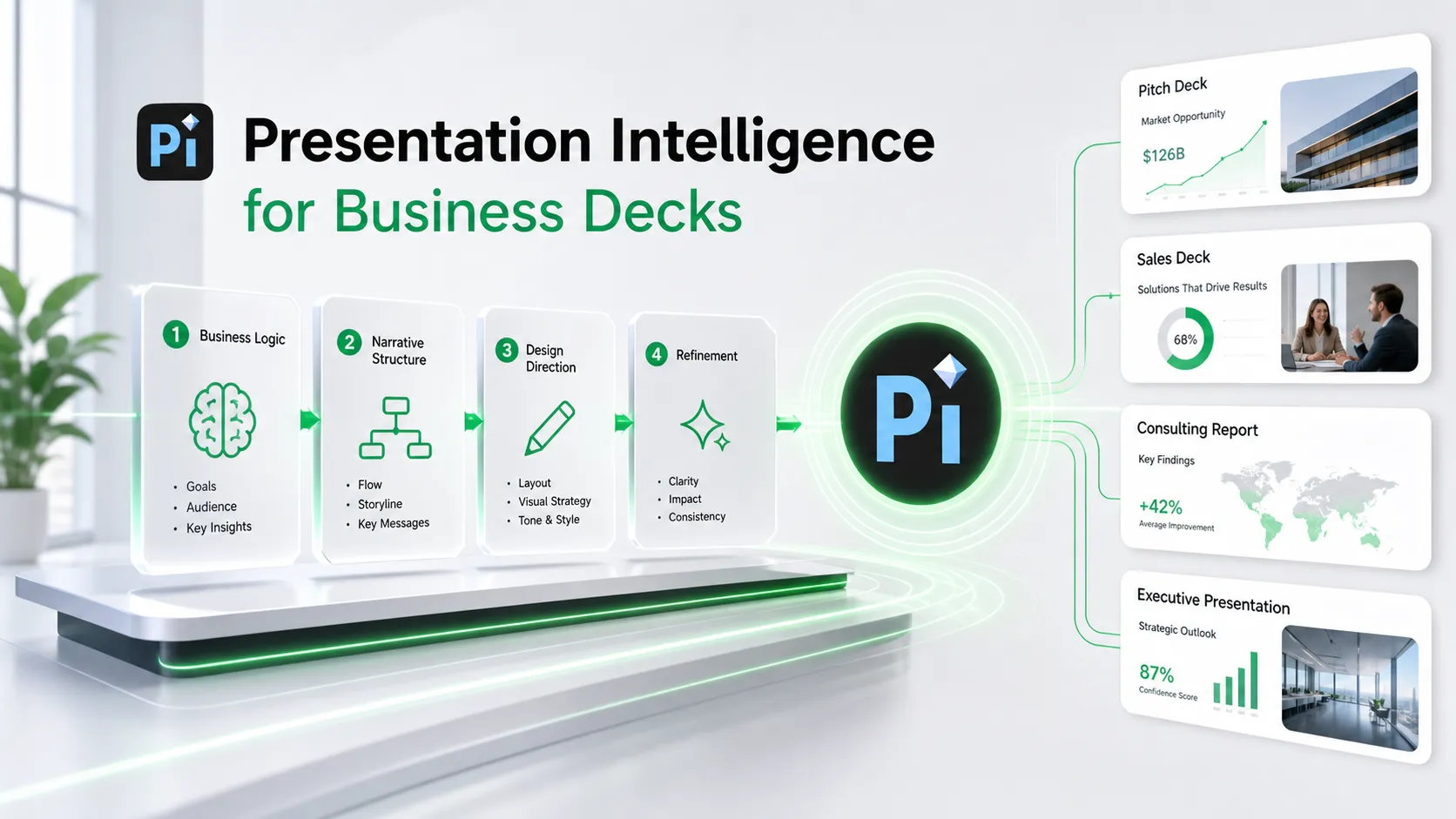
The Old Presentation Workflow: Powerful, but Manual
Traditional presentation tools give users significant control. You can place every element, adjust every chart, apply company templates, collaborate with teammates, and fine-tune the final deck for a specific meeting. For many organizations, that control is valuable because presentations are connected to brand systems, approval processes, and established habits.
The challenge is that the traditional workflow is often manual from start to finish. Before design even begins, someone has to define the story, build the outline, write the slide headlines, decide what each page should communicate, and arrange the supporting content. Then comes layout selection, formatting, visual hierarchy, icon choices, chart cleanup, alignment, spacing, and final polish.
That work is not trivial. A founder building a pitch deck, a consultant preparing a client report, or a sales team creating a proposal may spend hours moving between strategy, writing, design, and formatting. Traditional tools are powerful, but they usually wait for the user to know what to build.
What an AI Slide Maker Actually Changes
An AI slide maker changes the starting point. Instead of opening a blank file and manually building every page, users can begin with a prompt, notes, documents, research, or rough ideas. The AI presentation tool can help generate an outline, draft slide content, suggest layouts, and create a first version of the deck much faster than a fully manual process.
This reduces blank-page friction. It also changes iteration. Instead of rewriting every slide by hand, users can ask for a stronger structure, a more executive tone, a shorter version, or a different design direction. Presentation design AI can support the transition from idea to draft, giving teams more options earlier in the workflow.
However, speed is only one part of the change. The deeper opportunity is workflow intelligence: helping users think through what the presentation should say, how the story should unfold, and how the visuals should support the message.
Where Traditional Slide Creators Still Work Well
Traditional slide creators remain useful when precision, familiarity, and existing workflows matter most. If a team already has approved templates, a finalized structure, and a clear set of edits, traditional software may be the most efficient place to complete the work.
They also work well for simple updates. Replacing numbers in a quarterly report, adjusting a few slides for an internal meeting, or making a small change to a training deck may not require AI generation. In these cases, the value is not a new draft; it is control, consistency, and fast editing inside a known environment.
For teams with strict brand systems or complex collaboration processes, traditional tools can still be the final production layer. The point is not to abandon them. The point is to understand where AI can help before the deck reaches the last-mile editing stage.
Where Basic AI Presentation Tools Can Fall Short
Basic AI presentation tools can generate slides quickly, but quick output is not always ready for a serious business setting. A deck may look complete while still lacking the strategic clarity needed for a pitch, executive review, consulting readout, or sales conversation.
Common limitations include:
- Generic slide content that does not reflect the company’s specific context
- Weak narrative flow between sections
- Layouts that look clean but do not emphasize the right business insight
- Over-simplified messaging for complex topics
- Significant revision work before the deck feels meeting-ready
This is why professional teams should evaluate more than generation speed. A useful AI presentation workflow should support the logic of the deck, not only the appearance of slides.
AI Slide Maker vs Traditional Tools: A Practical Comparison
| Presentation Need | Traditional Tools | AI Slide Makers | Pi |
|---|---|---|---|
| Structure | Manual outlining | AI-generated outline | Business-ready narrative logic |
| Design speed | Slower manual layout | Faster first draft | Fast draft with premium direction |
| Business narrative | User-led | Varies by prompt quality | Built around professional use cases |
| Editing control | High precision | Depends on tool | Supports refinement toward final deck |
| Visual polish | Requires design skill | Often clean but generic | Business-grade aesthetics |
| High-stakes readiness | Strong with expert effort | May need heavy revision | Built for pitch decks, sales decks, and executive presentations |
How Pi Changes the Professional Presentation Workflow
Pi, short for Presentation Intelligence, is an AI presentation maker and AI PPT generator designed for professional business presentations. It is not positioned as a generic replacement for PowerPoint or Google Slides. Instead, Pi is built for the earlier and deeper part of the workflow: turning rough inputs into a structured, visually credible deck that can support a real business conversation.
That matters because high-stakes decks are judged on more than formatting. A pitch deck needs a persuasive investor narrative. A consulting report needs clear logic and evidence. A sales deck needs to connect customer pain to solution value. An executive presentation needs to make decisions easier. Pi focuses on this broader presentation intelligence layer.
1. Business Logic Comes Before Slide Styling
Many presentation workflows begin too quickly with visuals: choose a template, add text, insert charts, and polish the layout. Pi helps shift the process upstream by focusing first on the argument. What is the core message? What order should the audience hear it in? Which sections need more proof? Which slides should carry the decision logic?
This is especially useful for pitch decks, executive presentations, consulting reports, market research decks, product launch decks, and brand proposals. In these cases, a beautiful slide with weak logic still fails. Pi helps users shape the storyline before treating design as the main task.
2. Multi-Agent AI Supports More Than Text Generation
Pi’s Multi-Agent AI approach supports different parts of the presentation process, such as structure, messaging, design direction, and refinement. In practical terms, this means the workflow is not limited to generating a block of text and placing it into slides.
A professional deck usually requires several kinds of judgment. The narrative must be coherent. The wording must match the audience. The slide https://www.ibm.com/think/topics/multiagent-system sequence must feel intentional. The visual style must match the business context. Multi-Agent AI helps coordinate these layers so the deck can move from rough idea to stronger working draft with less manual rework.
This does not remove human judgment. The presenter still reviews, edits, and adapts the content. But it gives teams a stronger starting point than a blank canvas or a generic text-to-slide output.
3. Premium Visual Quality for Business-Ready Decks
Business presentations need to look credible. Visual quality affects how audiences perceive the seriousness of the message, especially in investor meetings, client proposals, board updates, and strategic reviews.
Pi helps users move beyond functional slides toward premium, business-grade aesthetics. That includes stronger visual hierarchy https://www.nngroup.com/articles/visual-hierarchy-ux-definition/ , cleaner layouts, more polished composition, and a presentation style that feels appropriate for professional contexts. The goal is not decoration. The goal is to make the message easier to understand and the presenter feel more prepared.
For teams without dedicated design support, this can be a major workflow improvement. Instead of spending hours trying to make a deck look executive-ready, users can begin with a more polished direction and refine from there.
Which Workflow Should You Choose?
Use traditional tools when you need precise editing, established templates, and familiar collaboration. They remain valuable for final adjustments, internal updates, and teams with mature presentation systems.
Use an AI slide maker when speed matters and you need a first draft quickly. AI can reduce blank-page friction, generate options, and help you explore different versions of a deck faster than a purely manual workflow.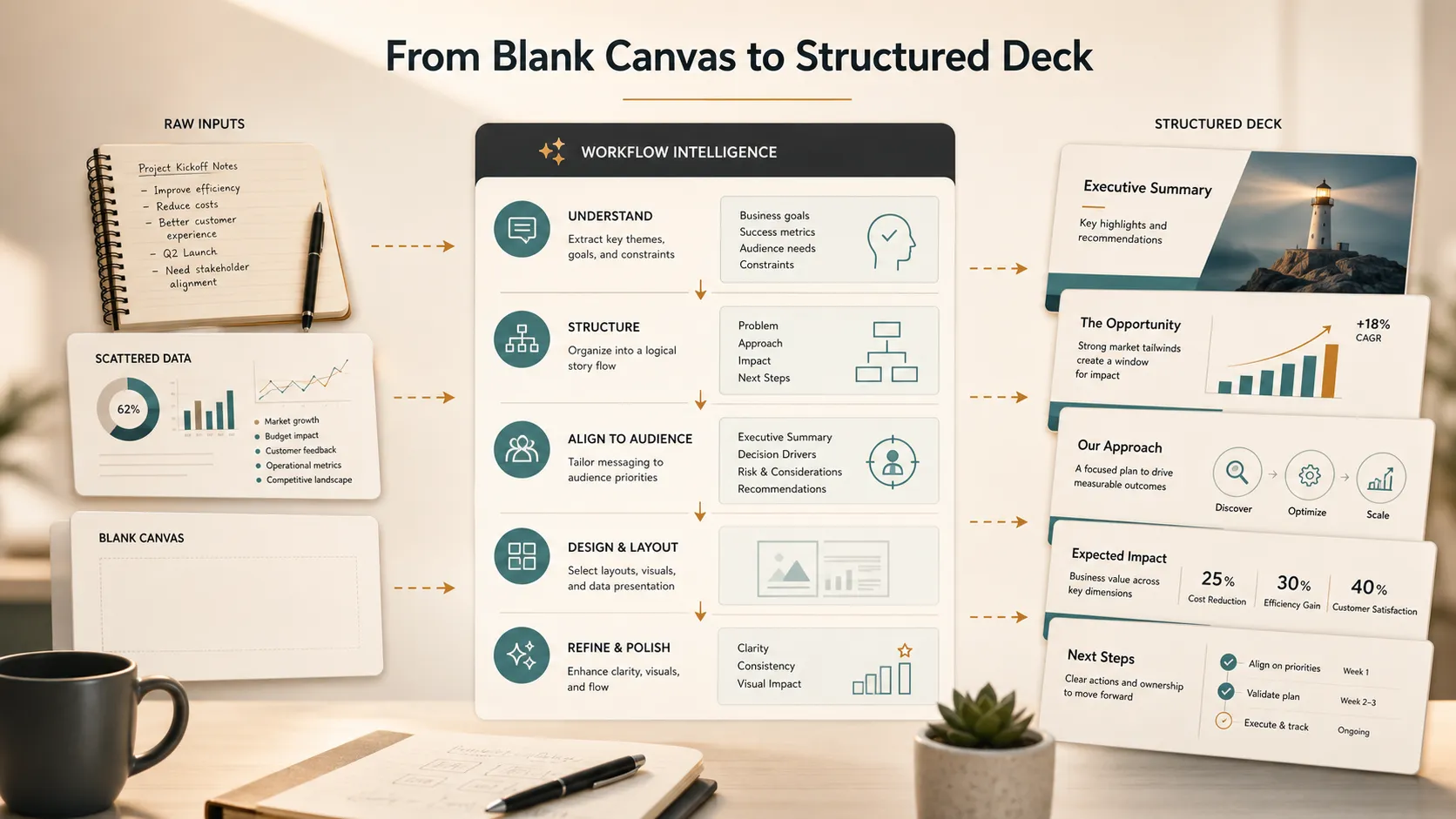
Use Pi when the goal is a professional, structured, visually credible business presentation. Pi is built for teams that need more than slide generation: business logic, narrative flow, premium visual quality, and a workflow that supports high-stakes presentation development.
Frequently Asked Questions (FAQ)
Q: Do AI slide makers replace PowerPoint or Google Slides? A: Not necessarily. AI slide makers are better understood as a workflow shift. They help with outlining, drafting, structuring, and visual direction, while traditional tools may still be useful for precise editing, collaboration, and final production.
Q: Are AI presentation tools good enough for business presentations? A: They can be, but quality varies. Some tools are useful for quick drafts, while professional business presentations often need stronger logic, clearer narrative flow, and more polished design. Teams should evaluate whether the output is meeting-ready or only a starting point.
Q: What makes Pi different from a basic AI slide maker? A: Pi, short for Presentation Intelligence, is built for professional business decks rather than generic slide output. It emphasizes Multi-Agent AI, business-ready structure, professional logic, and premium visual quality for use cases such as pitch decks, sales decks, consulting reports, and executive presentations.
Q: Do users still need to edit AI-generated decks? A: Yes. AI can accelerate the process and improve the starting point, but human review remains important. Presenters should refine the message, check facts, adapt the tone, and make sure the final deck fits the audience and business objective.