Awesome MCP Servers: Top Tools & Setup Guide

The growing ecosystem of awesome MCP servers is changing how AI developers, engineers, and power users build daily workflows. Instead of limiting an AI assistant to static prompts and manually pasted context, Model Context Protocol (MCP) servers provide controlled connections to files, repositories, documentation, databases, browser sessions, and business tools.
The opportunity is significant, but so is the selection challenge. A large MCP servers list may look impressive, yet installing every available integration can create unnecessary permissions, context overhead, latency, and maintenance work. The strongest MCP stack is rarely the biggest one. It is a focused group of trusted servers that gives an AI client the right context and actions for the work that happens repeatedly.
This guide explains how to evaluate MCP servers, which categories matter most, and how Pi MCP integration helps teams turn technical context into structured, business-ready presentations.
What Is Model Context Protocol and Why Do MCP Server Collections Matter?
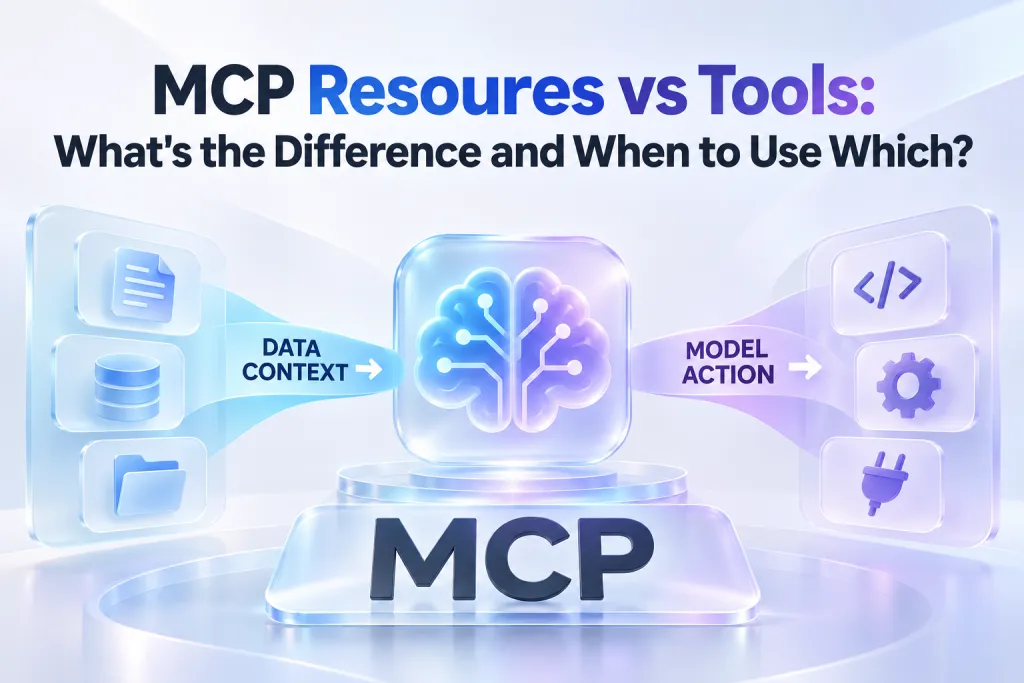
Model Context Protocol, commonly called MCP, is an open standard for connecting AI applications with external tools and data sources. It creates a more consistent interface between an AI client and the systems that contain useful context or perform useful actions.
An MCP-enabled workflow usually includes three components. The client is the AI application that users interact with. The server exposes approved capabilities, such as reading files, searching documentation, inspecting a database schema, or creating a task. The connected system is the underlying repository, API, local workspace, SaaS product, or business data source.
MCP makes these capabilities easier for AI clients to discover and use in a structured way. Rather than building a custom integration for every model, client, and service combination, developers can expose a standardized set of tools and resources through an MCP server.
This is why curated awesome mcp servers collections are useful. They help developers find common integration patterns, understand which server categories support their workflows, and compare implementations before granting access to valuable systems. However, a collection should be treated as a starting point for evaluation, not a production-ready installation checklist.
The right question is not, “Which server is most popular?” It is, “Which server gives my AI workflow the smallest useful set of capabilities with acceptable security and operational risk?”
How to Choose the Right MCP Servers Before Installing Anything
An MCP server can make an AI workflow more capable, but every connection expands the operational surface area around that workflow. A server with read access to a documentation site has a very different risk profile from one that can modify production records, write repository files, or access customer data.
Before adding a server, evaluate its role against the repeated work your team actually performs. For example, an engineer who frequently investigates unfamiliar services may benefit from repository and documentation access. A product lead preparing a quarterly update may benefit from approved research sources and a presentation workflow. A data analyst may need schema inspection but not write access.
Use these practical selection criteria:
- Workflow frequency: Prefer integrations that remove friction from tasks performed every week, not one-off experiments.
- Permission scope: Apply least privilege. Start with read-only access and narrowly scoped directories, repositories, or datasets.
- Maintenance quality: Review ownership, documentation, update activity, issue handling, and compatibility with your chosen client.
- Tool behavior: Separate retrieval tasks from side-effecting actions such as writes, deployments, account changes, or message sending.
- Context impact: More tools can mean more discovery metadata, more token use, and slower decisions by the AI client.
- Operational reliability: Consider rate limits, authentication expiry, network dependencies, error reporting, and rollback paths.
A thoughtful approach matters especially in environments associated with Anthropic MCP implementations and other compatible clients. The protocol standardizes the connection pattern, but it does not automatically make every server secure, well-maintained, or suitable for sensitive production workflows.
Top MCP Server Categories for Practical AI Workflows
A useful MCP servers list is organized around jobs to be done rather than individual names alone. The following categories cover many high-value AI workflows across development, research, operations, and business communication.
| MCP Server Category | Primary Workflow | Typical Permissions | Selection Considerations |
|---|---|---|---|
| File system and workspace | Read project files and artifacts | Scoped file read/write | Restrict paths and avoid broad home-directory access |
| Developer tools | Repositories, issues, pull requests, testing | API access; sometimes write actions | Separate review and execution permissions |
| Web and documentation | Current research and technical references | Search and read access | Validate source quality and freshness |
| Databases and services | Schema discovery and approved data retrieval | Read queries; limited writes | Use least privilege and audit high-impact actions |
| Presentation workflows | Convert project context into business decks | Structured generation requests | Confirm narrative, audience, and source quality |
The categories overlap in real projects. A product launch workflow, for instance, may begin with repository context, incorporate current documentation and product research, retrieve approved metrics, and end with an executive-ready presentation. The goal is to connect only the systems that strengthen each step.
File System and Local Workspace Servers
File system MCP servers are often among the first integrations developers explore because local files contain much of the context an assistant needs. Source code, architecture notes, specifications, changelogs, meeting summaries, and test artifacts can all help an AI client understand the task without requiring users to repeatedly copy and paste material.
For development work, scoped local access can support codebase orientation, documentation drafting, release-note preparation, and investigation of project decisions. For non-engineering users, controlled workspace access can help an assistant organize research notes, review planning documents, or synthesize approved project artifacts.
The important boundary is scope. Granting unrestricted access to an entire device may expose unrelated files, credentials, personal documents, or confidential work. A safer configuration limits access to designated project directories and gives users visibility into what the server can read or modify.
Write access deserves additional caution. Reading a specification is generally low risk compared with editing it. If file modification is necessary, test the workflow in a non-critical workspace first, require clear confirmation for consequential changes, and use version control where possible.
Developer Tools and Automation Servers
Developer-oriented MCP servers connect AI clients with the systems that engineers use to plan, build, review, test, and ship software. Common examples include repository platforms, issue trackers, CI environments, browser automation tools, and local development utilities.
Repository integrations can help an assistant inspect code history, summarize pull requests, identify relevant files, relate issues to implementation work, and prepare review notes. Issue-tracking integrations can provide current priorities, acceptance criteria, and ownership information that may not appear in the codebase itself.
Browser automation and testing servers can extend the workflow further. They may support controlled test execution, page inspection, regression checks, and evidence gathering for bugs. These capabilities are useful when a development task must be verified in a live or staging environment rather than inferred solely from source code.
Automation is valuable, but it should not erase accountability. An MCP client may be able to propose a pull request comment, create an issue, or trigger a workflow, yet teams should decide which actions require human approval. Read-oriented tools are generally easier to introduce. Actions that merge code, alter infrastructure, publish content, or create external communications should have stronger controls.
The most effective developer stack typically combines a small number of complementary servers: one for repository context, one for current technical documentation, and one for testing or task tracking when those activities are frequent. Adding redundant servers with similar capabilities can make tool discovery noisier without improving results.
Web, Documentation, and Research Servers
AI models are useful at synthesizing information, but technical and business decisions often require current sources. Web, documentation, and research MCP servers help reduce stale-context problems by giving an AI client access to approved external knowledge during a task.
For engineers, this category can support library documentation lookup, API reference checks, framework migration research, and dependency troubleshooting. For product and strategy teams, it can assist with market signals, public company information, competitor positioning, and industry terminology.
Current access does not remove the need for source validation. Search results can be incomplete, outdated, promotional, or misinterpreted. A reliable workflow asks the AI client to identify the source, distinguish evidence from inference, and flag uncertainty when the available material is weak.
Documentation servers are especially useful when they provide authoritative material for the exact technologies a team uses. They can reduce time spent navigating multiple browser tabs and help keep recommendations tied to the relevant version, API behavior, or deployment environment.
For research-heavy work, establish a clear rule about what can be treated as evidence. Internal strategy documents, official product documentation, regulated data sources, and open-web search results should not carry the same level of confidence by default.
Database and Service Connectivity Servers
Database MCP servers can provide powerful operational context. An AI client may inspect schemas, identify relationships between tables, retrieve approved records, or help draft queries for analysis. Service connectivity servers can perform similar roles for CRM systems, analytics platforms, support tools, and internal APIs.
The distinction between discovery and action is essential. Schema inspection and carefully governed read queries can help users understand a system. Write operations, deletions, account changes, financial actions, and production updates carry a different level of risk.
A well-designed database workflow usually starts with a restricted environment and a read-only identity. The assistant can then answer questions such as which fields exist, how data is organized, or what an approved report should include. When a workflow requires an update, teams should use explicit approvals, narrow allowlists, audit logs, and predictable rollback procedures.
Avoid connecting a general-purpose AI workflow directly to sensitive production systems with broad credentials. MCP is a connection standard, not a substitute for data governance. Security controls should include identity management, environment separation, secrets handling, query limits, and monitoring appropriate to the organization’s risk level.
Pi MCP: Turn Technical Context into Business-Ready Presentations
Technical work does not end when a feature is built, a bug is resolved, or research is collected. Teams often need to communicate progress to leadership, customers, investors, partners, or cross-functional stakeholders. That translation from detailed context to a clear narrative is where Pi supports an MCP-enabled presentation workflow.
Pi is an AI presentation maker built for professional business presentations, including executive updates, consulting reports, sales decks, product launch presentations, market research decks, and pitch decks. With Pi MCP integration, technical teams can bring approved project context into a presentation workflow instead of manually rebuilding the story in a separate tool.
1. Business Logic Comes Before Slide Styling
A strong business presentation needs more than attractive slides. It needs a clear audience, a defensible narrative, a logical flow, and a decision-oriented structure.
Pi helps teams transform technical briefs, roadmap notes, research findings, product context, and project updates into a presentation structure that is easier for stakeholders to follow. This is particularly valuable when the original material is fragmented across repositories, documents, tickets, and research sources.
Instead of moving raw technical detail directly onto slides, teams can shape it into an appropriate executive summary, problem statement, recommendation, progress report, implementation plan, or next-step discussion.
2. Multi-Agent Workflows Support Complex Source Material
Presentation work often requires several forms of reasoning at once: identifying the key message, organizing supporting evidence, selecting a coherent storyline, and producing a polished visual result. Pi’s Multi-Agent AI approach is designed for this deeper workflow.
Within an MCP-enabled environment, users can begin with the context already assembled for a task and direct Pi toward a specific communication outcome. For example, a team can turn a release summary and customer feedback into a product update, convert architecture decisions into a leadership briefing, or transform market research into a sales enablement deck.
The value is not simply generating slides faster. It is reducing the gap between the technical source material and the business conversation that depends on it.
3. Professional Structure Helps Teams Communicate with Confidence
Pi is designed around business-ready structure and premium visual quality. That makes it a practical addition to an MCP stack when presentation creation is a recurring part of engineering, product, consulting, or go-to-market work.
A developer may need to explain a platform migration. A product manager may need to align stakeholders around a roadmap decision. A solutions team may need to convert discovery findings into a client-facing proposal. In each case, Pi can help produce a more coherent first draft without forcing the team to start from a blank slide canvas.
Teams interested in enabling this workflow can review Pi’s MCP information and use the Pi MCP installation endpoint in a compatible client configuration. As with any server connection, verify client support, authentication requirements, workspace policies, and the exact available capabilities before using it with confidential material.
A Focused MCP Stack Beats an Overloaded One
The temptation to install every server from an awesome MCP servers directory is understandable. Each new integration appears to promise a more capable assistant. Yet tool sprawl can reduce clarity rather than improve it.
When too many servers are active, an AI client may spend more time discovering tool definitions, deciding between overlapping options, and handling authentication failures. Users may also lose track of which systems can access sensitive information or trigger side effects.
A focused stack starts with a specific workflow. An engineering lead might use repository context, official documentation, browser testing, and Pi for quarterly updates. A product team might use research, task tracking, approved analytics access, and Pi for stakeholder presentations. A data team might use schema inspection, governed query access, and documentation retrieval.
Review the stack regularly. Remove integrations that are rarely used, replace overlapping tools with a clearer standard, and reassess permissions when roles or projects change. The right number of active servers depends on the workflow, but each one should have an identifiable owner and a clear reason to exist.

MCP Client Setup Checklist
MCP client setup differs by application, operating system, authentication method, and transport type. Still, the implementation process should follow a consistent sequence.
First, confirm that the selected AI client supports the server’s connection approach and required configuration format. Next, review the server’s documentation and verify who maintains it. Use a trusted source for the installation details rather than copying configuration snippets from unverified discussions.
Configure authentication with secure environment handling or the organization’s approved secrets process. Do not hard-code tokens into shared configuration files or commit credentials into a repository. Limit each credential to the smallest practical scope.
After configuration, verify that the client can discover the server and inspect the tools it exposes. Test with a low-risk request, such as listing available resources, reading a non-sensitive document, or retrieving a schema description. Confirm that errors are understandable and that the assistant does not receive more access than intended.
Finally, document the server’s owner, purpose, permissions, data classification, and review date. This makes the MCP environment easier to maintain as the team grows and as integrations change.
Choosing an Awesome MCP Server Stack for Your Workflow
The future of MCP is not about replacing every existing API, workflow, or user interface. It is about making approved tools and context more accessible to AI clients in a consistent, governable way.
For developers, a practical stack may include file access, repository context, live documentation, and testing support. For product and business teams, the same foundation can extend into research, data retrieval, and communication workflows. The best choices are the servers that improve a repeated decision or task while preserving security, ownership, and human oversight.
Pi is a natural fit when that workflow ends with a high-stakes presentation. By connecting structured technical context with a professional presentation workflow, Pi helps teams move from project details to business-ready narratives with less manual rebuilding and more attention to the message.
Frequently Asked Questions (FAQ)
What are MCP servers?
MCP servers are integrations that expose approved tools, resources, or prompts to an MCP-compatible AI client. They can connect an assistant with local files, repositories, documentation, web research, databases, SaaS platforms, and specialized workflows such as presentation creation.
How many MCP servers should I install?
Install only the servers that support recurring, high-value tasks. Start with a small stack, evaluate usefulness, permissions, latency, and maintenance burden, then add more only when there is a clear workflow need. Fewer well-governed integrations are often more effective than a large collection of overlapping tools.
Is Model Context Protocol safe for production workflows?
MCP can support production workflows, but safety depends on the individual server, credentials, permissions, environment design, and approval processes. Use least-privilege access, separate development from production, protect secrets, test low-risk actions first, and add review controls for any tool that can change data or systems.
Can Pi be used in an MCP-enabled workflow?
Yes. Pi supports MCP-enabled presentation workflows for teams that need to turn technical briefs, product updates, research findings, and project context into structured, professional presentations. It is especially useful when engineers, product teams, and business stakeholders need to align around the same source material.