what is a firewall
A firewall is a security barrier that controls traffic between trusted and untrusted networks. In plain terms, it decides what is allowed to enter, what is allowed to leave, and what should be blocked.
The easiest way to understand a firewall is to think of it as a security desk at the entrance of a building. Not everyone can walk in. A guard checks who is coming, where they are going, and whether they are allowed. A firewall does something similar with network traffic. It checks data moving between devices, networks, apps, and the internet.
NIST defines a firewall as a gateway or system that limits access between networks according to security policy. Microsoft explains a firewall as something that controls what is and is not allowed to pass through network ports in its guide to what a firewall is.
What A Firewall Does
A firewall helps control network access. It does not make a system perfectly secure, but it reduces exposure by filtering traffic based on rules.
A firewall can:
- Block unwanted inbound connections
- Allow trusted outbound traffic
- Restrict traffic by IP address, port, protocol, or application
- Separate trusted internal networks from the public internet
- Log suspicious or blocked activity
- Help enforce company security policies
For a home user, the firewall may be built into the router and the computer. For a business, firewalls may sit at the edge of the network, inside cloud environments, between departments, or on individual devices.
How A Firewall Works
Network traffic moves in small units of data. A firewall looks at that traffic and compares it against rules. If the traffic matches an allowed rule, it can pass. If it matches a blocked rule, or does not meet the policy, the firewall denies it.
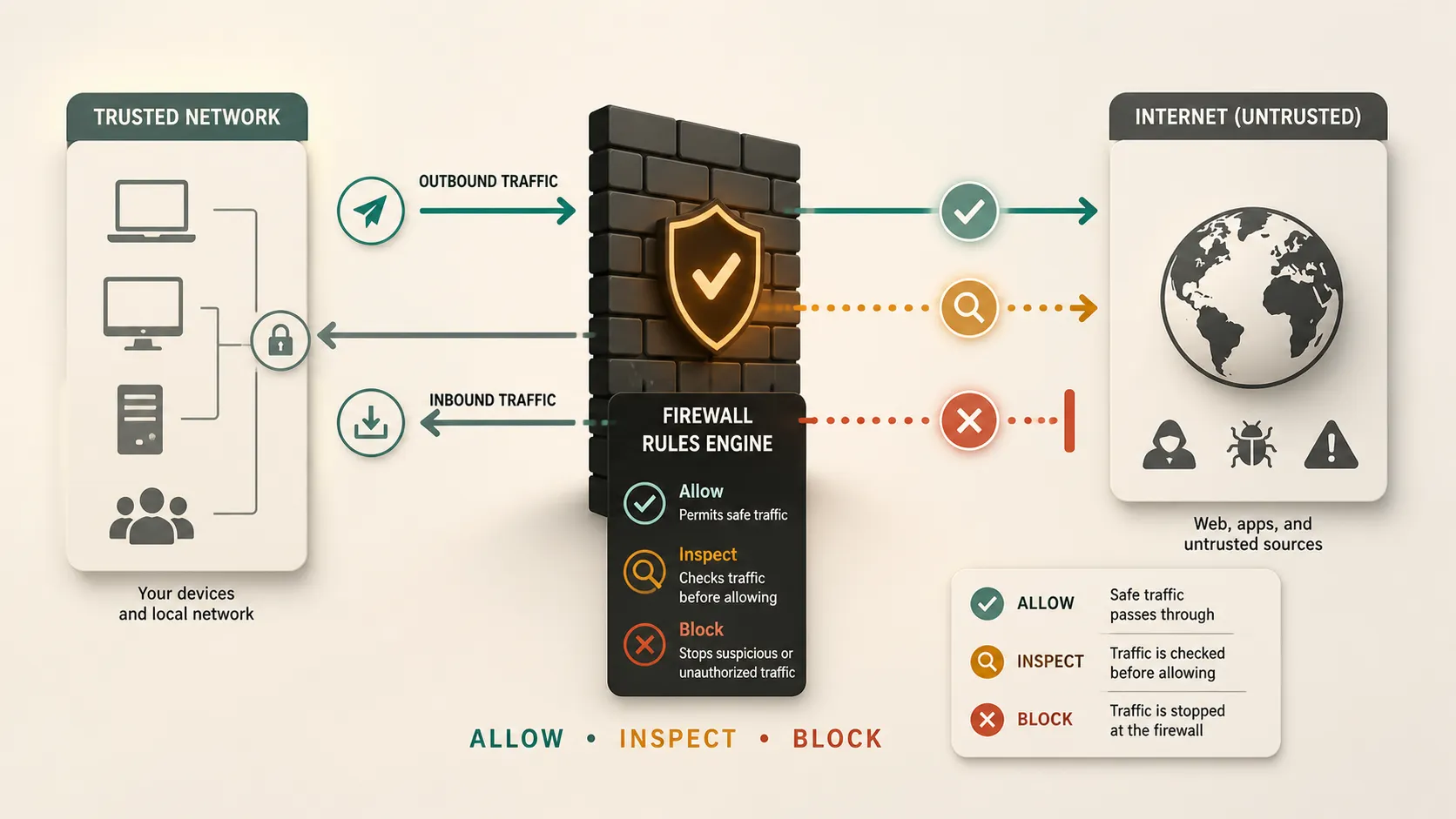
Rules can be based on details such as:
- Source IP address
- Destination IP address
- Port number
- Protocol
- Application
- User identity
- Connection state
- Security risk
Cisco describes a firewall as a tool that monitors incoming and outgoing traffic and allows or blocks traffic based on security rules. That rule-based decision is the core idea.
Inbound And Outbound Traffic
Inbound traffic is traffic coming into a device or network. For example, someone on the internet trying to connect to a company server is sending inbound traffic.
Outbound traffic is traffic leaving a device or network. For example, a laptop opening a website sends outbound traffic.
Many personal firewalls block most unsolicited inbound traffic by default. That is important because most laptops and home devices do not need strangers on the internet connecting to them directly. Outbound rules are also important, especially in businesses, because malware may try to connect to remote servers after infecting a device.
Firewall Rules
Firewall rules are the instructions that tell the firewall what to allow or block.
A simple rule might say:
- Allow web browsing over HTTPS
- Block unknown inbound traffic
- Allow email traffic from approved servers
- Block traffic from a suspicious IP address
- Allow a business app to connect only to a specific server
Good firewall rules should be specific. A rule that allows everything is not useful. A rule that blocks too much can break normal work. The practical goal is to allow necessary traffic and reduce unnecessary exposure.
NIST’s Guidelines on Firewalls and Firewall Policy explains firewall policy, configuration, testing, deployment, and management in more detail.
Common Firewall Types
| Firewall type | What it does | Best for |
|---|---|---|
| Packet filtering | Checks basic packet details | Simple traffic control |
| Stateful inspection | Tracks active connections | General network defense |
| Proxy firewall | Acts between user and service | Application-level filtering |
| Next-generation firewall | Adds deeper inspection | Business security |
| Cloud firewall | Protects cloud traffic | Cloud apps and workloads |
This table is simplified, but it gives the basic idea. Some modern firewalls combine several of these approaches.
Hardware Firewall Vs Software Firewall
A hardware firewall is a physical device. It often sits between a private network and the internet. Many home routers include basic firewall features. Businesses may use dedicated firewall appliances to protect office networks, data centers, or branch locations.
A software firewall runs on a device, such as a laptop, desktop, or server. Microsoft’s Windows Firewall overview describes Windows Firewall as a host-based firewall that filters traffic entering and leaving a device.
In many setups, both are used. A router or network firewall protects the broader network, while a device firewall protects the individual machine.
Network Firewall Vs Host-Based Firewall
A network firewall protects a network boundary. It may sit between an office network and the internet, between two internal network segments, or between a company network and a cloud environment.
A host-based firewall protects one device. It controls what traffic can enter or leave that specific computer or server.
Both are useful. A network firewall can stop many unwanted connections before they reach internal systems. A host-based firewall still matters if a device moves to another network, connects to public Wi-Fi, or needs its own protection.
What A Firewall Can Protect Against
A firewall can reduce many common risks. It can block unwanted access attempts, limit exposed services, restrict suspicious traffic, and help prevent unauthorized connections.
For businesses, firewalls also support segmentation. That means separating parts of a network so a problem in one area does not automatically spread everywhere else. CISA’s guidance on hardening communications infrastructure discusses using firewall capabilities and segmentation as part of a broader defense-in-depth approach in its enhanced visibility and hardening guidance.
A firewall is especially useful when combined with strong passwords, updates, endpoint protection, backups, identity controls, and user training.
What A Firewall Cannot Do
A firewall is important, but it is not magic.
A firewall may not stop:
- Phishing emails
- Weak passwords
- Stolen login credentials
- Malware hidden inside allowed traffic
- Unsafe downloads
- Attacks through approved apps
- Human mistakes
- Poorly configured cloud services
For example, if a user signs into a fake login page and gives away a password, a firewall may not prevent the account from being misused. If a firewall rule is too broad, dangerous traffic may be allowed because the policy itself is weak.
That is why firewalls are part of cybersecurity, not the whole thing.
Why Individuals Use Firewalls
Individuals use firewalls to reduce unwanted access to personal devices and home networks. A laptop connected to public Wi-Fi should not be open to every other device on that network.
A personal firewall helps control which apps can communicate and whether other devices can connect. Microsoft’s guide to firewall and network protection explains the difference between private and public network profiles in Windows Security.
For most people, the right move is simple: keep the firewall turned on unless there is a specific, trusted reason to change it.
Why Businesses Use Firewalls
Businesses use firewalls because they have more systems, more users, more data, and more risk. A company may need to protect customer records, internal tools, payment systems, cloud workloads, employee devices, and remote access.
A business firewall can help:
- Control access to internal systems
- Separate guest Wi-Fi from company devices
- Protect servers from unwanted traffic
- Support compliance requirements
- Monitor suspicious activity
- Limit damage if one system is compromised
Firewalls are also important for remote and hybrid work. Employees may connect from many locations, and traffic may move through cloud services, VPNs, and SaaS platforms.
Explaining Firewall Concepts In A Presentation
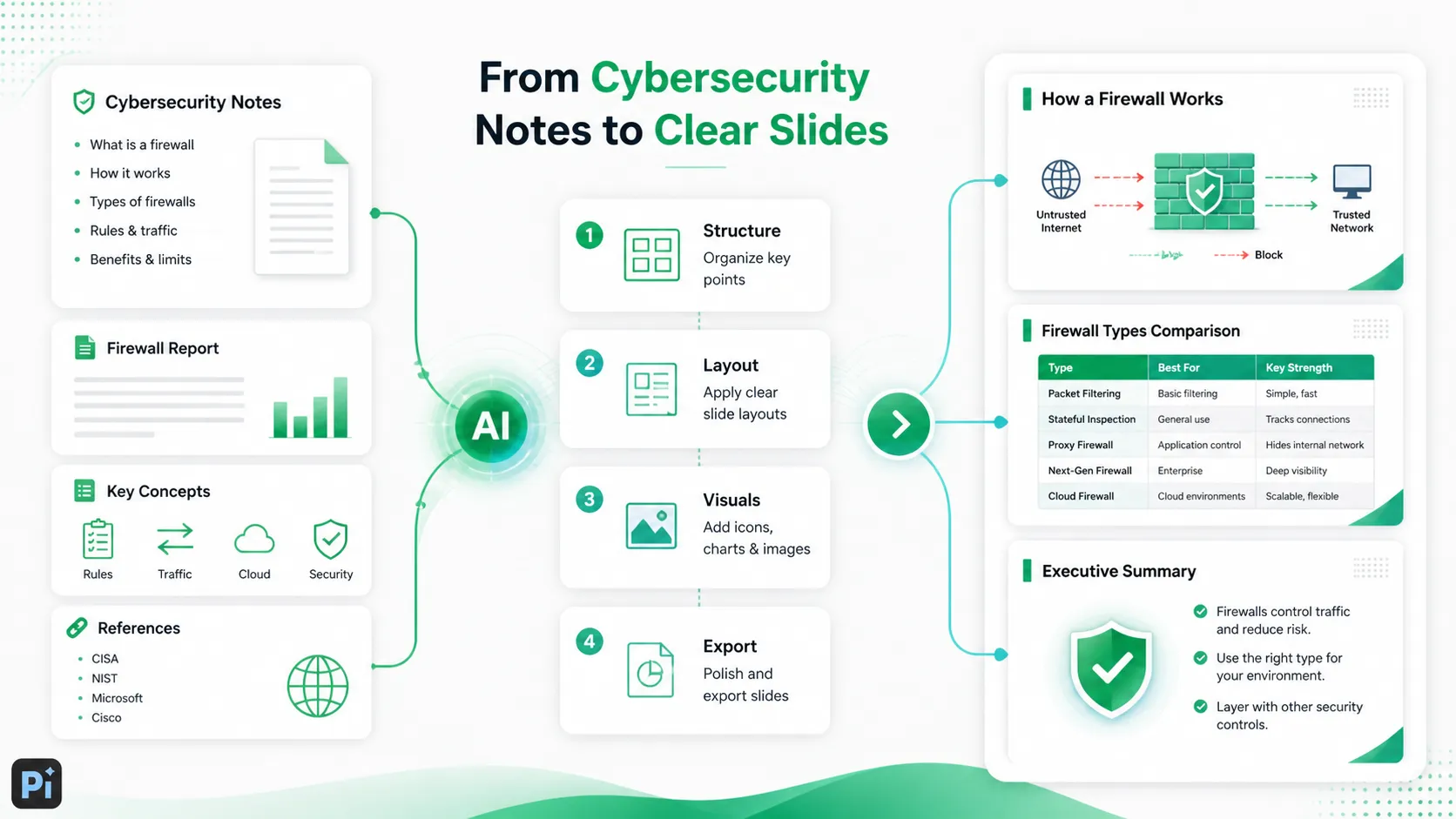
If you need to explain firewalls in a presentation, avoid starting with too much technical detail. Begin with the purpose: a firewall controls traffic based on rules.
A simple presentation structure could be:
1. What problem a firewall solves
2. What a firewall does
3. How traffic rules work
4. Inbound vs outbound traffic
5. Hardware vs software firewalls
6. Common firewall types
7. What firewalls can and cannot protect against
8. Why they matter for individuals and businesses
Use diagrams when possible. Show a trusted network, the internet, and the firewall between them. Then show allowed and blocked traffic. A visual flow is much easier to understand than a long list of ports and protocols.
The Verdict
A firewall is one of the basic building blocks of cybersecurity. It controls network traffic, blocks unwanted access, and helps enforce security rules between trusted and untrusted areas.
The key thing to remember is that a firewall is a filter, not a complete security system. It works best when it is configured carefully and combined with other protections, such as updates, identity security, endpoint protection, backups, monitoring, and user awareness.
For individuals, keeping the firewall on is a simple way to reduce risk. For businesses, firewall design and policy can shape how safely the network, cloud systems, and users communicate.
Frequently Asked Questions (FAQ)
Q: What is a firewall in simple terms?
A: A firewall is a security barrier that controls network traffic. It decides what can enter or leave a device or network based on rules.
Q: Is a firewall hardware or software?
A: It can be either. A hardware firewall is a physical device, such as a router or firewall appliance. A software firewall runs on a computer, server, or endpoint.
Q: Does a firewall stop all hackers?
A: No. A firewall helps block unwanted traffic and reduce exposure, but it cannot stop every threat. Phishing, stolen passwords, unsafe downloads, and misconfigured apps can still create risk.
Q: Should I keep my firewall on?
A: Yes, in most cases. Home users and businesses should generally keep firewalls enabled and only change settings when they understand the security impact.


